EasyManua.ls Logo

Sony Trinitron KV-29F3A - DOLBY PRO LOGIC SETUP; Configuring Dolby Pro Logic

Sony Trinitron KV-29F3A
58 pages
Print Icon
To Next Page IconTo Next Page
To Previous Page IconTo Previous Page
Loading...
—2I-
24
Dolby
Pro
Logic
Setting
Up
Dolby
Pro
Logic
Before
viewing
Dolby
Surround
encoded
programmes,
you
have
to
set
up
the
levels
or
modes
of
the
speakers.
Normally
this
is
required
only
when
you
install
the
TV
and
the
speakers
or
change
their
positions.
1
Press
the
MENU
button
©
2
Push
joystick
@
to
blue
or
green
to
select
the
symbol
E24
on
the
menu
screen
then
push
to
yellow.
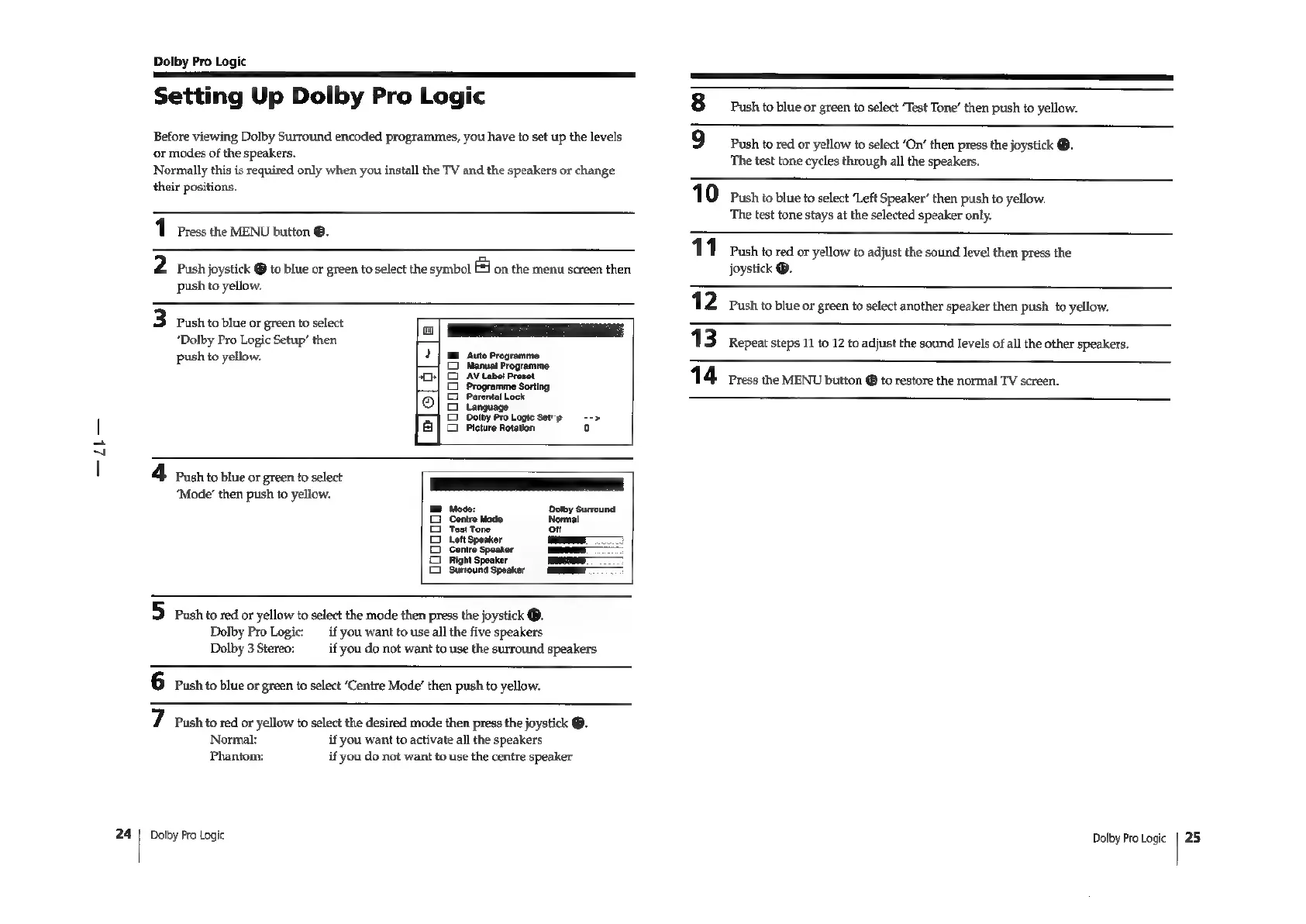
3
Push
to
blue
or
green
to
select
‘Dolby
Pro
Logic
Setup’
then
push
to
yellow.
Auto
Programme
Manual
Programme
i
AVLabe!
Preset
a
me
Sorting
a
a
5
o
Progra
Parental
Lock
Language
Dolby
Pro
Logie
Set”
a
Picture
Rotation
a
>
Ho
(2)
4
Push
to
blue
or
green
to
select
‘Mode’
then
push
to
yellow.
Dolby
Surround
wr
5D
push
to
red
or
yellow
to
select
the
mode
then
press
the
joystick
@.
Dolby
Pro
Logic:
__
if
you
want
to
use
all
the
five
speakers
Dolby
3Stereo:
_if
you
do
not
want
to
use
the
surround
speakers
6
Push
to
blue
or
green
to
select
‘Centre
Mode’
then
push
to
yellow.
7
Push
tored
or
yellow
to
select
the
desired
mode
then
press
the
joystick
@.
Normal:
if
you
want
to
activate
all
the
speakers
Phantom:
if
you
do
not
want
to
use
the
centre
speaker
Dolby
Pro
Logic
8
push
to
blue
or
green
to
select
“Test
Tone’
then
push
to
yellow.
9
Push
to
red
or
yellow
to
select
‘On’
then
press
the
joystick
®.
The
test
tone
cycles
through
all
the
speakers.
10
Push
to
biue
to
select
‘Left
Speaker’
then
push
to
yellow.
The
test
tone
stays
at
the
selected
speaker
only.
111
Push
to
red
or
yellow
to
adjust
the
sound
Ievel
then
press
the
joystick
®.
12.
Push
to
blue
or
green
to
select
another
speaker
then
push
to
yellow.
13
Repeat
steps
11
to
12
to
adjust
the
sound
levels
of
all
the
other
speakers.
1
4
Press
the
MENU
button
@
to
restore
the
normal
TV
screen.
Dolby
Pro
Logic
25

Related product manuals