EasyManua.ls Logo

Sony TRINITRON KV-E2911D - Page 15

Sony TRINITRON KV-E2911D
56 pages
Print Icon
To Next Page IconTo Next Page
To Previous Page IconTo Previous Page
Loading...
|
KV-E2511D
RM-689
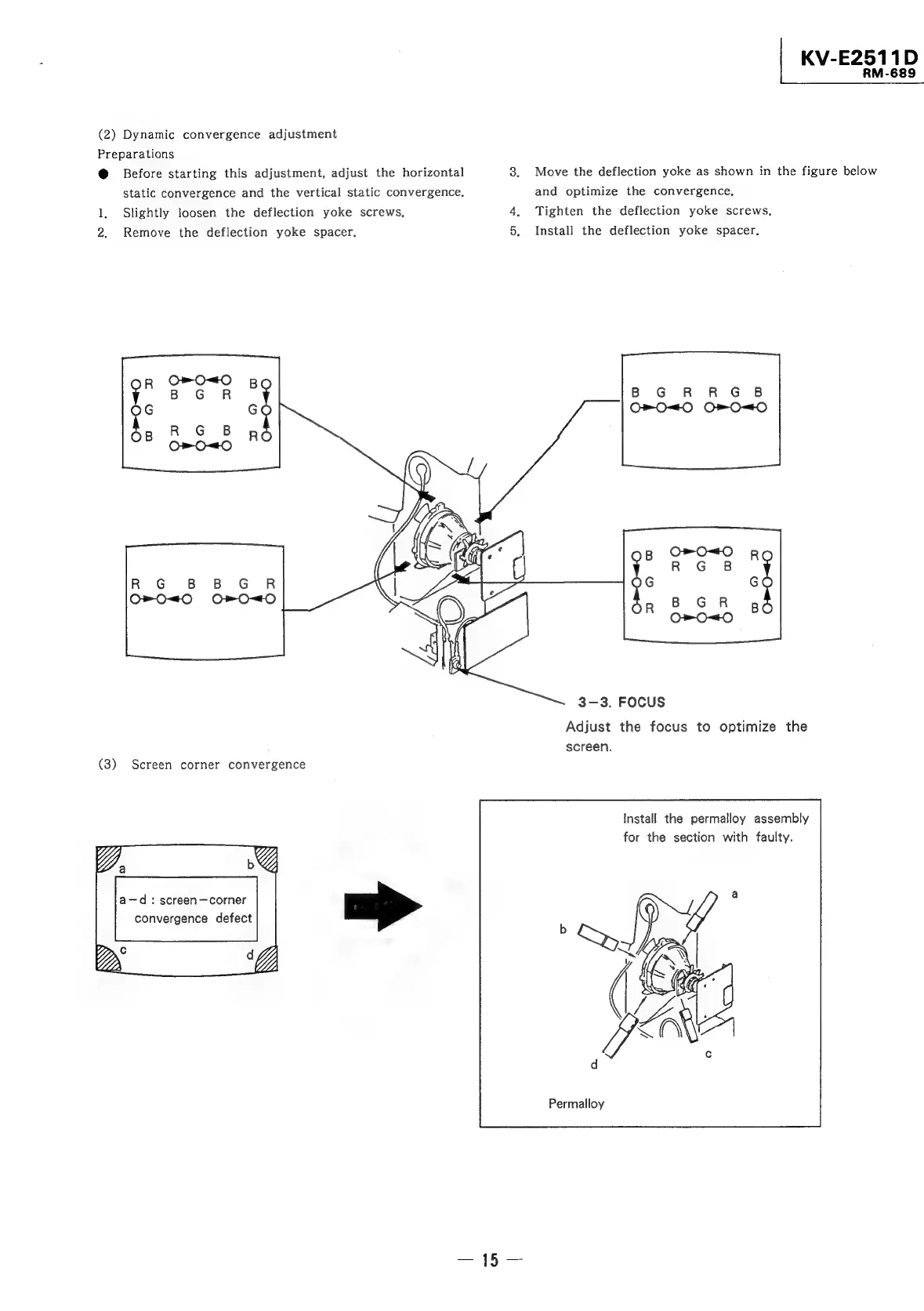
(2)
Dynamic
convergence
adjustment
Preparations
@
Before
starting
this
adjustment,
adjust
the
horizontal
8.
Move
the
deflection
yoke
as
shown
in
the
figure
below
static
convergence
and
the
vertical
static
convergence.
and
optimize
the
convergence,
1,
Slightly
loosen
the
deflection
yoke
screws,
4,
Tighten
the
deflection
yoke
screws,
2.
Remove
the
deflection
yoke
spacer.
5.
Install
the
deflection
yoke
spacer,
B
GR
RGB
R
G
B
B
GR
3-3.
FOCUS
Adjust
the
focus
to
optimize
the
screen.
(8)
Screen
corner
convergence
Install
the
permalloy
assembly
for
the
section
with
faulty.
a-—d
:
screen~corner
convergence
defect
Permalloy

Related product manuals