EasyManua.ls Logo

Sony TRINITRON KV-M1450E - Optional Connections

Sony TRINITRON KV-M1450E
50 pages
Print Icon
To Next Page IconTo Next Page
To Previous Page IconTo Previous Page
Loading...
34
——EE——————S—E—E————————_
a
ee
eer
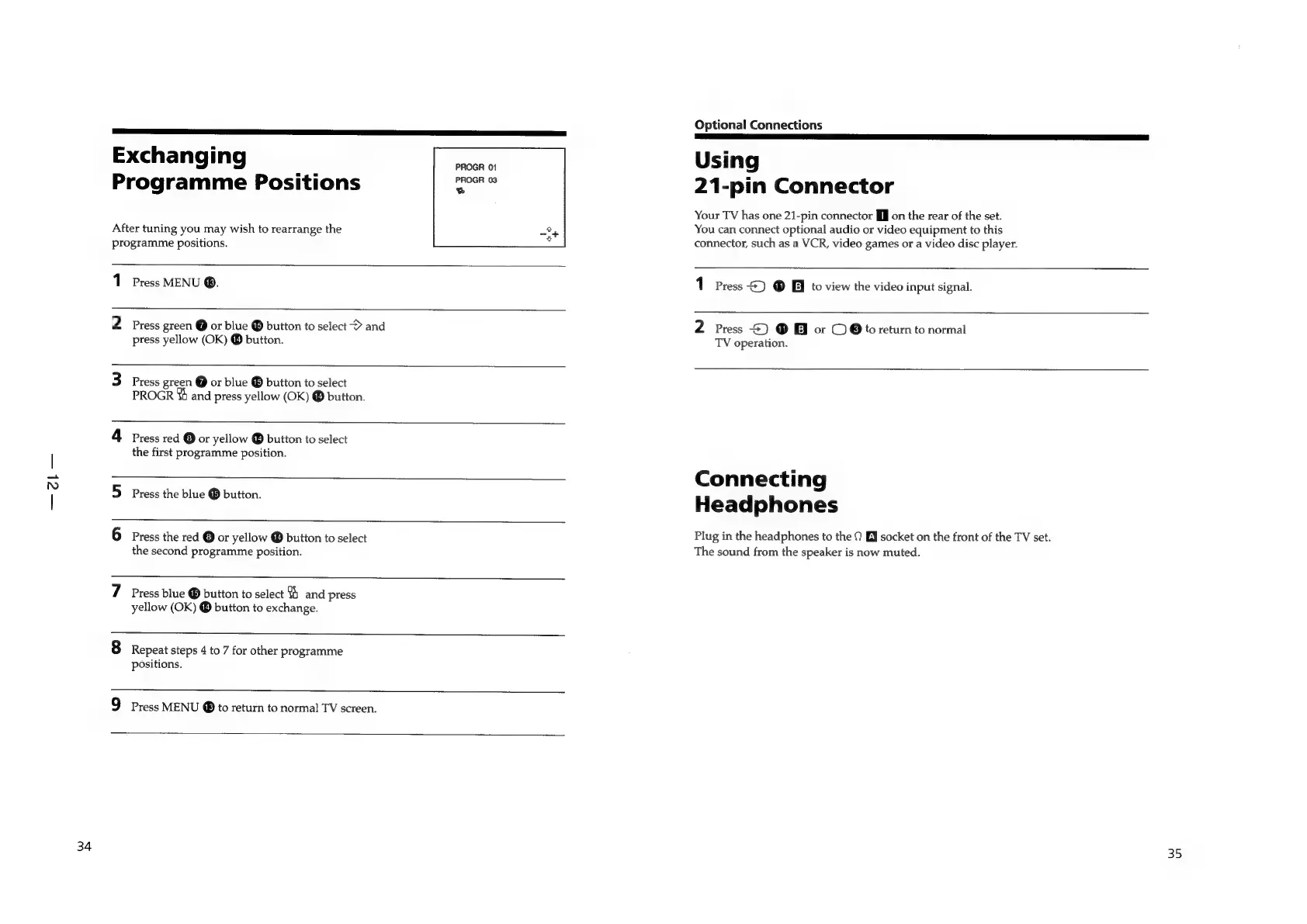
Exchanging
th
Programme
Positions
oo
After
tuning
you
may
wish
to
rearrange
the
programme
positions.
1
Press
MENU
@.
2
Press
green
@
or
blue
®
button
to
select
>
and
8
press
yellow
(OK)
®
button.
3
Press
green
@
or
blue
®
button
to
select
PROGR
4h
and
press
yellow
(OK)
®
button.
4
press
red
©
or
yellow
®
button
to
select
the
first
programme
position.
5
press
the
blue
®
button.
6
Press
the
red
©
or
yellow
®
button
to
select
the
second
programme
position.
7
Press
blue
®
button
to
select
%
and
press
yellow
(OK)
®
button
to
exchange.
8
Repeat
steps
4
to
7
for
other
programme
positions.
9
Press
MENU
@
to
return
to
normal
TV
screen.
Optional
Connections
Using
21-pin
Connector
Your
TV
has
one
21-pin
connector
[ff
on
the
rear
of
the
set.
You
can
connect
optional
audio
or
video
equipment
to
this
connector,
such
as
a
VCR,
video
games
or
a
video
disc
player.
1
Press
2)
@
Ei
to
view
the
video
input
signal.
2
Press
S)
®
&
or
©
Oto
return
to
normal
TV
operation.
Connecting
Headphones
Plug
in
the
headphones
to
the
0
EY
socket
on
the
front
of
the
TV
set.
The
sound
from
the
speaker
is
now
muted.
35

Related product manuals