EasyManua.ls Logo

Sony TRINITRON KV-M1450E - Electrical Adjustments; Entering Service Mode; On-Screen Menu Adjustments

Sony TRINITRON KV-M1450E
50 pages
Print Icon
To Next Page IconTo Next Page
To Previous Page IconTo Previous Page
Loading...
KV-M145
4-1.
ELECTRICAL
ADJUSTMENTS
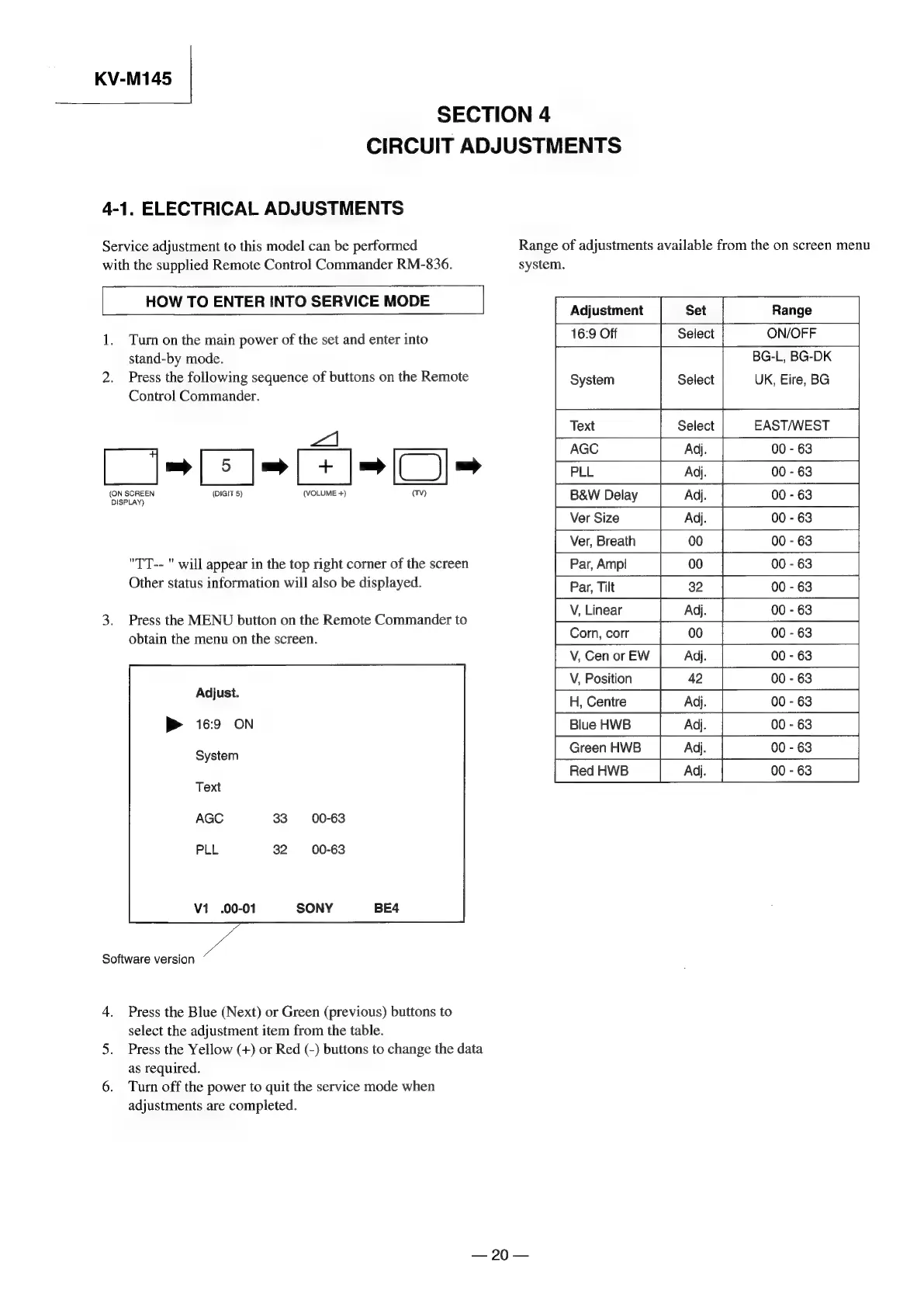
Service
adjustment
to
this
model
can
be
performed
with
the
supplied
Remote
Control
Commander
RM-836.
SECTION
4
CIRCUIT
ADJUSTMENTS
Range
of
adjustments
available
from
the
on
screen
menu
HOW
TO
ENTER
INTO
SERVICE
MODE
1.
Turn
on
the
main
power
of
the
set
and
enter
into
stand-by
mode.
2.
Press
the
following
sequence
of
buttons
on
the
Remote
Control
Commander.
vA
=O
(ON
SCREEN
(DIGIT
5)
DISPLAY)
"TT--
"
will
appear
in
the
top
right
corner
of
the
screen
Other
status
information
will
also
be
displayed.
3.
Press
the
MENU
button
on
the
Remote
Commander
to
obtain
the
menu
on
the
screen.
Software
version
4.
Press
the
Blue
(Next)
or
Green
(previous)
buttons
to
select
the
adjustment
item
from
the
table.
5.
Press
the
Yellow
(+)
or
Red
(-)
buttons
to
change
the
data
as
required.
6.
Turn
off
the
power
to
quit
the
service
mode
when
adjustments
are
completed.
90
system.
[
Adjustment
Set
Range
16:9
Off
Select
ON/OFF
BG-L,
BG-DK
System
Select
UK,
Eire,
BG
Text
Select
EAST/WEST
AGC
Adj.
00
-
63
PLL
Adj.
00
-
63
B&W
Delay
Adj.
00
-
63
Ver
Size
Adj.
00
-
63
Ver,
Breath
00 00
-
63
Par,
Amp!
00
00
-
63
Par,
Tilt
32
00
-
63
V,
Linear
Adj.
00
-
63
V,
Cen
or
EW
Adj.
00
-
63
V,
Position
42 00
-
63
H,
Centre
Adj.
00
-
63
Blue
HWB
Adj.
00
-
63
Green
HWB
Adj.
00
-
63
Red
HWB
Adj

Related product manuals