EasyManua.ls Logo

Sony TRINITRON KV-M1450E - Troubleshooting Common Issues; Picture and Sound Problems; Color and Picture Distortion

Sony TRINITRON KV-M1450E
50 pages
Print Icon
To Next Page IconTo Next Page
To Previous Page IconTo Previous Page
Loading...
36
Additional
Information
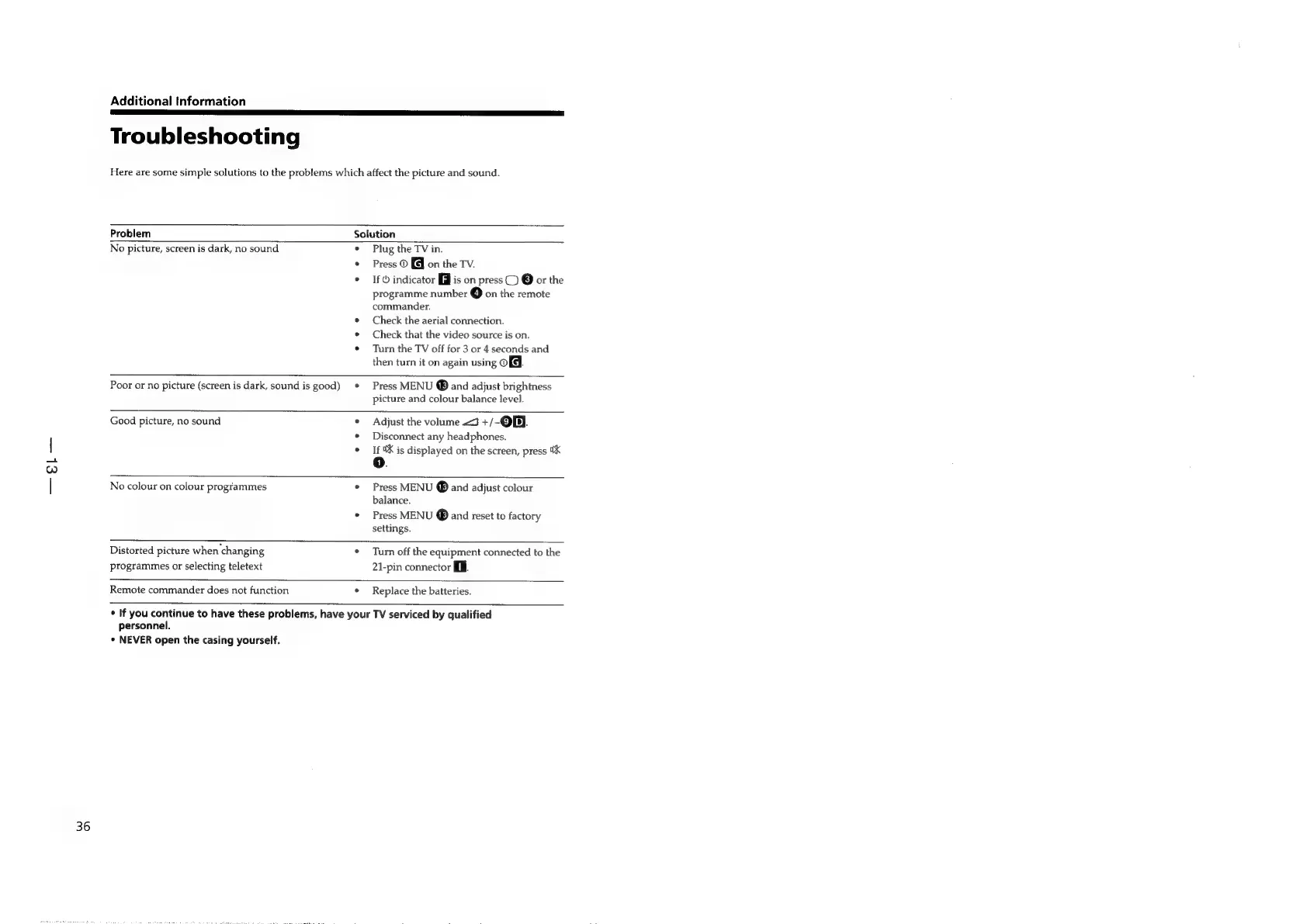
Troubleshooting
Here
are
some
simple
solutions
to
the
problems
which
affect
the
picture
and
sound.
Problem
Solution
No
picture,
screen
is
dark,
no
sound
°
e
Plug
the
TV
in.
Press
©
on
the
TV.
If
©
indicator
[iJ
is
on
press
C)
@
or
the
programme
number
@
on
the
remote
commander.
Check
the
aerial
connection.
Check
that
the
video
source
is
on.
Turn
the
TV
off
for
3
or
4
seconds
and
then
turn
it
on
again
using
OG.
Poor
or
no
picture
(screen
is
dark,
sound
is
good)
Press
MENU
®
and
adjust
brightness
picture
and
colour
balance
level.
Good
picture,
no
sound
.
e
Adjust
the
volume
J
+/-@BJ.
Disconnect
any
headphones.
If
8X
is
displayed
on
the
screen,
press
5K
o.
No
colour
on
colour
programmes
e
Press
MENU
and
adjust
colour
balance.
Press
MENU
®
and
reset
to
factory
settings.
Distorted
picture
when
changing
°
programmes
or
selecting
teletext
Turn
off
the
equipment
connected
to
the
21-pin
connector
i.
Remote
commander
does
not
function
°
Replace
the
batteries.
¢
If
you
continue
to
have
these
problems,
have
your
TV
serviced
by
qualified
personnel.
¢
NEVER
open
the
casing
yourself.

Related product manuals