EasyManua.ls Logo

Sony TRINITRON KV-M1620U - Viewing Teletext; Teletext Functions

Sony TRINITRON KV-M1620U
12 pages
Print Icon
To Next Page IconTo Next Page
To Previous Page IconTo Previous Page
Loading...
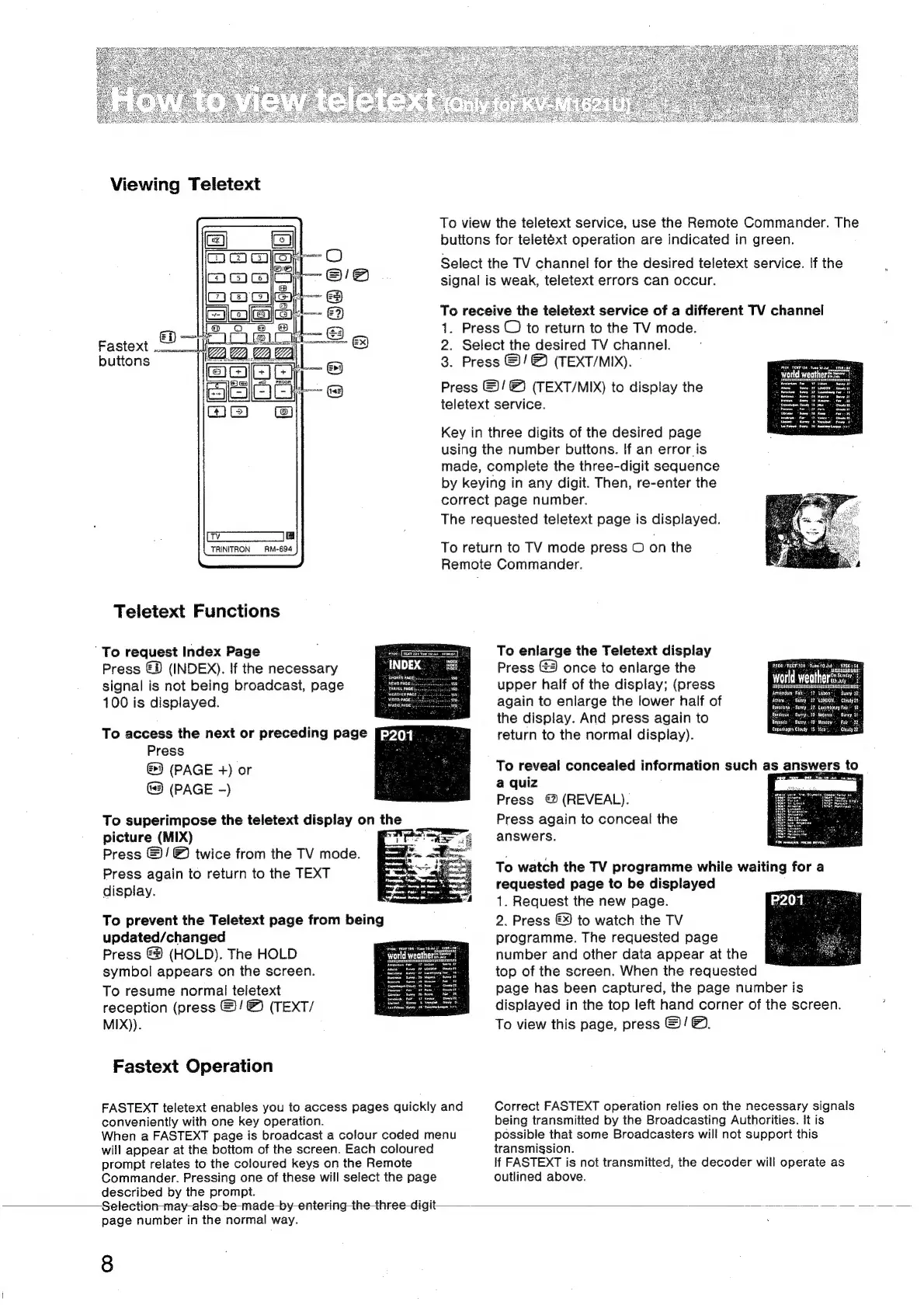
Viewing
Teletext
buttons
Teletext
Functions
‘To
request
Index
Page
Press
€®
(INDEX).
If
the
necessary
signal
is
not
being
broadcast,
page
100
is
displayed.
To
access
the
next
or
preceding
page
Press
(PAGE
+)
or
(PAGE
-)
picture
(MIX)
Press
©!
@
twice
from
the
TV
mode.
Press
again
to
return
to
the
TEXT
display.
To
prevent
the
Teletext
page
from
being
updated/changed
Press
(HOLD).
The
HOLD
symbol
appears
on
the
screen.
To
resume
normal
teletext
reception
(press
@/
&
(TEXT/
MIX)).
Fastext
Operation
FASTEXT
teletext
enables
you
to
access
pages
quickly
and
conveniently
with
one
key
operation.
When
a
FASTEXT
page
is
broadcast
a
colour
coded
menu
will
appear
at
the
bottom
of
the
screen.
Each
coloured
prompt
relates
to
the
coloured
keys
on
the
Remote
Commander.
Pressing
one
of
these
will
select
the
page
described
by
the
prompt.
Selection
-may-also-be-made-by-entering
the
three-digit
page
number
in
the
normal
way.
8
To
view
the
teletext
service,
use
the
Remote
Commander.
The
buttons
for
teletéxt
operation
are
indicated
in
green.
Select
the
TV
channel
for
the
desired
teletext
service.
If
the
signal
is
weak,
teletext
errors
can
occur.
To
receive
the
teletext
service
of
a
different
TV
channel
1.
Press
©)
to
return
to
the
TV
mode.
2.
Select
the
desired
TV
channel.
3.
Press
&/
(TEXT/MIX).
Press
©)!
®
(TEXT/MIX)
to
display
the
teletext
service.
Key
in
three
digits
of
the
desired
page
using
the
number
buttons.
If
an
error
is
made,
complete
the
three-digit
sequence
by
keying
in
any
digit.
Then,
re-enter
the
correct
page
number.
The
requested
teletext
page
is
displayed.
To
return
to
TV
mode
press
©
on
the
Remote
Commander.
To
enlarge
the
Teletext
display
Press
once
to
enlarge
the
upper
half
of
the
display;
(press
again
to
enlarge
the
lower
half
of
the
display.
And
press
again
to
return
to
the
normal
display).
To
reveal
concealed
information
such
as
answers
to
a
quiz
Press
(REVEAL).
Press
again
to
conceal
the
answers.
PROG!
TEXTING
|
Tues-t0
dud.
1756354:
slg
world
weatheroes":
Stholy
Bistsiststtistetesstesttiintetelestsetel
tt
tag
Amsterdam:
Falk:
AT
Lisbon
=
‘Sunny
27:
Batéeloqa
.-
Suny
..22.
Lusembourg
Fair,"
18:
Bordeaux
..”
Sunny,
29
Mejoreo.
my,
Coponhagen
Cloudy
1S
Nico.
‘Cloudy
22.
ose
isaac
«
To
watch
the
TV
programme
while
waiting
for
a
requested
page
to
be
displayed
1.
Request
the
new
page.
2.
Press
€9
to
watch
the
TV
programme.
The
requested
page
number
and
other
data
appear
at
the
top
of
the
screen.
When
the
requested
page
has
been
captured,
the
page
number
is
displayed
in
the
top
left
hand
corner
of
the
screen.
To
view
this
page,
press
&)/
&.
Correct
FASTEXT
operation
relies
on
the
necessary
signals
being
transmitted
by
the
Broadcasting
Authorities.
It
is
possible
that
some
Broadcasters
will
not
support
this
transmission.
If
FASTEXT
is
not
transmitted,
the
decoder
will
operate
as
outlined
above.

Related product manuals