EasyManua.ls Logo

Sony TRINITRON KV-M1620U - How to Adjust the. Picture; Other Functions

Sony TRINITRON KV-M1620U
12 pages
Print Icon
To Next Page IconTo Next Page
To Previous Page IconTo Previous Page
Loading...
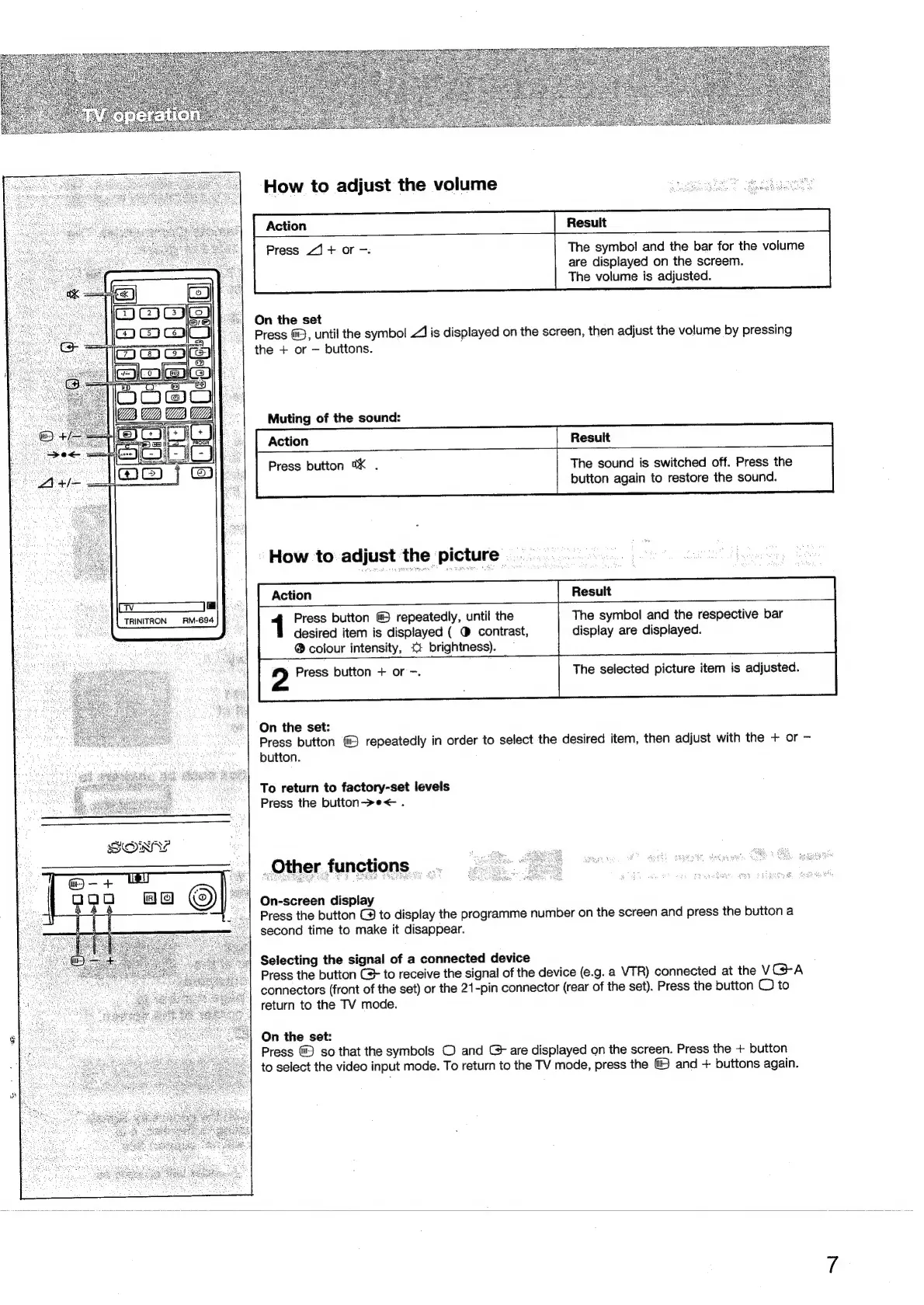
How
to
adjust
the
volume
Action
Press
4]
+
or
-.
The
symbol
and
the
bar
for
the
volume
are
displayed
on
the
screem.
The
volume
is
adjusted.
On
the
set
Press
@),
until
the
symbol
1
is
displayed
on
the
screen,
then
adjust
the
volume
by
pressing
the
+
or
buttons.
Muting
of
the
sound:
Action
Resuit
Press
button
0X
.
The
sound
is
switched
off.
Press
the
button
again
to
restore
the
sound.
How
to
adjust
the
.
picture
Action
1
Press
button
&)
repeatedly,
until
the
The
symbol
and
the
respective
bar
desired
item
is
displayed
(
®
contrast,
display
are
displayed.
a
TRINITRON
RM-694
®
colour
intensity,
<+
brightness).
2
Press
button
+
or
-.
The
selected
picture
item
is
adjusted.
On
the
set:
Press
button
repeatedly
in
order
to
select
the
desired
item,
then
adjust
with
the
+
or
-
button.
To
return
to
factory-set
levels
Press
the
button>e<
.
Other
functions.
On-screen
display
Press
the
button
@
to
display
the
programme
number
on
the
screen
and
press
the
button
a
second
time
to
make
it
disappear.
Selecting
the
signal
of
a
connected
device
Press
the
button
C+
to
receive
the
signal
of
the
device
(e.g.
a
VTR)
connected
at
the
VGA
connectors
(front
of
the
set)
or
the
21-pin
connector
(rear
of
the
set).
Press
the
button
@
to
return
to
the
TV
mode.
On
the
set:
Press
so
that
the
symbols
©
and
C
are
displayed
on
the
screen.
Press
the
+
button
to
select
the
video
input
mode.
To
return
to
the
TV
mode,
press
the
and
+
buttons
again.

Related product manuals