EasyManua.ls Logo

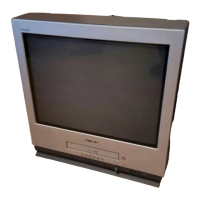
Sony TRINITRON KV-VF21M70 - User Manual

Sony TRINITRON KV-VF21M70
62 pages
Print Icon
To Next Page IconTo Next Page
Loading...
Trinitron Color
Video TV
©1999 by Sony Corporation
KV-VF21M70
3-866-053-31 (1)
Operating Instructions
Before operating the unit, please read this manual thoroughly and retain it for
future reference.
############
GB
AR
PAL NTSC

Other manuals for Sony TRINITRON KV-VF21M70

Questions and Answers

  • K
    Karen RiceAug 19, 2025
    Why is there no picture or sound on my Sony TRINITRON KV-VF21M70 TV VCR Combo?
    • P
      Paul RuizAug 19, 2025
      If your Sony TV VCR Combo shows no picture or sound, the power cord or antenna might not be properly connected. Make sure the AC power cord and antenna connections are secure. Also, the TV might not be turned on. Press the power button on the TV or the remote. If the standby indicator is red, press the power button or a program number button on the remote.
  • J
    James RobbinsAug 21, 2025
    What to do if my Sony TRINITRON KV-VF21M70 VCR Combo has a good picture but no sound?
    • A
      Andrew PearsonAug 21, 2025
      If you're getting a good picture but no sound on your Sony TV VCR Combo, first check the volume level and increase it if it's too low by pressing the volume up button. Also, ensure that the sound isn't muted by pressing the mute button. Finally, if headphones are connected, disconnect them.
  • H
    hsanchezAug 23, 2025
    What to do if my Sony TV VCR Combo has no picture or sound from video input sources?
    • J
      Jeremy Benson DDSAug 23, 2025
      If you're not getting any picture or sound from video input sources on your Sony TV VCR Combo, check the connecting cord between the TV and the input sources to make sure it is connected properly. Also, make sure that you have selected the correct input by pressing the input button so that “t1” or “t2” appears.
  • C
    Christopher AndersonAug 26, 2025
    Why is the picture on my Sony TRINITRON KV-VF21M70 TV VCR Combo snowy and the sound abnormal?
    • C
      courtneycalderonAug 26, 2025
      If you're experiencing a snowy picture and abnormal sound on your Sony TV VCR Combo, the antenna cable might be loose or damaged. Check the antenna cable and its connection both on the TV and at the wall. You can also display the TV SET UP menu and select MANUAL PROGRAM to manually preset the channel again.
  • M
    megan07Aug 28, 2025
    Why is the color on my Sony TV VCR Combo bad or missing?
    • C
      Christy CarpenterAug 28, 2025
      If the color on your Sony TV VCR Combo is poor or missing, the color level setting might be too low. Adjust the PICTURE, COLOR, and BRIGHT settings in the PERSONAL ADJUST menu. The picture setting could also be inappropriate; try pressing the PIC MODE button to switch the picture setting. Finally, the color system setting might be wrong; display the TV SET UP menu and check the color system (COL SYS) setting.
  • M
    Monica SaundersAug 30, 2025
    Why does my Sony TV VCR Combo have double images or ghosts?
    • S
      Sandra WallaceAug 30, 2025
      If your Sony TV VCR Combo is displaying double images or “ghosts”, it could be due to broadcast signals being reflected by nearby mountains or buildings. Using a highly directional antenna may improve the picture.
  • M
    Meghan JordanSep 1, 2025
    Why does my Sony TRINITRON KV-VF21M70 TV VCR Combo have a good picture but abnormal sound?
    • E
      Emily ClarkSep 1, 2025
      If your Sony TV VCR Combo has a good picture but the sound is abnormal, the TV system setting might be incorrect. If the sound of all channels is abnormal, display the TV SET UP menu and select the appropriate TV system (TV SYS), then preset the channels again.
  • S
    Samantha SanchezSep 4, 2025
    Why does my Sony TRINITRON KV-VF21M70 TV VCR Combo show dotted lines or stripes?
    • J
      jacksoncoltonSep 4, 2025
      If your Sony TV VCR Combo is showing dotted lines or stripes, there may be local interference from devices like cars, neon signs, hair dryers, or power generators. Avoid using such equipment near the TV.
  • D
    davidsonjohnSep 6, 2025
    What causes abnormal color patches on my Sony TV VCR Combo?
    • T
      travis46Sep 6, 2025
      Abnormal color patches on your Sony TV VCR Combo can be caused by magnetic disturbance from external speakers or other equipment. Try moving these devices away from the TV. Turn off the TV for about five minutes, then turn it back on.
  • J
    Jamie CaseySep 8, 2025
    Why has the clock stopped and "--:--" is displayed on my Sony TRINITRON KV-VF21M70 VCR Combo?
    • W
      williamskimberlySep 8, 2025
      If the clock on your Sony TV VCR Combo has stopped and “--:--” is displayed, it indicates that the power has been interrupted or the AC power cord is disconnected. You will need to re-set the clock and timer settings.

Summary

WARNING

Safety Information

General safety, installation, and operation procedures to prevent fire and electric shock hazards.

About Moisture Condensation

Guidance on preventing tape damage due to moisture condensation when moving the unit between temperature zones.

Getting Started

Step 2: Installing the Video TV

Methods to secure the video TV to prevent falling using supplied accessories.

Step 5: Setting the Clock

Guide to setting the clock, essential for timer recording and on-timer functions.

Step 6: Setting the Channels

Steps for automatically presetting up to 100 TV channels for optimal reception.

Basic Operations

Recording TV Programs

Step-by-step guide to recording TV programs, including selecting program position and tape speed.

Recording using QUICK-TIMER

How to preset the video TV to record one program within a 24-hour period.

Additional Operations

Additional Information

Self-Diagnosis Function

How to use the self-diagnosis feature to identify video TV problems based on indicator flashes.

Troubleshooting

A guide to diagnosing and solving common problems encountered with the video TV.

Sony TRINITRON KV-VF21M70 Specifications

General IconGeneral
Screen Size21 inches
Display TypeCRT
Aspect Ratio4:3
BrandSony
ModelKV-VF21M70
InputsComposite, RF
TypeTelevision

Related product manuals