35
Additional Operations
Changing the PICTURE MODE setting
The PICTURE MODE menu allows you to adjust the picture quality.
1
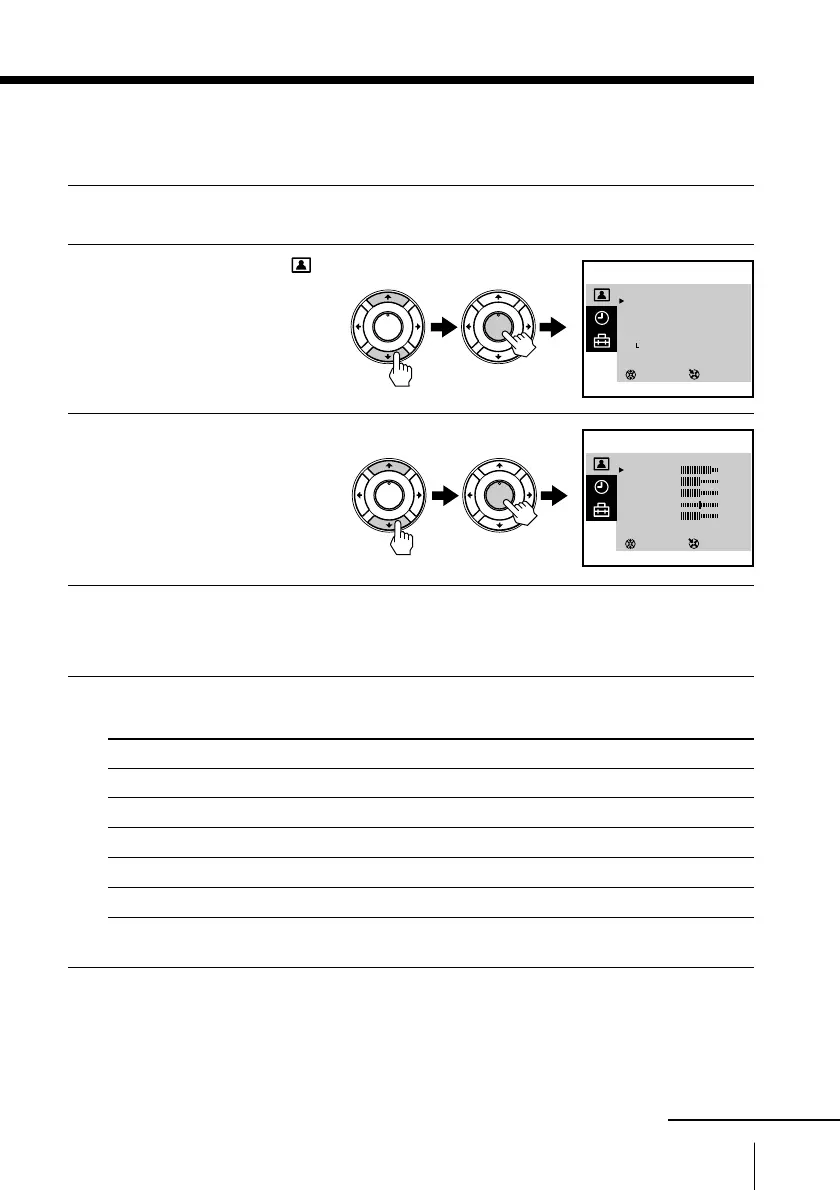
Press MENU.
2
Press M or m to select ,
then press ENTER.
3
Press M or m to select
ADJUST , then press
ENTER.
4
Press M or m to select the desired item, then press ENTER.
The adjustment bar for the selected item appears at the bottom of the
screen.
5
Adjust the value according to the following table, then press
ENTER.
For Press m to Press M to
PICTURE decrease picture contrast increase picture contrast
COLOR decrease color intensity increase color intensity
BRIGHT darken the picture brighten the picture
HUE* increase red picture tones increase green picture tones
SHARP soften the picture sharpen the picture
*You can adjust HUE for the NTSC color system only.
To return to the normal screen
Press MENU.
SELECT
PICTURE MODE
·
DYNAMIC
·
STANDARD
·
SOFT
·
PERSONAL
ADJUST
3
ENTER
SELECT
PERSONAL ADJUST
PICTURE
COLOR
BLIGHT
HUE
SHARP
3
ENTER
80
50
50
00
50
PLAY
ENTER
H
PLAY
ENTER
H
PLAY
ENTER
H
PLAY
ENTER
H
continued







 To Next Page