6
Getting Started
Step 3: Connecting the antenna
For better TV reception and clear recordings, connect an outdoor
antenna to your video TV.
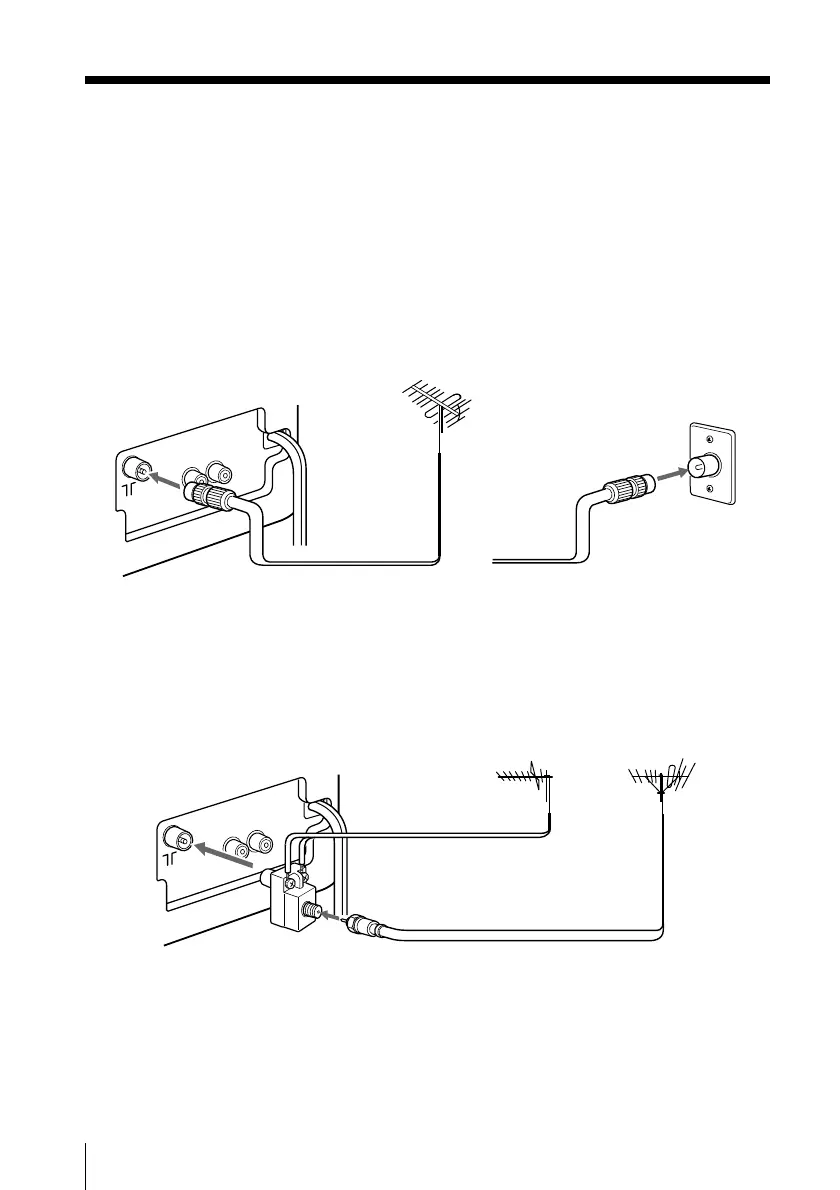
Connecting an outdoor antenna
To connect a VHF antenna or a combination VHF/UHF
antenna—75-ohm coaxial cable (round)
Attach an IEC antenna connector to the 75-ohm coaxial cable.
Plug the connector into the 8 (antenna) socket of the video TV.
To connect both VHF and UHF antennas
Attach the antenna cable ends to the VHF/UHF mixer (not
supplied).
Plug the mixer into the 8 (antenna) socket of the video TV.
On a wall
75-ohm coaxial cable
Rear
VHF/UHF
antenna
or
Rear
300-ohm twin-lead cable
VHF/UHF mixer
(not supplied)
UHF antenna
VHF antenna







 To Next Page