;:PD-1302
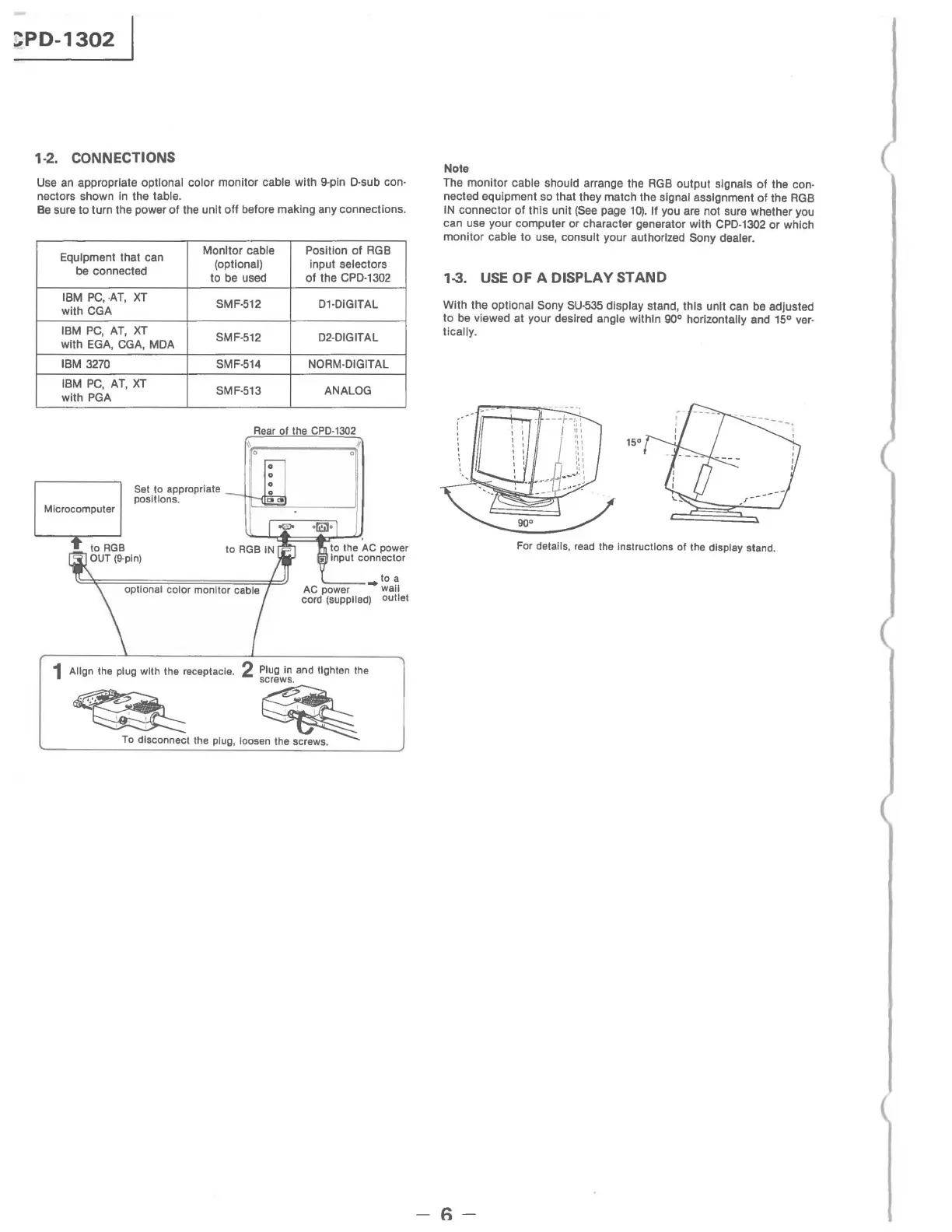
1·2. CONNECTIONS
Use
an
appropriate optional color monitor cable with 9-pln D·sub con·
nectors shown
in
the table.
Be
sure to turn the power
of
the unit off before making any connections.
Equipment that can
be connected
IBM
PC,
·AT,
XT
with CGA
IBM
PC,
AT,
XT
with
EGA,
CGA,
MDA
IBM
3270
IBM
PC,
AT,
XT
with
PGA
Monitor cable
Position
of
RGB
(optional) input selectors
to be used
of
the
CPD·1302
SMF·512
D1·DlGITAL
SMF·512 D2·DIGITAL
SMF·514 NORM·DIGITAL
SMF·513 ANALOG
Rear of the CPD·I302
',r,:-
_____
~II
o
o
Set
to
appropriate :
positions.
-;'''''
IL
"':
""''''+='''~
'''
'''=:'-
____
...JI
Microcomputer
to the
AC
power
Input connector
..
to a
AC
power wall
cord (supplied) outlet
1 Align the plug with the receptacle. 2 Plug in and tighten the
screws.
~
~
,
To
disconnect the plug, loosen the screws,
Note
The monitor cable should arrange the
RGB
output signals of the con·
nected equipment so that they match the signal assignment of the
RGB
IN
connector of this unit
(See
page
10).
If you are not sure whether you
can use your computer or character generator with
CPD·1302
or
which
monitor
cable to use, consult your authorized Sony dealer.
1-3.
USE
OF
A DISPLAY STAND
With the optional Sony
SU·535
display stand, this unit can
be
adjusted
to
be
viewed at your desired angle within
goo
horizontally and 15° ver.
tically.
15°
For details, read the instructions of the display stand,
-6-







 To Next Page