76
— Quick Reference —
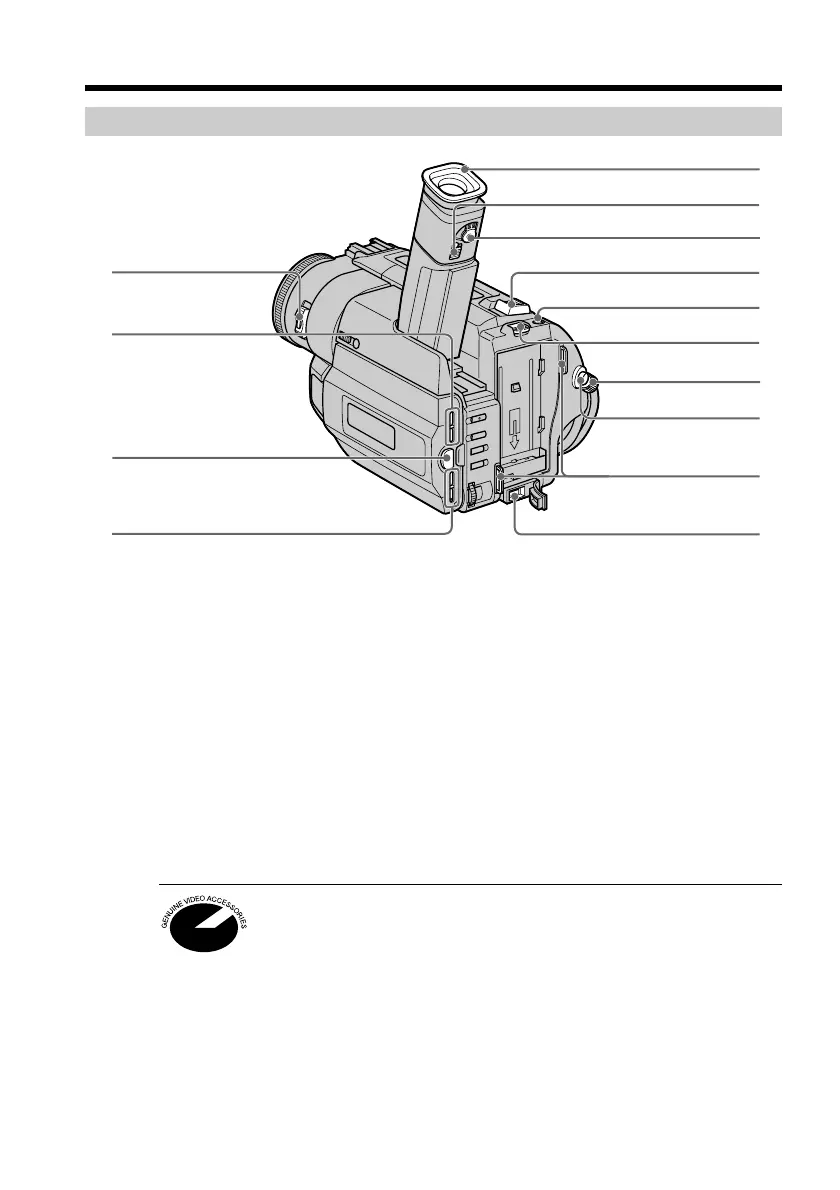
Identifying the parts and controls
1 POWER switch (p. 14)
2 LCD BRIGHT buttons (p. 15)
3 OPEN button (p. 14)
4 VOLUME buttons (p. 22)
5 Eyecup (p. 72)
6 Eyecup RELEASE knob (DCR-TRV203/
TRV210/TRV310 only) (p. 72)
7 Viewfinder lens adjustment lever
(p. 16)
8 Power zoom lever (p. 17)
9 PHOTO button (p. 27)
0 BATT RELEASE lever (p. 8)
!¡ STANDBY switch (p. 14)
!™ START/STOP button (p. 14)
!£ Hook for shoulder strap (p. 78)
!¢ DC IN jack (p. 9)
This mark indicates that this product is a genuine accessory for Sony
video products.
When purchasing Sony video products, Sony recommends that you
purchase accessories with this “GENUINE VIDEO ACCESSORIES”
mark.
Camcorder
DCR-TRV203/TRV210/TRV310
4
1
3
!¡
!™
!£
!¢
2
9
7
5
8
6
0










 To Next Page