13
Paper
Use only Sony UPP-84S/84HG paper designed for use
with this unit. High print quality cannot be guaranteed if
any other paper is used with this unit, and such paper
could damage the unit.
Paper You Can Use
Paper characteristics are as follows.
Notes on storing and handling paper
Storing unused paper
• Store unused paper at a temperature below 30°C
(86°F) in a dry location that is not exposed to direct
sunlight.
• Do not store unused paper near volatile liquids or
allow the paper to contact any organic volatile liquid,
cellophane tape, or any compound of vinyl chloride.
Loading paper
• Handle the paper carefully when loading to avoid
touching the printing surface with your fingers.
Perspiration or oil from you hands could cause
pictures to blur.
• After removing the sheet from the leading edge of the
paper, pull the paper out about 15 cm (6 in.) before
printing. Sheet adhesive remaining on the paper could
spoil a picture.
Storing printouts
• To prevent printouts from fading or changing color,
store them in a cool, dry location where the
temperature is not higher than 30°C (86°F).
• Store printouts in a polypropylene pouch or between
sheets of paper that contain no plastic.
• Do not store printouts where they will be exposed to
direct sunlight or high humidity.
• Do not store printouts near volatile liquids or allow the
prints to contact any organic volatile liquid,
cellophane tape, or any compound of vinyl chloride.
• To prevent fading, do not stack printouts on or under a
diazo copy sheet.
• To mount printouts on another sheet of paper, use
double-sides tape or a water base adhesive.
Loading Paper in the
Unit
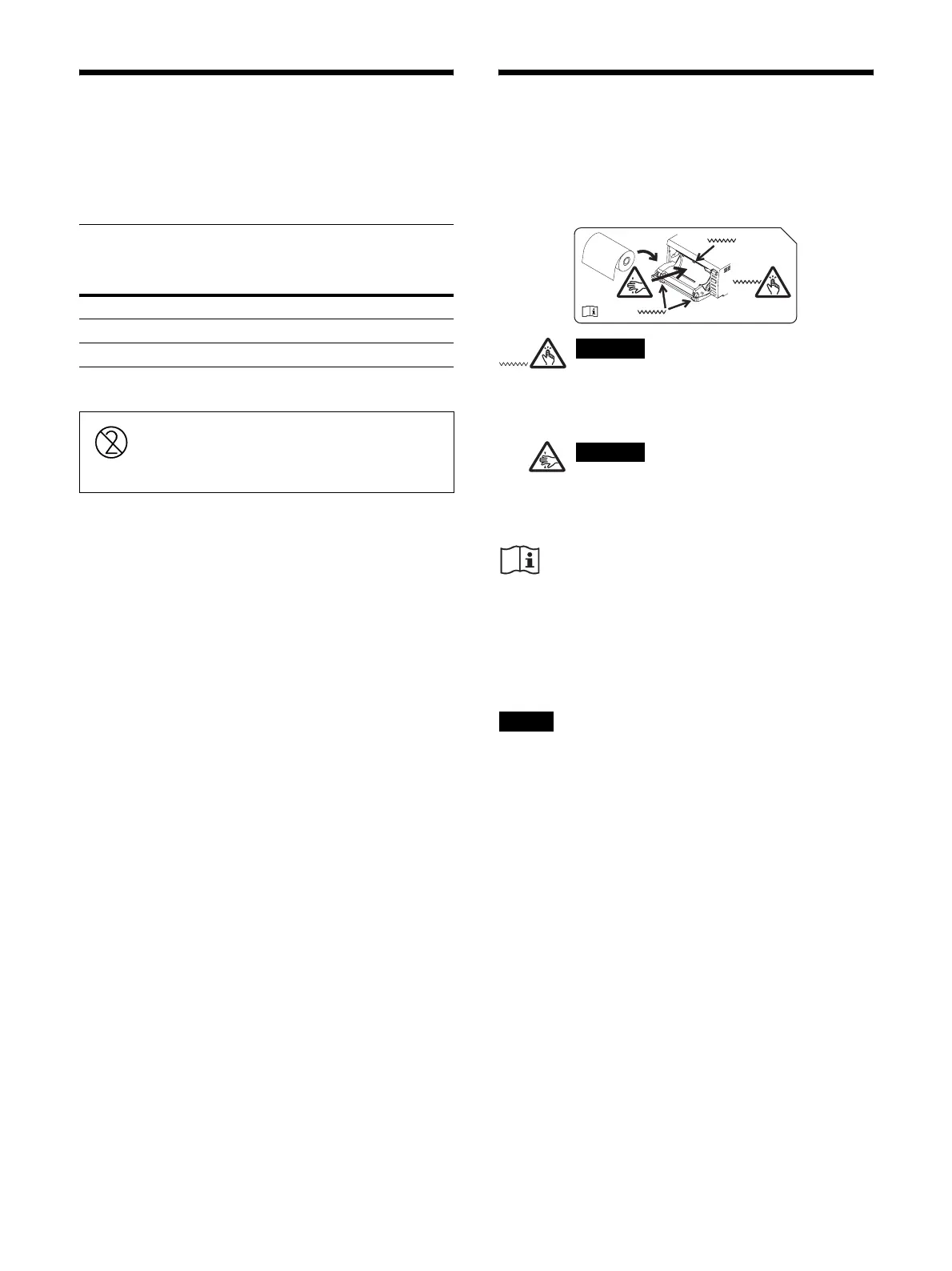
When loading paper in the unit, be sure to note the
caution graphic symbols on the unit.
A paper cutter is mounted with the unit.
When loading paper, be careful not to touch
the paper cutter. Touching the paper cutter
may cause injury.
Do not insert your finger into the back of the
paper tray. Your finger may become stuck in
an internal gap, which may lead to injury.
Caution
Do not touch any unit circuitry and the patient at the
same time.
If the unit malfunctions, it may generate voltage that
could be harmful to the patient.
Notes
• Before loading paper in the unit, see “Paper”
(page 13).
• Always handle paper carefully when loading to avoid
adversely affecting the quality of the printouts. Never
bend or crease the paper and never touch the printing
surface with your fingers. Fingerprints perspiration
can blur printing.
• Do not use any paper other than UPP-84S/84HG
paper. (page 13)
• Confirm that the printer driver paper type settings are
suitable for the paper to be used.
• You can check the currently selected paper on the
printer driver display.
For more details, see “Setup Guide.”
Print Characteristics Paper Type
Normal UPP-84S
High Glossy UPP-84HG
Do not re-use
Doing so may result in malfunction and
negatively affect printing results.
Caution
Caution



 To Next Page