9
Getting Started
Overview
This unit is a printer that prints images by heating a
thermal head, according to the input image data, and
pressing the head against special thermal printing paper
to print the image on the paper. It features the following
characteristics.
Quiet, High Quality, Fast Printing
• Employs a thin thermal head with a built-in high speed
drive IC, capable of high resolution images of
11.8 dots/mm.
• Print speeds of approximately 1 high quality image
(896 × 1196 dots (approx. 76 × 101 mm)) every
5 seconds when the “High Speed Print Mode”
checkbox is on.
• Standard image memory capable of handling and
printing images up to 896 × 2688 dots (approx. 76 ×
227 mm).
• Monochrome printing with up to 256 shades of
gradation.
USB interface
The unit is equipped with a USB connector which
complies with the USB specification.
Easy Paper Loading
Free access to the door allows you to drop paper into the
unit for easy loading.
Location and Function
of Parts and Controls
For more details, see the referenced page numbers
enclosed in parentheses ( ).
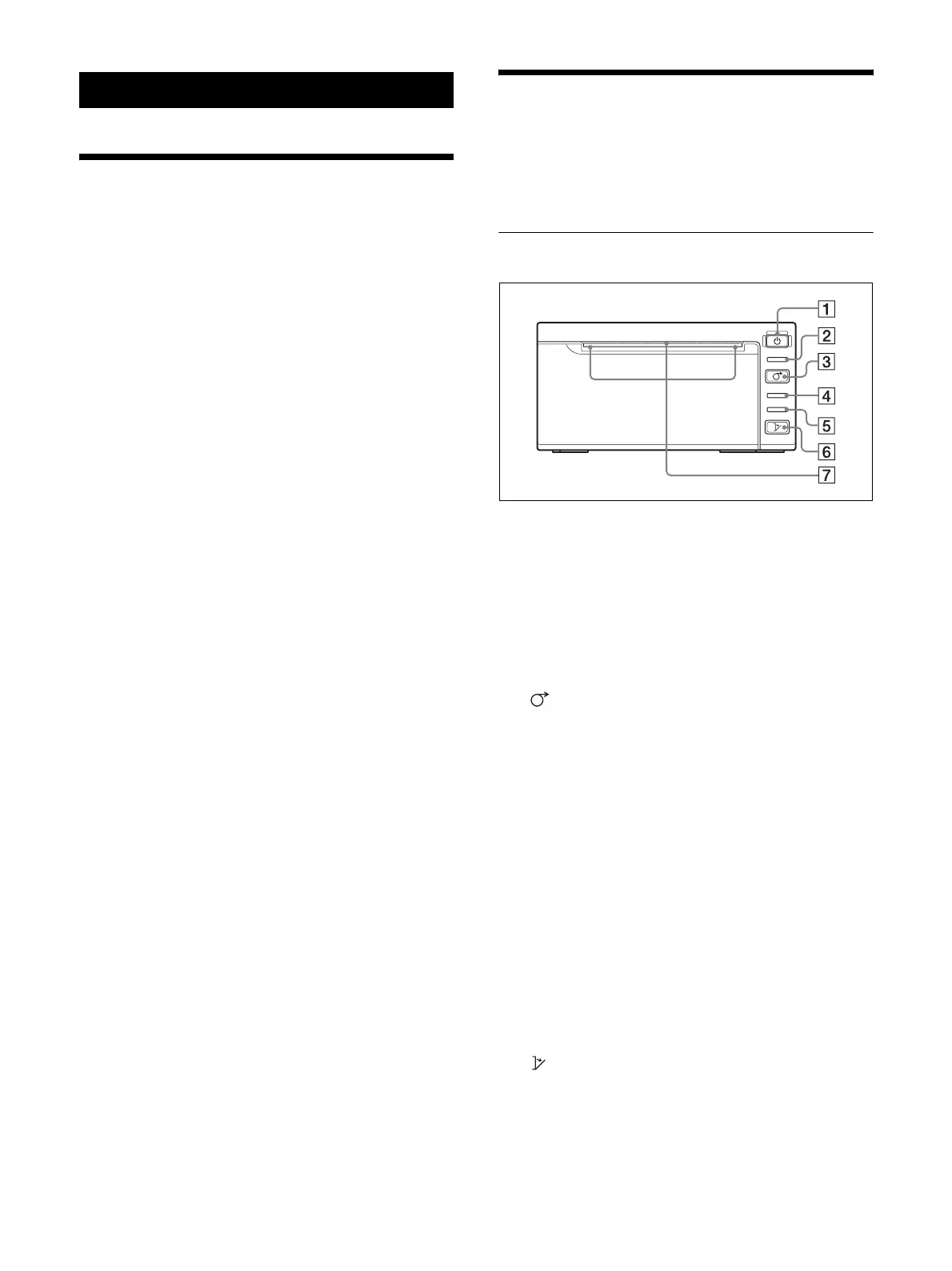
Front Panel
A 1 On/standby switch
1 On/standby lamp
(14, 15, 17)
Press to turn the unit on (1 On/standby lamp
lights).
B PRINT lamp
Lights while printing.
C FEED button (14, 15)
Hold down to feed paper.
The paper will only feed when the button remains
pressed.
If insufficient paper has been fed after printing,
press the button for a short time to feed extra paper.
For details on feeding paper after printing, see
“Setup Guide.”
Press to cancel a print job that is currently in
progress.
D PAPER lamp
Lights when the paper is not set in the tray correctly
or if the tray is empty.
E ALARM lamp
Lights when the door is open or if a problem occurs
in the printer.
F OPEN button (14)
Press to open the door.
Press and hold down this button all the way, to open
the door.
OPEN
ALARM
PAPER
FEED
PRINT



 To Next Page