17
Cleaning the Cabinet
Note
Before cleaning the printer, be sure to turn off the power
and disconnect the power cord.
When the cabinet becomes dirty
When solvents such as benzene or thinner, or acid,
alkaline or abrasive detergent, or chemical cleaning
cloths are used on the printer surface, the surface finish
may be damaged. Take care with respect to the
following:
• Clean the printer surface with a 50 to 70 v/v%
concentration of isopropyl alcohol or a 76.9 to
81.4 v/v% concentration of ethanol.
• Stubborn stains may be removed with a soft cloth such
as a cleaning cloth lightly dampened with mild
detergent solution and then cleaned using the above
chemical.
• Do not use unnecessary force to rub the printer surface
with a stained cloth. The printer surface may be
scratched.
• Do not keep the printer surface in contact with a
rubber or vinyl resin product for a long period of time.
The surface finish may deteriorate or the coating may
come off.
Cleaning the Thermal Head
If the printout is dirty or white stripes appear on the
printouts, clean the thermal head using the cleaning
sheet supplied.
Note
A paper cutter is mounted with the unit. When attaching
the head cleaning sheet, be careful not to touch the paper
cutter. Touching the paper cutter may cause injury.
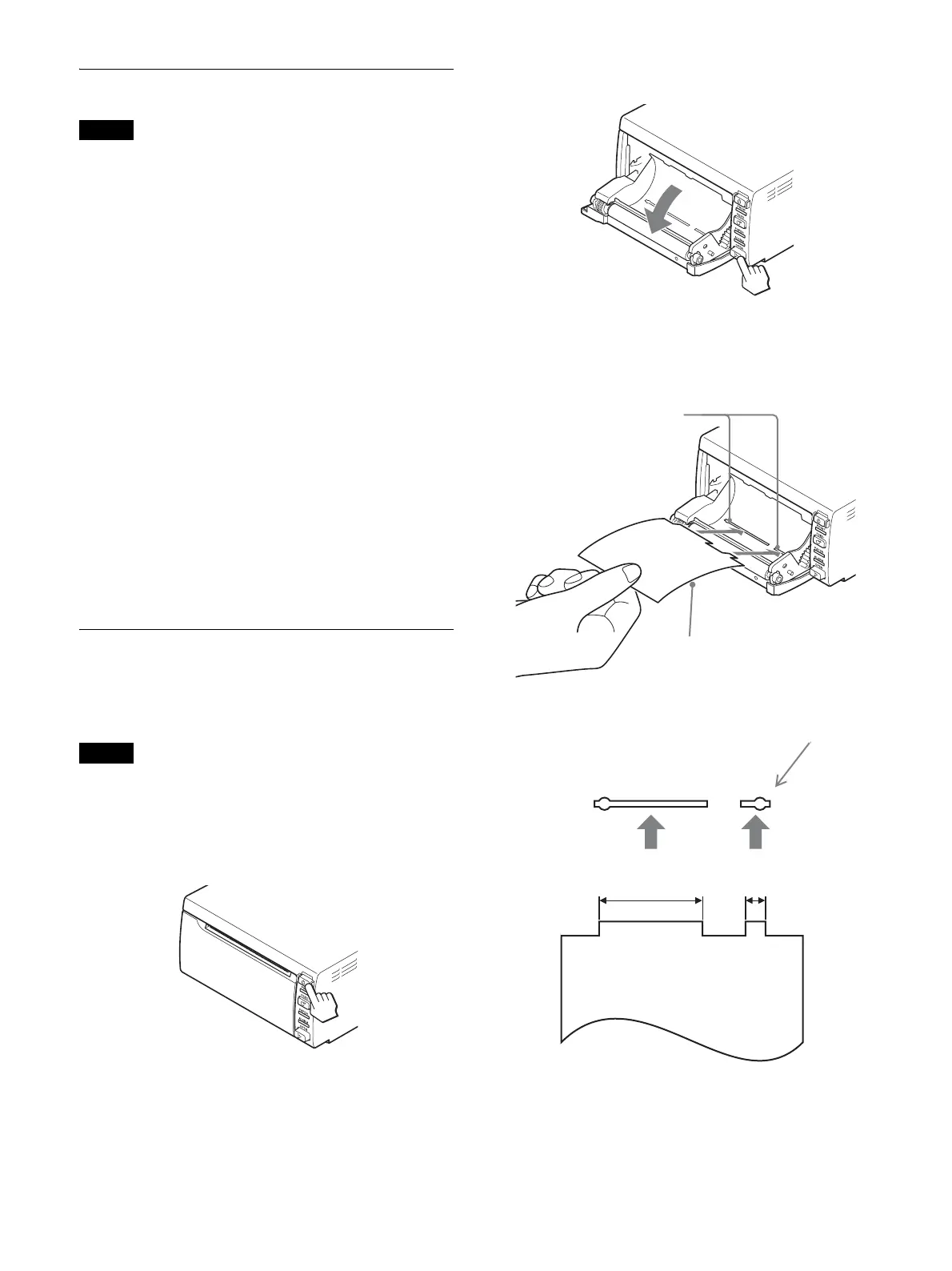
1
Press the 1 On/standby switch to turn the unit on.
2
Press the OPEN button to open the door.
If the paper is loaded in the paper tray, remove it.
3
Insert the cleaning sheet, with the black surface
facing down, into the groove of the paper tray.
4
Close the door by pushing it.
Insert the cleaning
sheet into the
grooves of the
paper tray.
Cleaning sheet supplied
With the black side facing down
wide
grooves of the paper tray
narrow



 To Next Page