45
Attachment and Installation Procedures
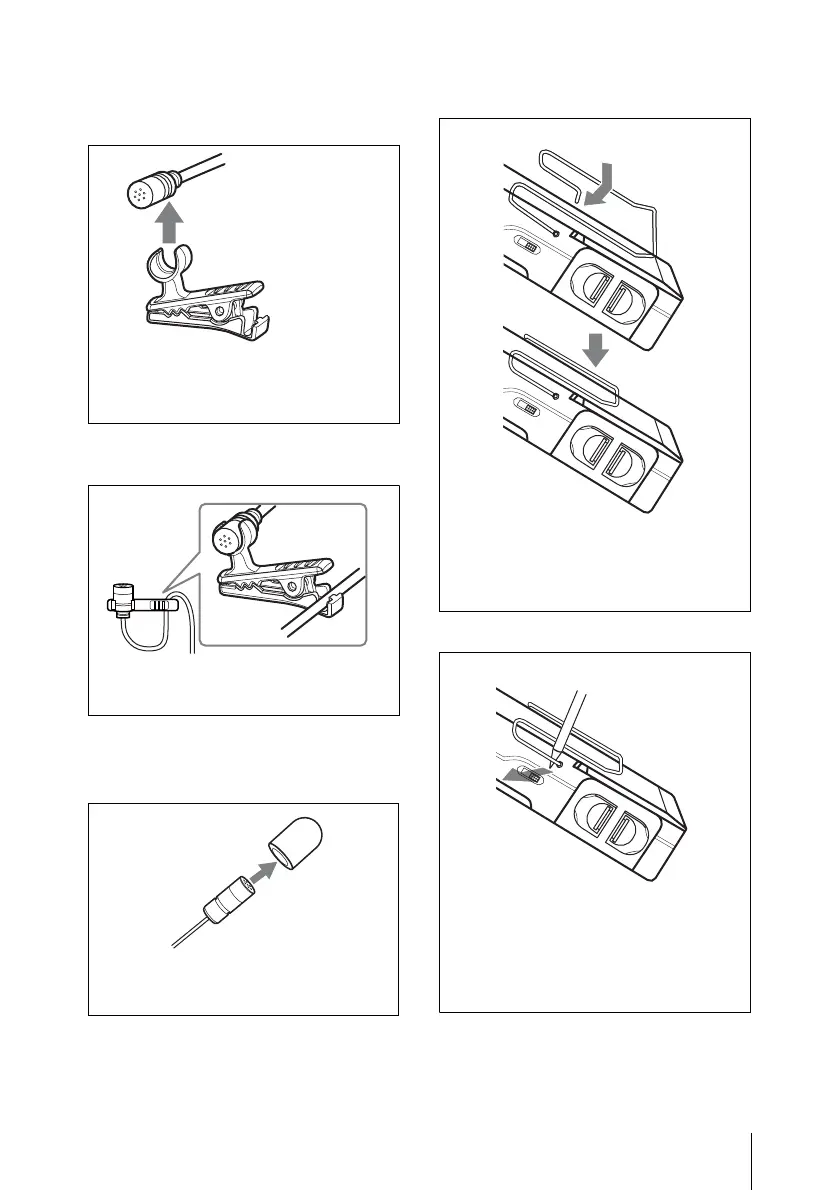
To attach the holder clip to
the microphone
To take the slack out of the
microphone cable
To attach the wind screen to
the microphone
To attach the belt clip
To remove the belt clip
Push the holder clip against the bottom
of the microphone until the holder clip
clicks into place.
Run the cable through the clamping
part of the holder clip.
Insert the microphone into the hole at
the bottom of the windscreen.
Insert one end of the belt clip into one of
two holes on either side of the
transmitter, and then insert the other end
into the hole on the other side.
Insert a pointed object such as a ballpoint
pen between the belt clip and the
transmitter to make some space between
them, and then remove the end of the belt
clip from the hole on the side of the
transmitter.



 To Next Page