VPL-CS1
4-074-278-11 (1)
C:\MUN\Data\FM\VPL-CS1\VPL-
CS1.nouhindata\407427811VPLCS1WW\02GB-
VPLCS1WW\03OVR.fm
masterpage:Left
GB
12
Location and Function of Controls
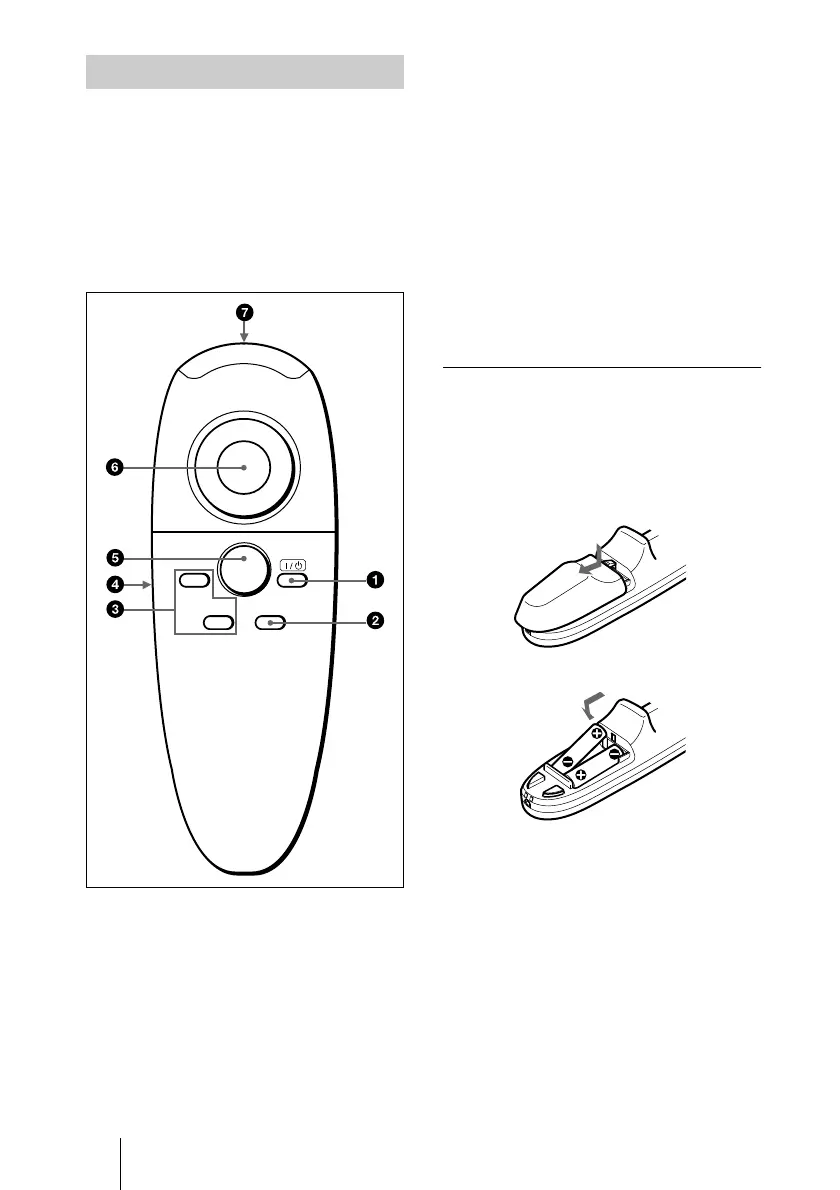
The keys that have the same names as those
on the control panel function identically.
You can control a connected computer using
the Remote Commander.
For details, see “To control the computer
using the supplied Remote Commander” on
page 22.
1
I /
1
11
1
key
2
INPUT key
3
FUNCTION 1, 2 keys
When you have saved a file in the
FUNCTION 1 or 2 key using the
supplied application software, you can
open the file with a press of the
corresponding key.
For details, see the README file and
the HELP file supplied with the
application software.
4
L CLICK key
Functions as the left button on a mouse.
5
R CLICK key
Functions as the right button on a mouse.
6
Joystick
Functions as the mouse of the computer
connected to the unit.
7
Infrared transmitter
To install batteries
1
Push and slide to open the lid, then
install the two size AAA (R03)
batteries (supplied) with the correct
polarity.
2
Replace the lid.
Remote Commander
INPUT
R. CLICK
FUNCTION
1
2
Be sure to install
the battery from
the
#
side.



 To Next Page