VPL-CS1
4-074-278-11 (1)
C:\MUN\Data\FM\VPL-CS1\VPL-
CS1.nouhindata\407427811VPLCS1WW\02GB-
VPLCS1WW\03OVR.fm
masterpage:Left
GB
8
Location and Function of Controls
Location and
Function of Controls
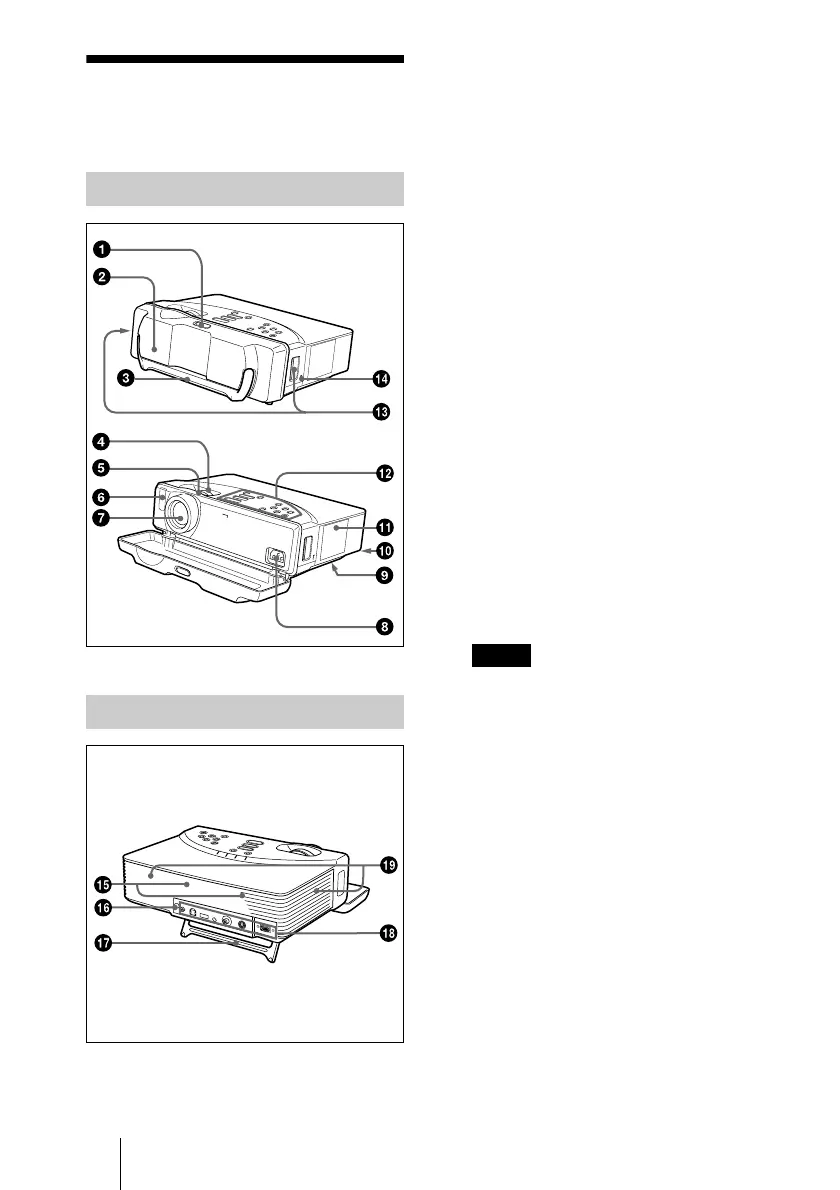
1
Lock button
2
Front cover
Slide the lock button to open the front
cover. The leg on the bottom of the
projector opens. When projecting the
picture, place the projector on a flat
surface with the leg open.
3
Carrying handle
Pull up the handle from the projector for
carrying.
4
Zoom ring
Adjusts the picture size.
5
Focus ring
Adjusts the picture focus.
6
Front remote control detector
(SIRCS receiver)
7
Lens
8
AC IN socket
Connects the supplied AC power cord.
9
Ventilation holes (intake)/air
filter cover (bottom)
• Do not place anything near the
ventilation holes as it may cause internal
heat build-up.
• Do not place your hand or objects near
the ventilation holes as it may cause the
air coming out heat build-up.
• To maintain optimal performance,
clean
the air filter every 300 hours.
q;
q;q;
q;
Lamp cover (bottom)
qa
qaqa
qa
Ventilation holes (exhaust)
qs
qsqs
qs
Control panel
For details, see “Control Panel” on
page 10.
qd
qdqd
qd
Shoulder strap holder
Front/Left Side/Bottom
Rear/Right Side
Notes



 To Next Page