VPL-CS1
4-074-278-11 (1)
C:\MUN\Data\FM\VPL-CS1\VPL-
CS1.nouhindata\407427811VPLCS1WW\02GB-
VPLCS1WW\04SET.fm
masterpage:Left
19
GB
Selecting the Menu Language
Setting Up and Projecting
Selecting the Menu Language
You can select one of seven languages for displaying the menu and other on-
screen displays. The factory setting is English.
1
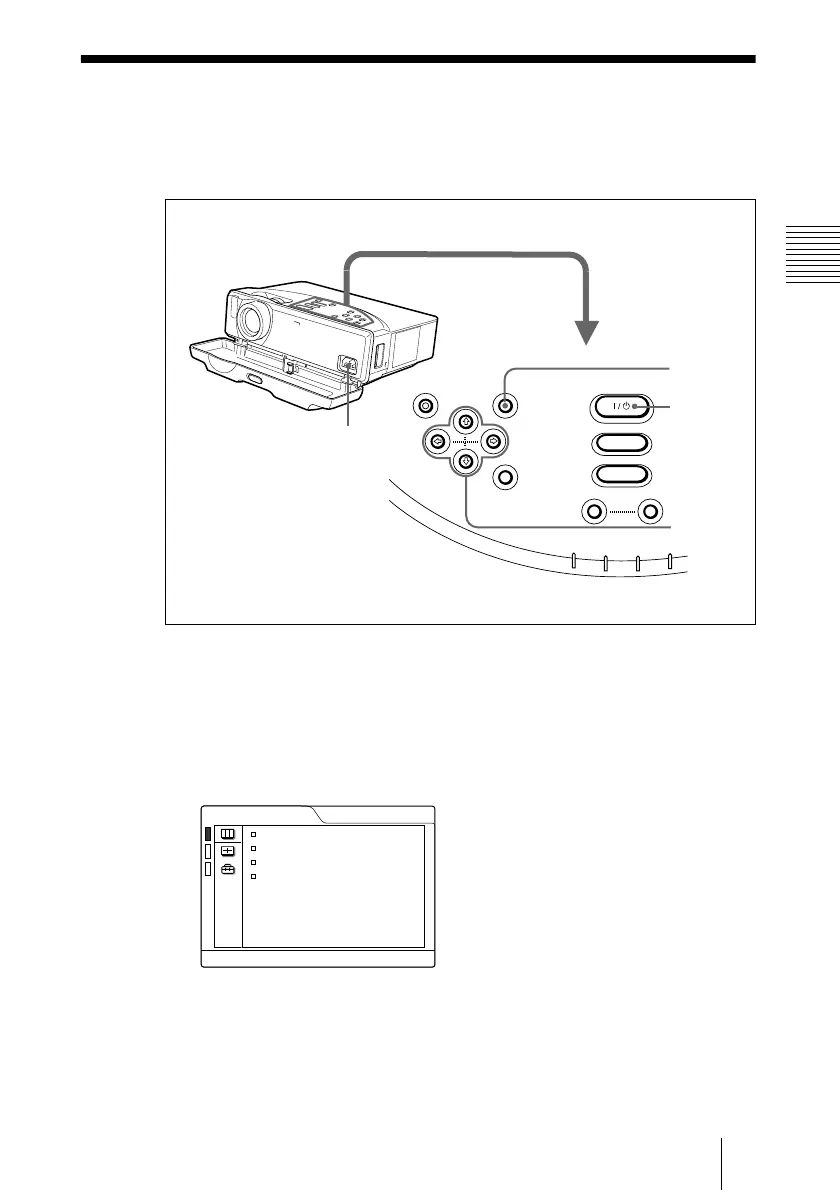
Open the front cover, then plug the AC power cord into a wall outlet.
2
Press the
I
/
1
key to turn on the projector.
3
Press the MENU key.
The menu appears.
The menu presently selected is shown as a yellow button.
1
RESET MENU
POWER
INPUT
APA
VOLUME
POWER SAVING
ON/STANDBY
F
A
N
/T
E
M
P
LAMP/COVER
ENTER
3
2
4,5,6
+
–
80
50
PICTURE CTRL
CONTRAST:
BRIGHT:
GAMMA MODE: GRAPHICS
COLOR TEMP: HIGH
INPUT-A



 To Next Page