VPL-CS1
4-074-278-11 (1)
C:\MUN\Data\FM\VPL-CS1\VPL-
CS1.nouhindata\407427811VPLCS1WW\02GB-
VPLCS1WW\04SET.fm
masterpage:Left
17
GB
Connecting the Projector
Setting Up and Projecting
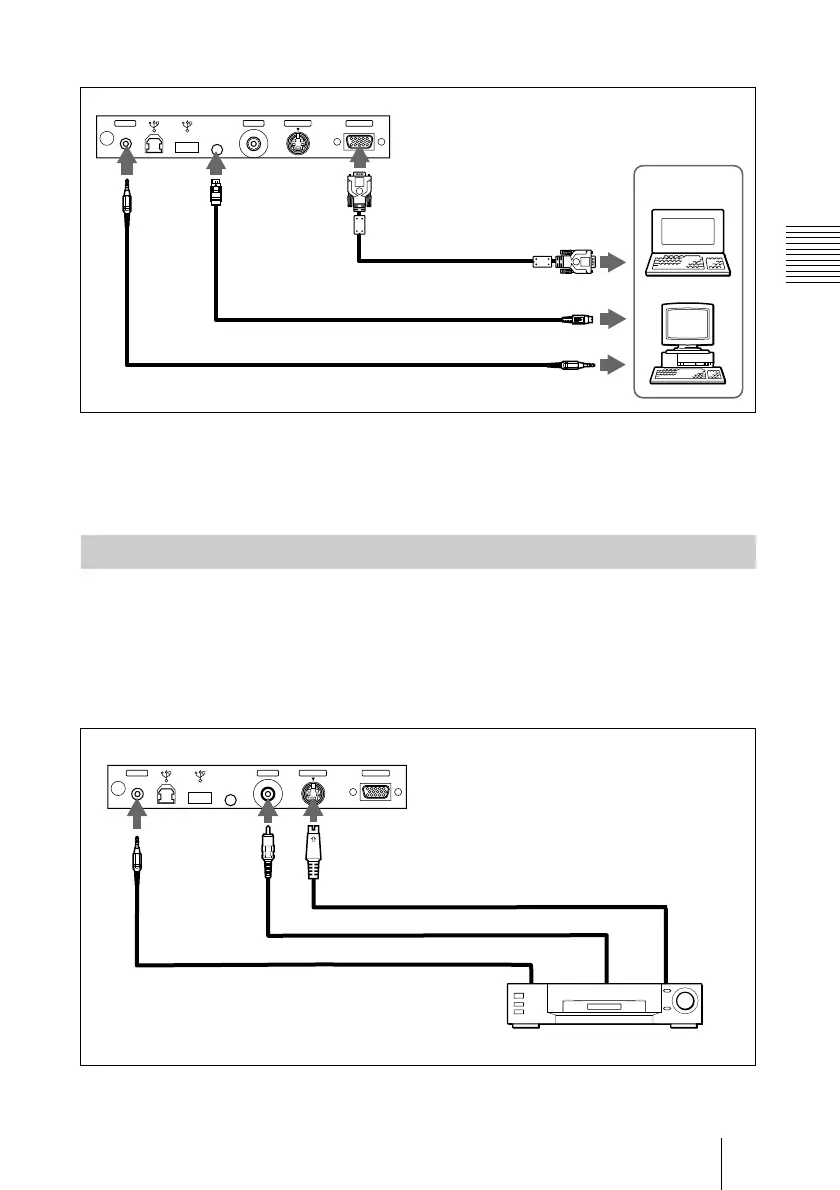
When you use a PS/2 mouse port
To connect a Macintosh computer
Use an ADP-20 signal adapter (not supplied). In this case, however, you can
not control the mouse of the computer by the Remote Commander.
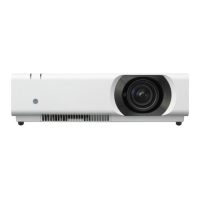
This section describes how to connect the projector to a VCR and 15k RGB/
component equipment.
For more information, refer to the instruction manuals of the equipment you
are connecting.
To connect a VCR
1)
When both the S VIDEO and VIDEO jacks are connected to the external equipment,
the input signal from the S VIDEO jack is selected.
Connecting with a VCR or 15k RGB/Component Equipment
INPUT AS VIDEOVIDEOMOUSEAUDIO
to audio output
Rear side
HD D-sub
15-pin cable
(supplied)
to mouse port (PS/2)
PS/2 Mouse cable (supplied)
Stereo audio connecting cable (not supplied)
to monitor output
Computer
INPUT AS VIDEOVIDEOMOUSEAUDIO
Video cable (not supplied)
Stereo audio
connecting
cable (not
supplied)
S-Video cable (not supplied)
VCR
to video
output
1)
to S video
output
1)
Rear side
to audio
output



 To Next Page