15
Selecting the Menu Language
Convenient Functions
B Convenient Functions
Selecting the Menu
Language
You can select one of fifteen languages for
displaying the menu and other on-screen
displays. The factory setting is English.
To change the menu language, proceed as
follows:
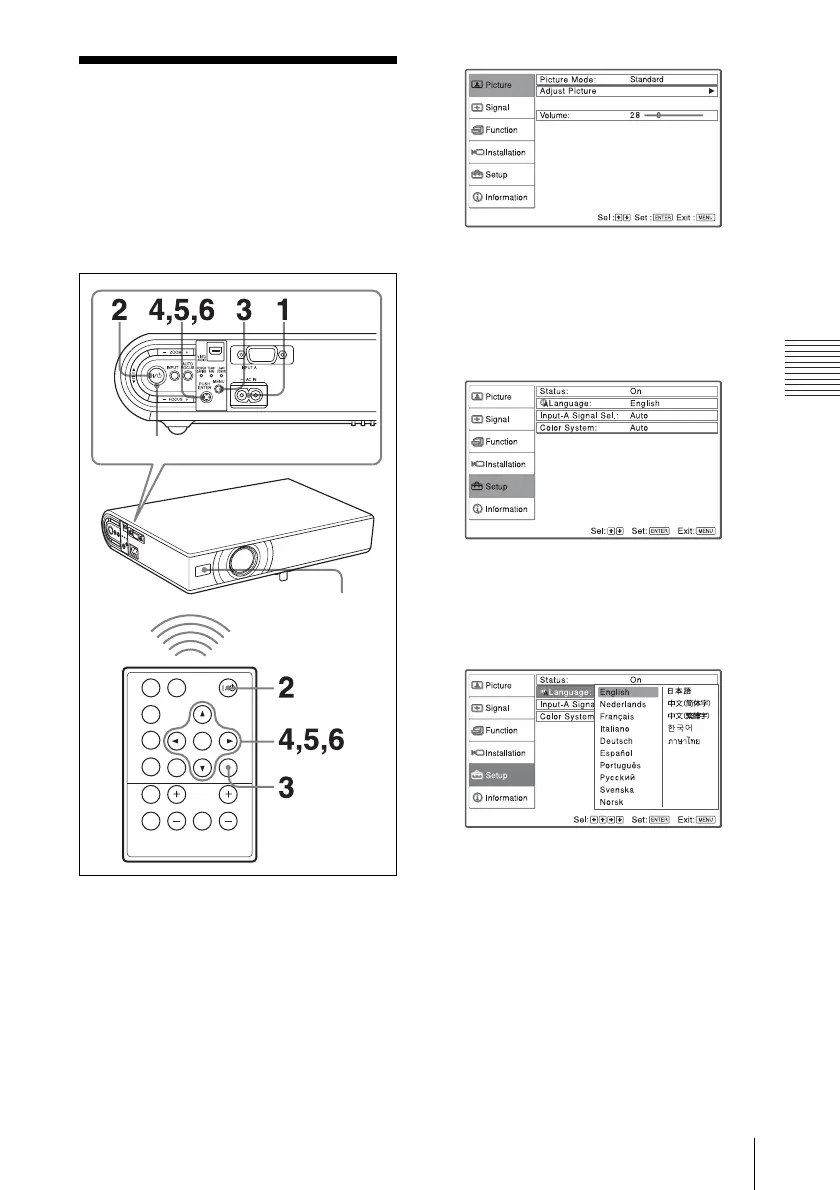
1 Plug the AC power cord into a wall
outlet.
2 Press the ?/1 key to turn on the
projector.
3 Press the MENU key.
The menu appears.
The menu currently selected is shown as
a yellow button.
4 Press the v or V key to select the
Setup menu, then press the
B or
ENTER key.
The selected menu appears.
5 Press the v or V key to select
“Language,” then press the
B or
ENTER key.
6 Press the v, V, b or B key to select a
language, then press the ENTER key.
The menu changes to the selected
language.
To clear the menu
Press the MENU key.
The menu disappears automatically if a key
is not pressed for one minute.
APA
FREEZE
KEY
STONE
/TILT
LENS
AUTO
FOCUS
PIC
MUTING
AUDI O
MUTING
INPUT
ENTER
RESET
D ZOOM VOLUME
MENU
Front remote
control detector
ON/STANDBY indicator



 To Next Page