25
The Function Menu
Adjustments and Settings Using a Menu
• Press the APA key when the full image is displayed on the screen. If the projected image includes
a black portion around it, the APA function will not work properly and some parts of the image
may not be displayed on the screen.
• You can cancel the adjustment by pressing the APA key again while “Adjusting” appears on the
screen.
• The picture may not be adjusted properly depending on the type of input signal.
• Adjust the “Dot Phase,” “H Size,” and “Shift” items on the Signal menu when you adjust the
picture manually.
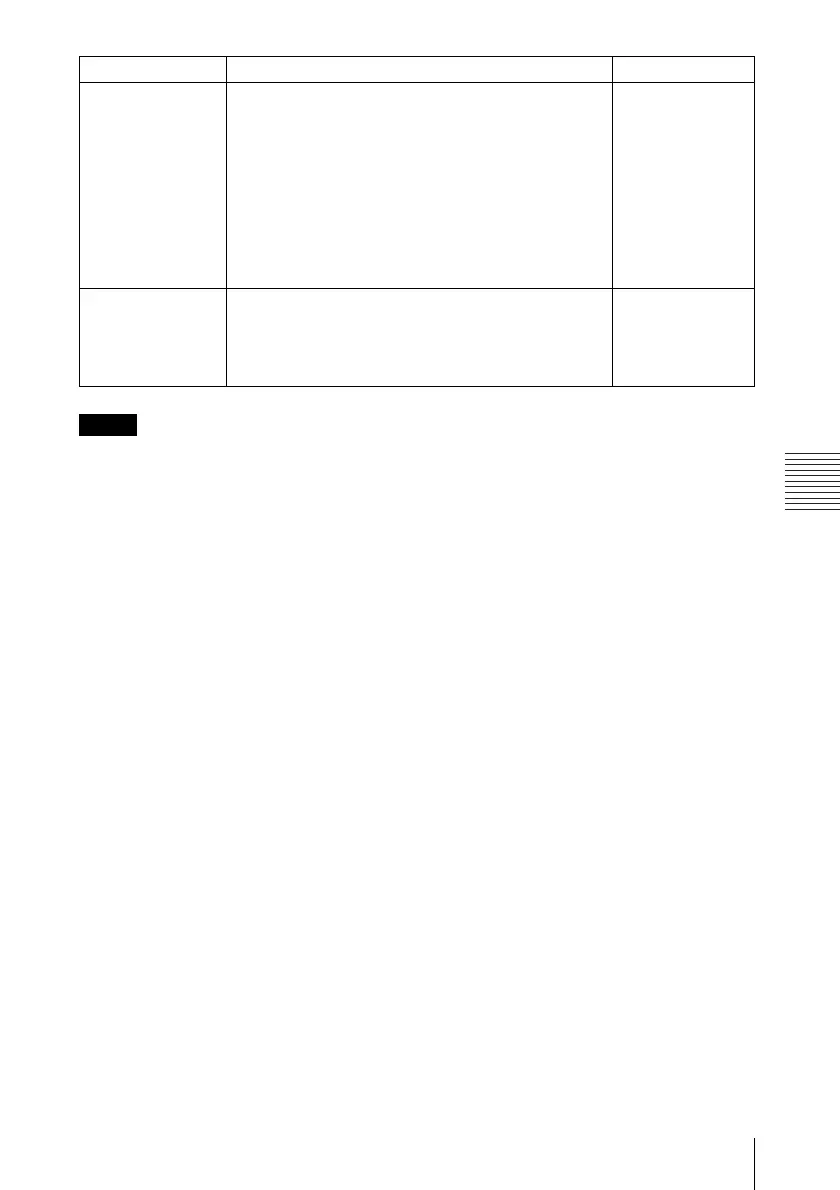
Panel Key Lock Locks all the control panel keys on the side panel of
the projector so that the projector can be operated only
with the Remote Commander.
To lock the control panel keys, set to “On.”
When it is set to “On,” keeping the ?/1 key on the
control panel pressed for 10 seconds turns the projector
on when it is in standby mode, and turns the projector
to standby mode when the power is on. If you press
and hold the MENU key for about 10 seconds when
the power is on, the lock will be released and “Panel
Key Lock” is automatically set to “Off.”
Off
Security Lock Turns on the projector’s security lock function.
When set to “On,” turns on the security lock function,
which locks the projector once a password has been
set.
For details, see “Security Lock” on page 16.
Off
Setting items Functions Initial setting
Notes



 To Next Page