9
FR
Configuration
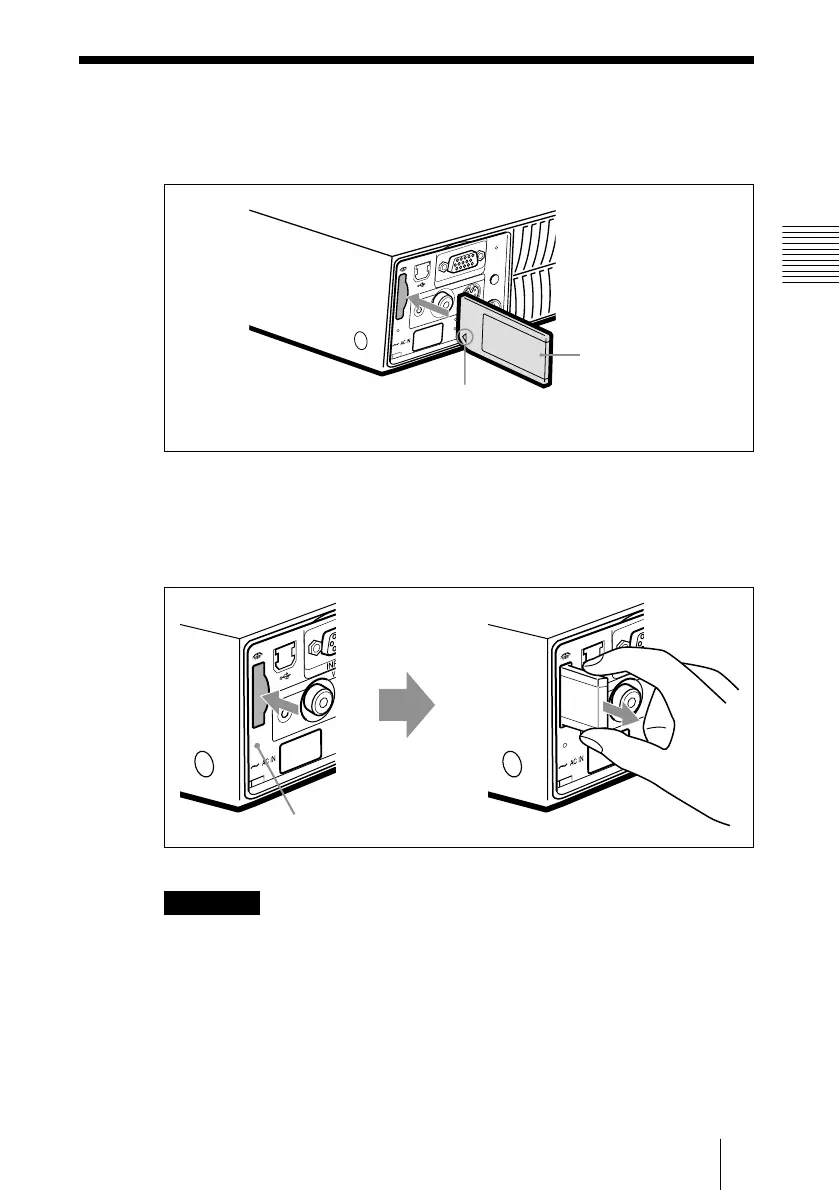
Utilisation du Memory Stick
Insérez le Memory Stick dans l’emplacement prévu à cet effet sur le côté
du projecteur.
Pour retirer le Memory Stick
Si le témoin d’accès est éteint, appuyez sur le Memory Stick et retirez votre
main. Lorsque le dispositif de verrouillage se débloque, retirez le Memory
Stick.
Remarque
Insérez le Memory Stick avec la flèche en direction de l’emplacement
Memory Stick.
Utilisation du Memory Stick
A
U
D
IO VIDEO
POWER
SAVIN
G
MENU
PUSH
ENTER
S VIDEO
TEMP/FAN
LAMP/COV
E
R
INPUT A
AC
C
ES
S
P
R
O
Memory Stick
Insérez le Memory Stick dans le sens indiqué par la
flèche et poussez jusqu’au déclic.
A
U
D
IO
A
U
D
IO
AC
C
E
S
S
P
R
O
AC
C
E
S
S
P
RO
Témoin d’accès
B
Configuration



 To Next Page