GB
8
B
Setting Up
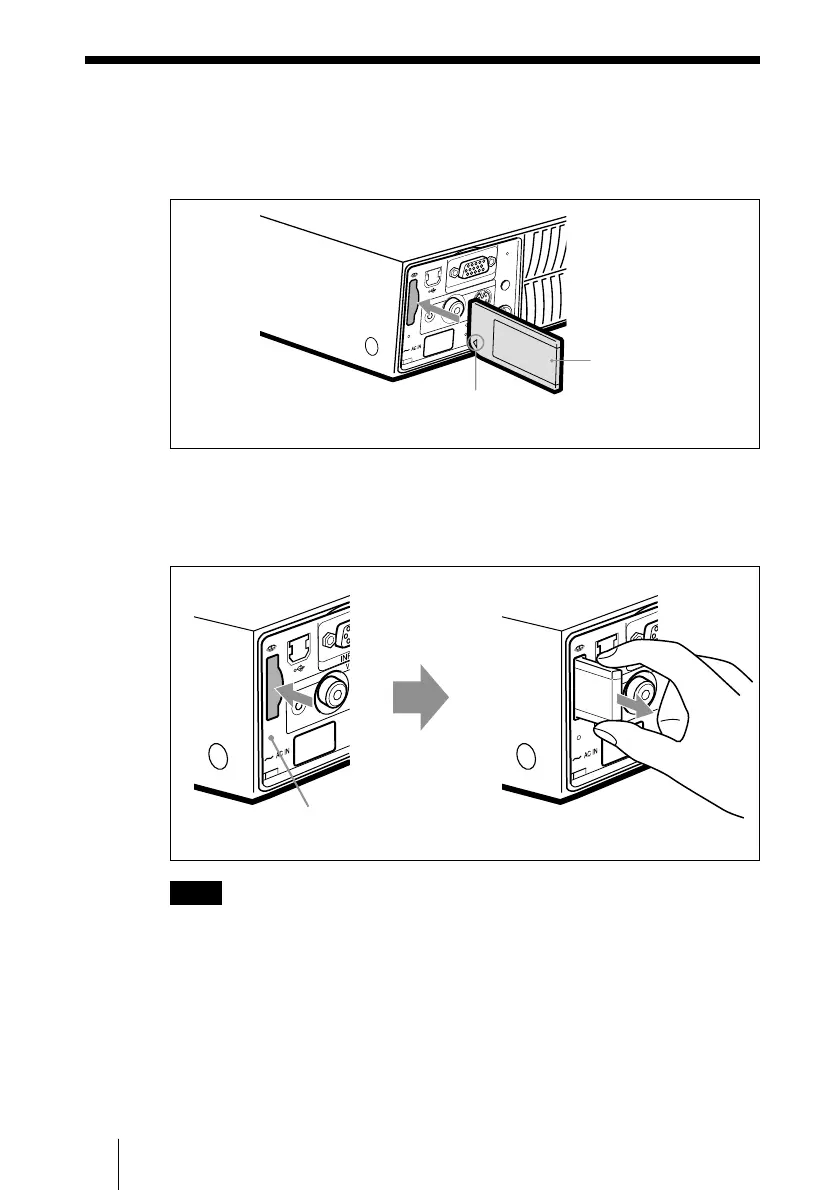
Using the Memory Stick
Insert the Memory Stick into the Memory Stick slot on the side of the
projector.
To remove the Memory Stick
When the access lamp is turned off, press the Memory Stick and remove
your hand. As the lock is released, remove the Memory Stick.
Note
Insert the Memory Stick with the arrow mark pointing toward the
Memory Stick slot.
Using the Memory Stick
A
U
D
IO VIDEO
POWER
SAVIN
G
MENU
PUSH
ENTER
S VIDEO
TEMP/FAN
LAMP/COV
E
R
INPUT A
AC
C
ES
S
P
R
O
Memory Stick
Insert the Memory Stick in the direction of
the arrow until it clicks.
A
U
D
IO
A
U
D
IO
AC
C
E
S
S
P
R
O
AC
C
E
S
S
P
RO
Access lamp



 To Next Page