EasyManua.ls Logo

Sony VPL-ES1 - User Manual

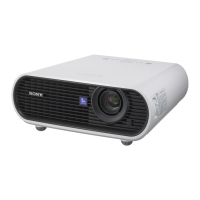
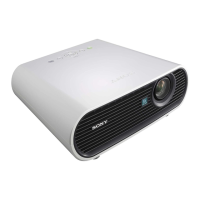
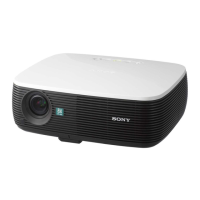
Sony VPL-ES1
156 pages
Print Icon
To Next Page IconTo Next Page
Loading...
Data Projector VPL-ES1
© 2004 Sony Corporation
4-098-859-41 (1)
Data Projector
GB
FR
ES
Operating Instructions
Mode d’emploi
Manual de instrucciones
VPL-ES1

Table of Contents

Other manuals for Sony VPL-ES1

Questions and Answers

  • C
    Caroline BrownAug 21, 2025
    What to do if my Sony VPL-ES1 power is not turning on?
    • B
      Brenda AlexanderAug 21, 2025
      If your Sony Projector is not turning on, wait for about 90 seconds before turning it on again if the power was recently turned off and on. Also, ensure that the lamp cover is securely closed.
  • J
    jchaseSep 3, 2025
    How to reduce noise in the picture on my Sony VPL-ES1?
    • M
      Michelle CochranSep 3, 2025
      If the picture on your Sony Projector is noisy, change the desktop pattern on the connected computer.
  • L
    latoyasandersSep 1, 2025
    How to fix picture flickering on Sony VPL-ES1 Projector?
    • L
      Leslie PatelSep 1, 2025
      If the picture flickers on your Sony Projector, adjust the Dot Phase in the INPUT SETTING menu.
  • H
    Heather TownsendAug 30, 2025
    What does it mean when the LAMP/COVER indicator lights up on my Sony Projector?
    • L
      lori88Aug 31, 2025
      If the LAMP/COVER indicator lights up on your Sony Projector, it could mean the lamp has reached the end of its life and needs to be replaced. It could also indicate that the lamp is overheating; in that case, wait 90 seconds for it to cool down before turning the power back on.
  • A
    Alexander SmithAug 29, 2025
    Why is my Sony Projector Remote Commander not working?
    • T
      tanneraprilAug 29, 2025
      If the Remote Commander for your Sony Projector is not working, replace the batteries with new ones.
  • A
    Amanda DonaldsonAug 28, 2025
    How to troubleshoot no sound on Sony VPL-ES1 Projector?
    • M
      Michael SmithAug 28, 2025
      If there is no sound coming from your Sony Projector, check all cable connections to ensure they are correct. Make sure you are using a no-resistance stereo audio cable. Finally, check and adjust the sound settings on the projector.
  • J
    Jeremy GreerAug 27, 2025
    How to fix no picture on Sony Projector?
    • J
      Jessica TaylorAug 27, 2025
      If there is no picture on your Sony Projector, ensure all cables are properly connected. If they are not, make the proper connections. Select the correct input source using the INPUT key. Also, ensure the computer signal is set to output only to an external monitor.
  • D
    Dr. Antonio Austin DDSAug 25, 2025
    How to adjust the image size on my Sony VPL-ES1 Projector if it extends beyond the screen?
    • X
      xlongAug 25, 2025
      If the image extends beyond the screen on your Sony Projector, and there are black edges around the image, display the full image on the screen and press the APA key. You can also adjust the Shift settings in the INPUT SETTING menu.
  • D
    Dr. Tracey BryanAug 23, 2025
    How to fix blurry picture on Sony VPL-ES1?
    • M
      Morgan AlvarezAug 23, 2025
      If the picture on your Sony Projector is not clear, adjust the focus. If condensation has occurred on the lens, leave the projector on for about two hours.

Summary

Overview

Precautions

Safety guidelines for operation, installation, and cleaning to prevent hazards and ensure optimal performance.

Notes on Installation

Guidelines on suitable and unsuitable installation locations and conditions to prevent malfunction or damage.

Features

Highlights key functionalities like high brightness, high resolution, intelligent auto-setup, and short focus lens.

Setting Up and Projecting

Installing the Projector

Provides a table guiding the optimal distance between the lens and the screen based on screen size.

Connecting the Projector

Instructions and illustrations for connecting the projector to various external devices like computers and VCRs.

Selecting the Menu Language

Step-by-step guide on how to change the menu and on-screen display language from the projector's settings.

Projecting

Instructions on turning on the projector, connecting equipment, and adjusting picture settings like input source, tilt, zoom, and focus.

Effective Tools for Your Presentation

Explains features like Digital Zoom and Freeze function for enhancing presentations.

Adjustments and Settings Using the Menu

Using the MENU

General guide on navigating the projector's on-screen menu system to make adjustments and settings.

The PICTURE SETTING Menu

Details on adjusting picture parameters like Picture Mode, Contrast, Brightness, Color, Hue, and Sharpness.

The INPUT SETTING Menu

Covers settings related to input signals, including aspect ratio (Wide Mode) and scan converter options.

Maintenance

Replacing the Lamp

Step-by-step instructions for safely replacing the projector lamp, including necessary precautions.

Cleaning the Air Filter

Guide on how to clean or replace the air filter to maintain optimal performance and prevent overheating.

Troubleshooting

A guide to diagnose and resolve common operational issues with power, picture, sound, and remote commander.

Warning Messages

Explains various warning messages displayed by the projector and their corresponding remedies.

Other

On the emergency mode

Instructions on how to manually operate the lens protector and tilt adjuster in emergency situations.

Specifications

Technical specifications of the projector, including optical, electrical, input/output, and general characteristics.

Sony VPL-ES1 Specifications

Projection System IconProjection System
projection system3 LCD panels, 1 lens projection system
projection lens1.2 times F2.2 to 2.4 f18.0 to 21.6mm
lamp185W UHP
Screen and Resolution IconScreen and Resolution
screen coverage40'' to 150''
light output1500 ANSI lm
resolution video600 TV lines
Throwing Distance IconThrowing Distance
40-inch throwing distance1.1 to 1.4 m
60-inch throwing distance1.7 to 2.1 m
80-inch throwing distance2.3 to 2.8 m
Power IconPower
power requirementsAC 100 to 240 V, 50/60 Hz
power consumption max250 W
standby power consumption4.6 W
Operating Environment IconOperating Environment
operating temperature0 to 35 degrees Celsius
operating humidity35% to 85%
heat dissipation853.1 BTU
Weight and Dimensions IconWeight and Dimensions
weight kgApprox. 2.8 kg
weight lbApprox. 6 lbs., 3 oz.
dimensions (WxHxD) mm295 x 78 x 238

Related product manuals