5
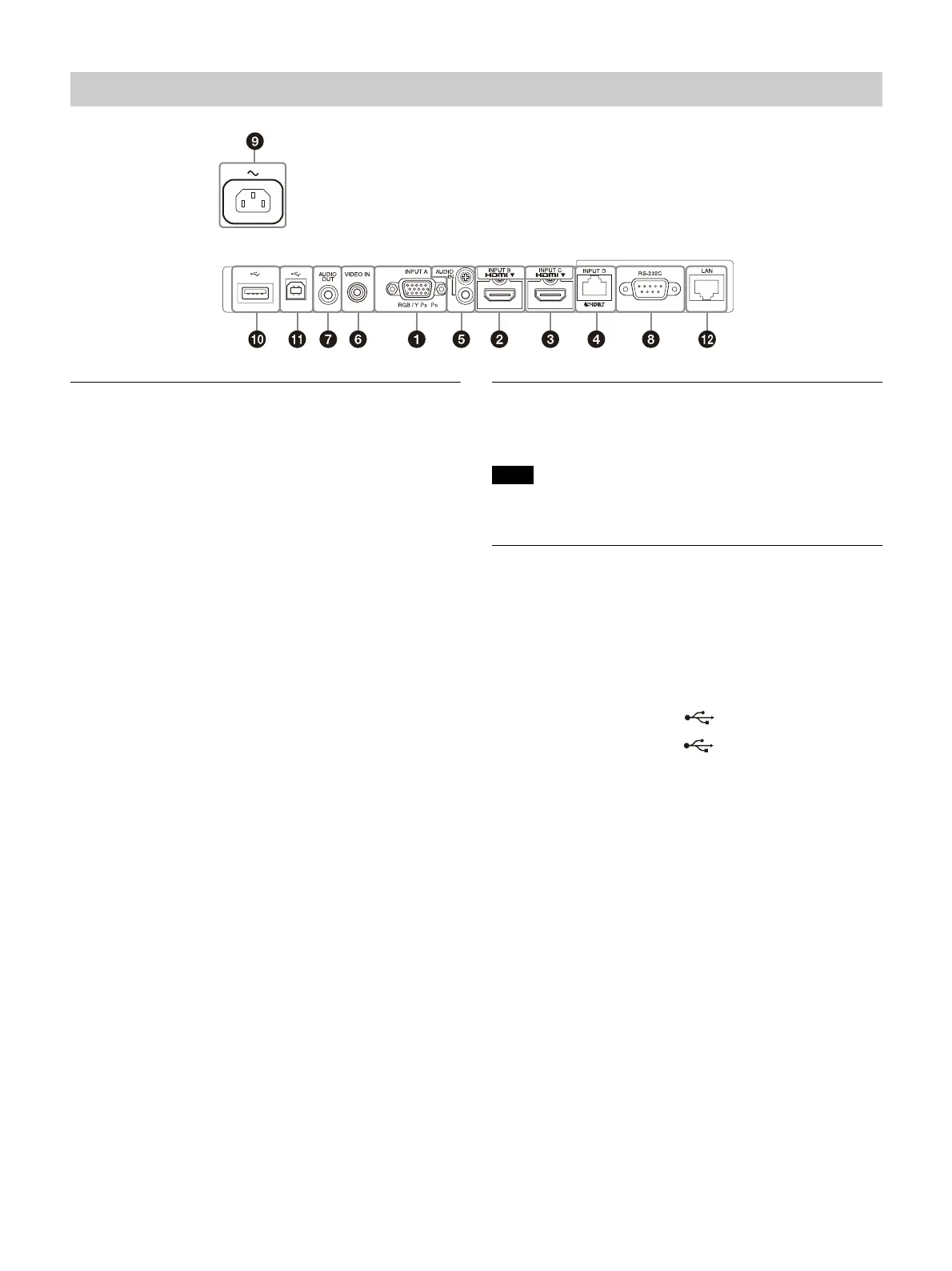
Input (page 8)
INPUT A
Video: RGB/YPBPR input terminal (RGB/YPBPR)
INPUT B
Video: HDMI input terminal (HDMI)
Audio: HDMI input terminal (HDMI)
INPUT C
Video: HDMI input terminal (HDMI)
Audio: HDMI input terminal (HDMI)
INPUT D
HDBaseT terminal
Use a straight CAT5e or CAT6 shielded LAN cable (not
supplied).
AUDIO (AUDIO IN)
Audio: Audio input terminal
VIDEO (VIDEO IN)
Video: Video input terminal
Output (page 13)
AUDIO (AUDIO OUT)
Audio: Audio output terminal
When the speaker setting is set to “Always On” and the
light is turned off, INPUT A is enabled.
Others
RS-232C terminal (RS-232C)
RS-232C compatible control terminal. Connects the
computer’s RS-232C terminal and the RS-232C cross
cables.
AC IN (~) socket
Connects the supplied AC power cord.
USB terminal (Type A) ( ) (page 9)
USB terminal (Type B) ( ) (page 43)
LAN terminal (page 9)
Terminals
Note



 To Next Page