8
Connecting the Projector
• Make sure all the equipment is powered off when connecting the projector.
• Use the proper cables for each connection.
• Insert the cable plugs firmly. Loose connections may reduce per
formance of picture signals or cause a malfunction. When
pulling out a cable, be sure to grip it by the plug, not the cable itself.
• For more information, refer also to the instruct
ion manuals of the equipment you are connecting.
• Use a no-resistance audio cable.
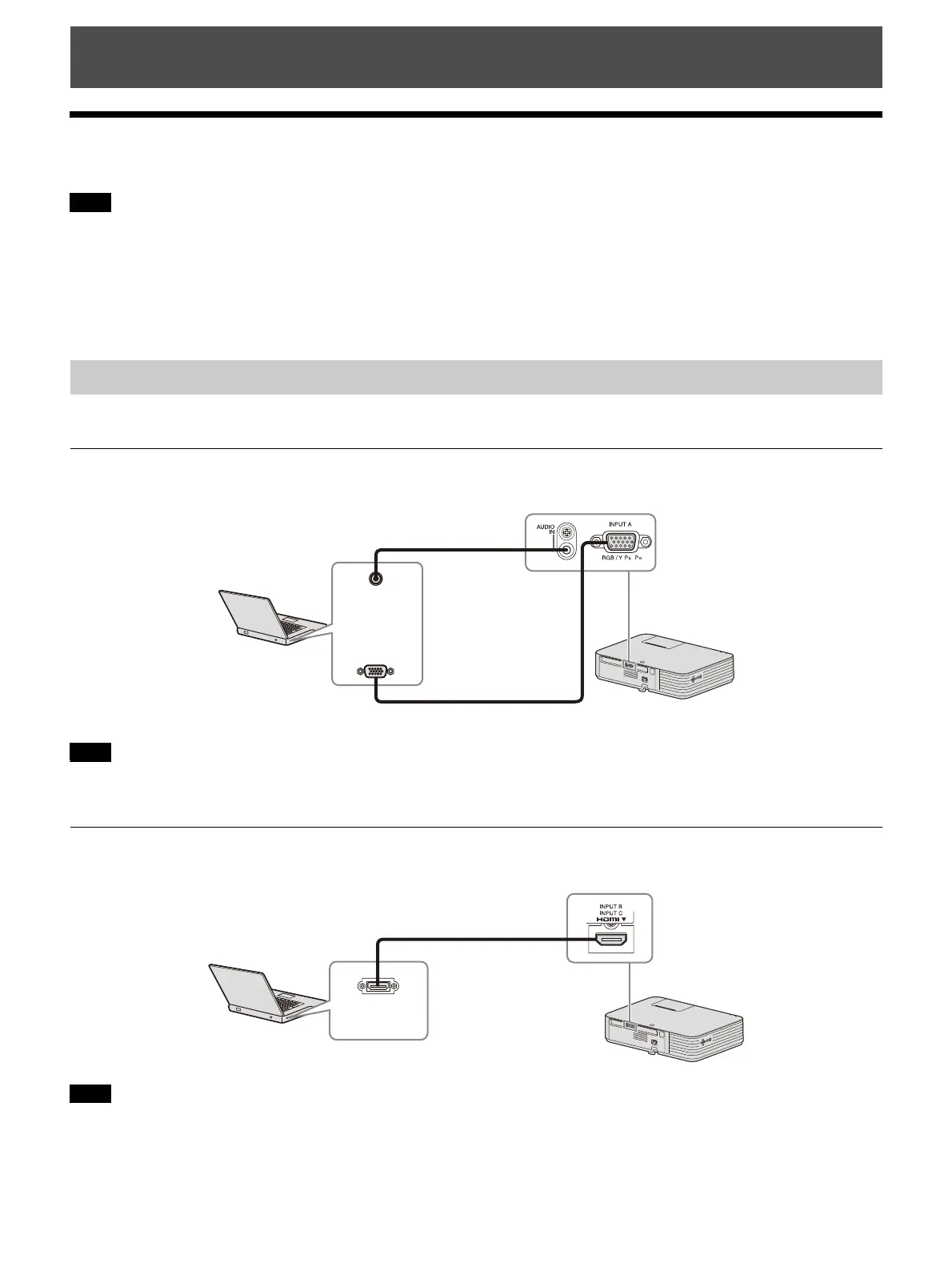
Connection with a computer is explained for each input signal.
INPUT A
For connecting a computer with an RGB output terminal.
In screen setting of your computer, it is recommended that you set the resolution of an external monitor
to 1,920 × 1,200 pixels.
INPUT B/INPUT C
For connecting a computer with an HDMI output terminal.
• Use HDMI-compatible equipment which has the HDMI Logo.
• Use a high speed HDMI cable(s) on which the cable type logo is specified. (Sony products are recommended.)
Preparation
Notes
Connecting a Computer
Note
Notes
RGB output
terminal
Audio output
terminal
Mini D-sub 15-pin cable (not supplied)
Computer
Audio cable (Stereo mini plug) (not supplied)
HDMI output
terminal
HDMI cable (not supplied)
Computer



 To Next Page