1-38
VPL-S900E, VPL-S900M, VPL-S900U
2
The IFB-X600E interface board is designed to be mounted on Sony
VPL-X600E/S600E LCD data projector so that composite video or S
video (Y/C) signals and audio signals from video equipment can be
input.
Mounting the IFB-X600E
Note
Before installing the board, make sure the following have been done:
• Turn off the power of the projector.
• Disconnect the projector power cable from the wall outlet.
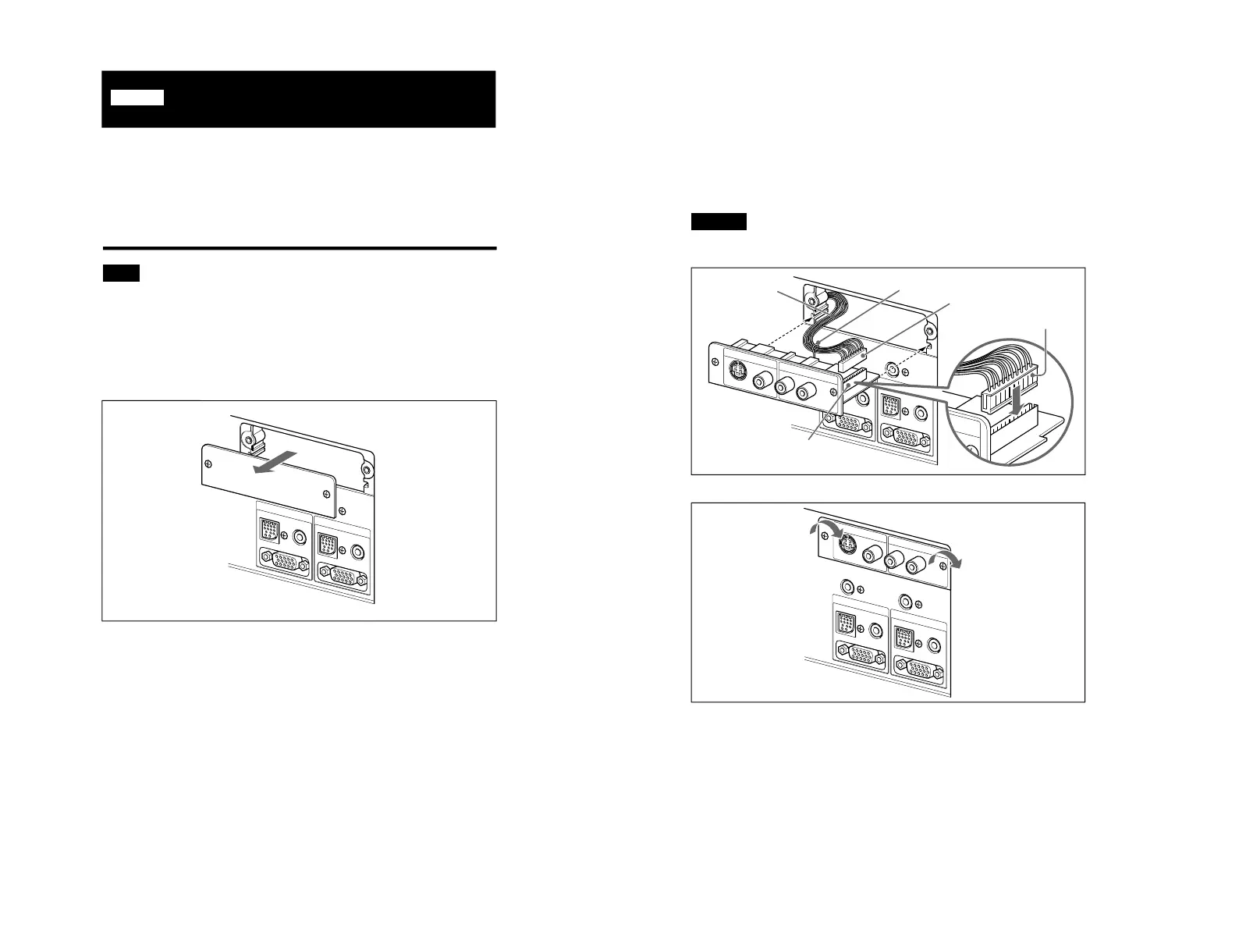
1 Remove the blind plate on the rear of the projector by
loosening the two screws with the supplied Philips
screwdriver.
English
3
2 Pull out the connector socket from the projector. Insert the
connector socket (set the uneven side on the right) into the
interface board connector plug. Gather the wires together and
place them in the hook of the interface board.
3
Insert the interface board by aligning it with the projector guides.
Caution
Make sure that the wire is not caught between the opening of the
projector and the board.
4 Tighten the two interface board screws.
Wire
Hook
Connector plug
Uneven side



 To Next Page