41
Projecting
Using the Supplied Software to Adjust the
Picture Quality (ImageDirector3)
By using the “ImageDirector3” (supplied as a CD-ROM), you can make the desired
gamma correction from a computer connected to the projector. Connect the REMOTE
connector of the projector with a computer and start-up “ImageDirector3” on the
computer.
For details on how to use the “ImageDirector3”, refer to the Help within the CD-ROM.
• You need to install the “ImageDirector3” on a computer beforehand.
• When connecting the REMOTE connector with a computer, connect while the power of
the computer and the projector is off.
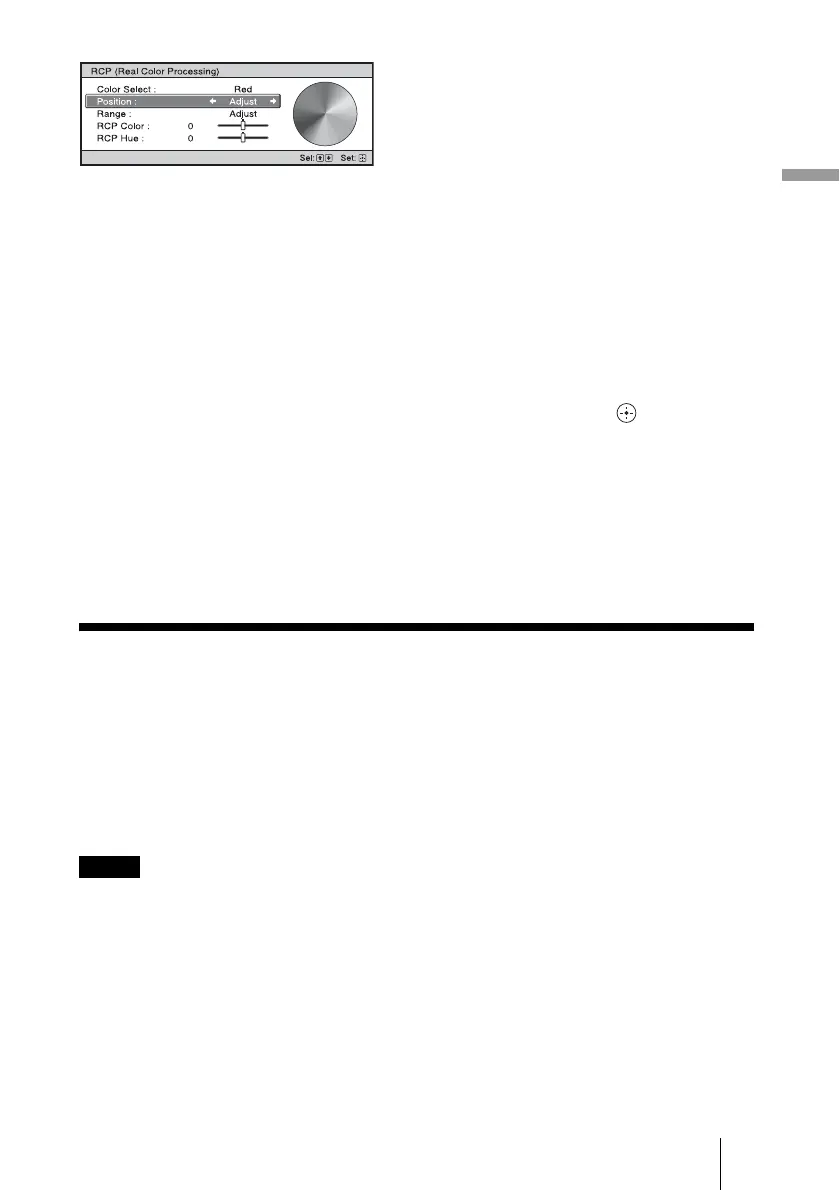
2 Press
M/m to select “Position” or
“Range,” and specify it more
delicate color position and color
range you want to adjust using
</,.
4 Adjust the color of the specified
portions.
Press
M/m to select “RCP Color” or
“RCP Hue,” then adjust the color or
hue of the portions selected in step 3 to
suit your taste using
</, while
watching the projected picture. The
picture is returned to normal color
during adjustment.
5 After the adjustment is
complete, press .
The RCP window disappears and the
picture of step 2 is appeared. Then
after a few seconds, normal picture is
restored.
Tip
There are some limitations on selection of
position and range.
Notes



 To Next Page