46
Picture Menu
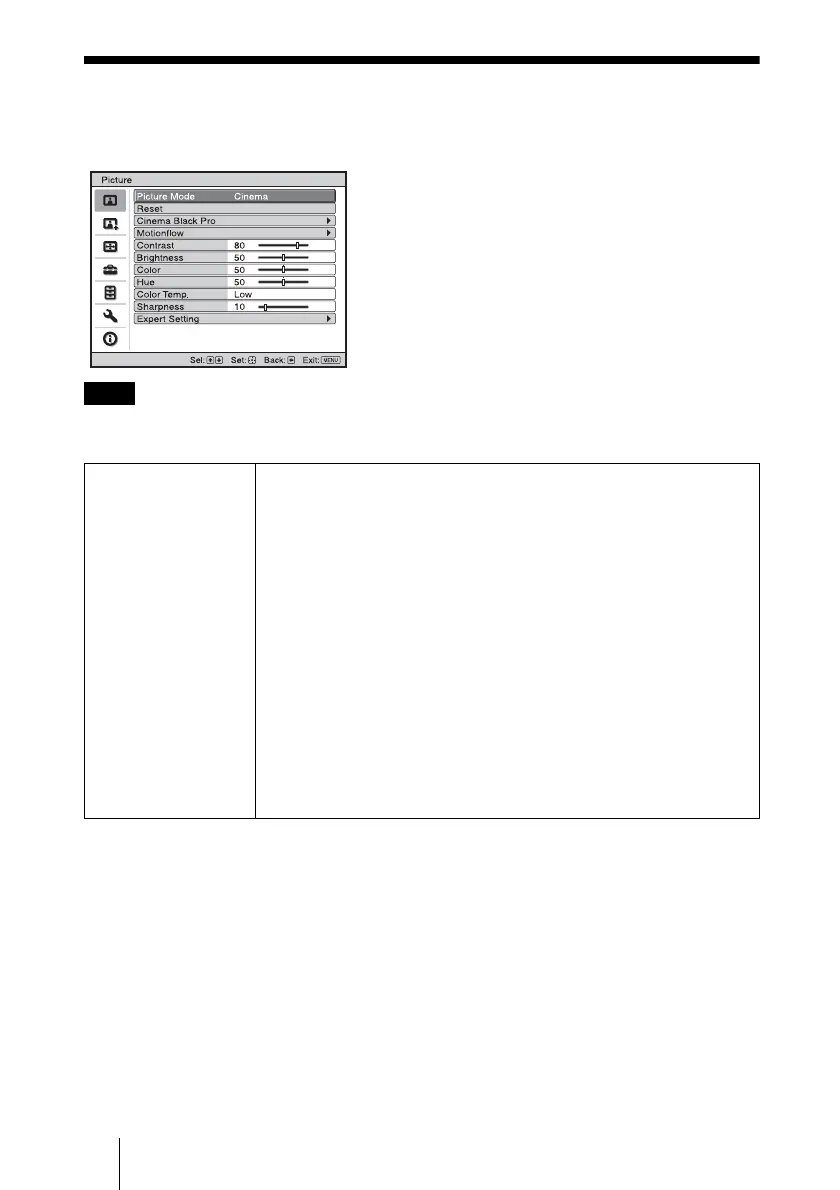
The Picture menu is used for adjusting the picture.
These items may not be available, depending on the type of input signal. For details, see
“Input Signals and Adjustable/Setting Items” (1 page 79).
Note
Picture Mode You can select the picture viewing mode that best suits the type of
picture or the environment.
Dynamic: Vivid picture quality that enhances sharpness and contrast of
the picture.
Standard: Standard picture quality that emphasizes on naturalness.
Cinema: Picture quality suited for watching movies.
User 1, User 2, User 3: You can adjust the quality of the picture to suit
your taste and then store the settings. Once the settings are stored, you
can view the picture with the adjusted picture quality by pressing the
PICTURE MODE button on the remote control.
To store the settings
1 Select User 1, User 2, or User 3.
2 Adjust the items you want in the menus.
Tip
You can also store the settings if the picture quality is adjusted in
“Dynamic”, “Standard” or “Cinema”. To reset everything to the factory
settings, select “Reset” from the menu.



 To Next Page