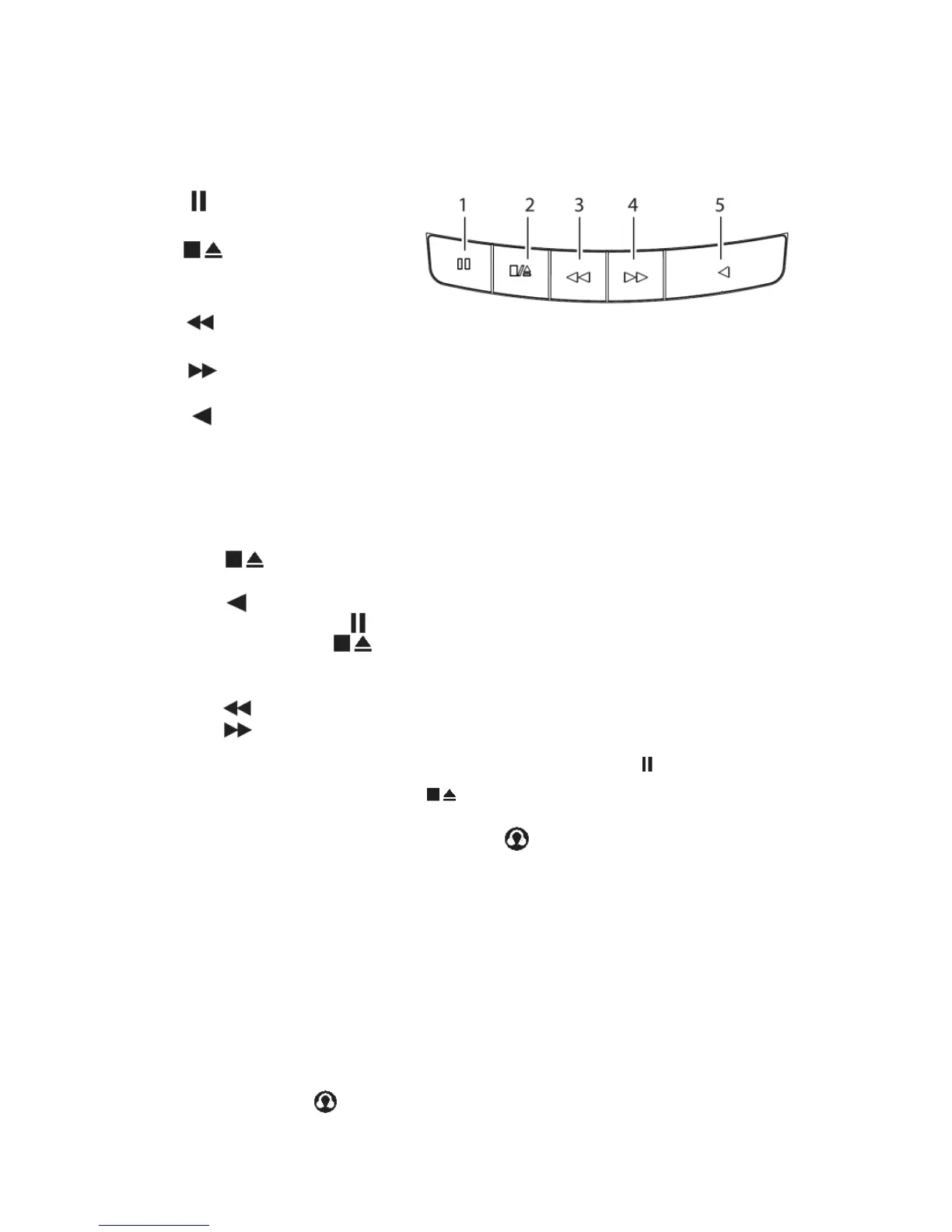
CASSETTE PLAY
1. PAUSE BUTTON
Pauses playback
2. STOP/ EJECT Button
Stops playback
Opens the cassette door
3. F.FED Button
Fast forwards playback
4. REW Button
Fast reverses playback
5. PLAY button
Plays back cassette
Cassette Playback
1. Set the
FUNCTION
selector to
TAPE position.
2.
Press
the
button to open the cassette compartment door, and insert
a cassette
and
close the cassette compartment
door.
3.
Press
the
button to start
playback.
4.
To pause playback, press
the
button. To resume, press the button
again.
5.
To stop the tape, press
the button.
Fast Forwarding/Rewinding
1.
Press
the
button until you reach your desired
passage.
2.
Press
the
button to stop fast
forwarding/rewinding.
•
The buttons automatically release
at
the end of
a
cassette and the unit
is
switched off (unless
the
button
is pressed.)
•
During fast forwarding/rewinding, the buttons will not be released
at
the end of
a
cassette.
To
switch off the unit, make sure
the cassette buttons are all released by pressing
the button.
AUX IN / HEADPHONES JACK
To play music from an external Audio
player
Connected to the
AUX IN
jack
• Set the function selector to
AUX
position.
•
Set the volume level on your Personal Audio player
up
To about half
level.
•
Set the volume on your audio system to the level
you
require. I
f
the volume will not set
high
enough you may need to increase the volume setting on the
player.
NOTE:
-
I
t is not
possible
to
navigate
the menu
system from your external
audio
device
with this player
if it is
connected via the AUX IN
jack.
There
is a
headphone
output jack
at
the side
of
the unit.
If
headphones
are
connected
to this socket for private listening, the speakers will cut out
automatically.


 To Next Page