BALANCED/ UNBALANCED INPUTS
The Tarantula has the ability to accept either a standard unbalanced RCA signal input, or a balanced
“Pro Audio” style input signals with the use of the Soundstream BLT Balanced Line Transmitter or some
other balanced line audio source. Before installing your system, you should decide upon which signal
type you wish to run.
The Tarantula’s signal input accepts a wide range of input level: from 300mV to 5.0V for both balanced
and unbalanced inputs. For the best S/N Ratio, we recommend that the input level control be set as far
down as possible (rotated counterclockwise), while maintaining an acceptable level of output.
Using the “Unbalanced” RCA Input
When using the unbalanced RCA input, the RIGHT channel input signal switch MUST be in the ‘UNBAL’
position. Also, when first installing the amplifier using this input configuration, we suggest that the left
channel input signal switch be in the ‘UNBAL’ position as well. If you experience alternator whine or
other installation noise with both switches in the ‘UNBAL’ position, try moving the LEFT channel
input signal switch to the ‘BAL’ position. This should remove any system noise due to the installation.
Using the “Balanced” Input
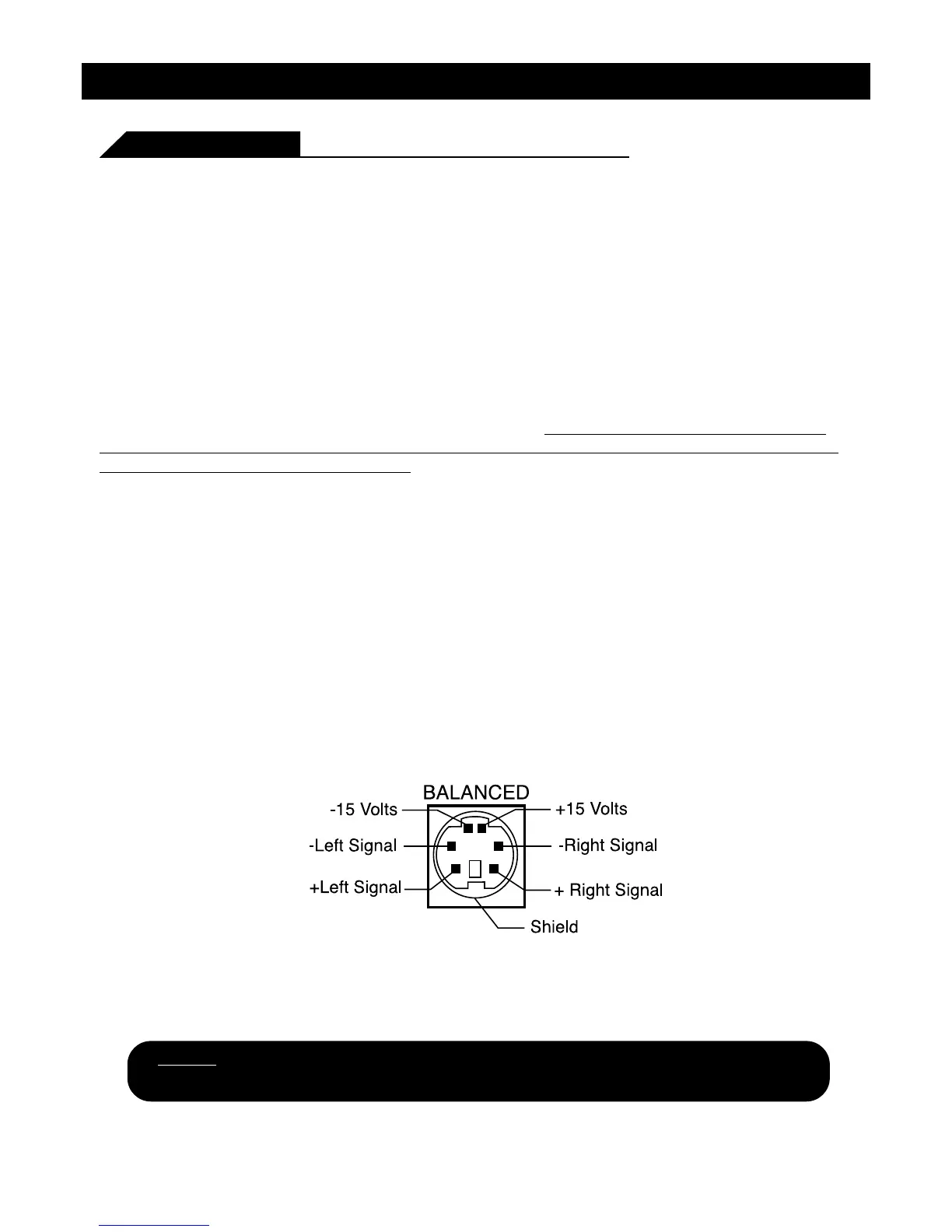
When using the balanced B-pin DIN audio input, the switches MUST be in the ‘BAL ’ position. Also, we
recommend that when using this input configuration, the input level control be set to the “minimum”
position (rotated counterclockwise). The system gain should then be adjusted on the BLT Balanced Line
Transmitter or other balanced line audio source.
Advantages of using “Balanced” Inputs
1. Improved Signal to Noise Ratio (SIN Ratio).
2. Excellent noise cancellation characteristics.
3. Immune to noise radiated in the car audio environment.
8
NOTE: The pin configuration shown in the diagram is the view looking into the
Balanced input jack on the amplifier.





 To Next Page