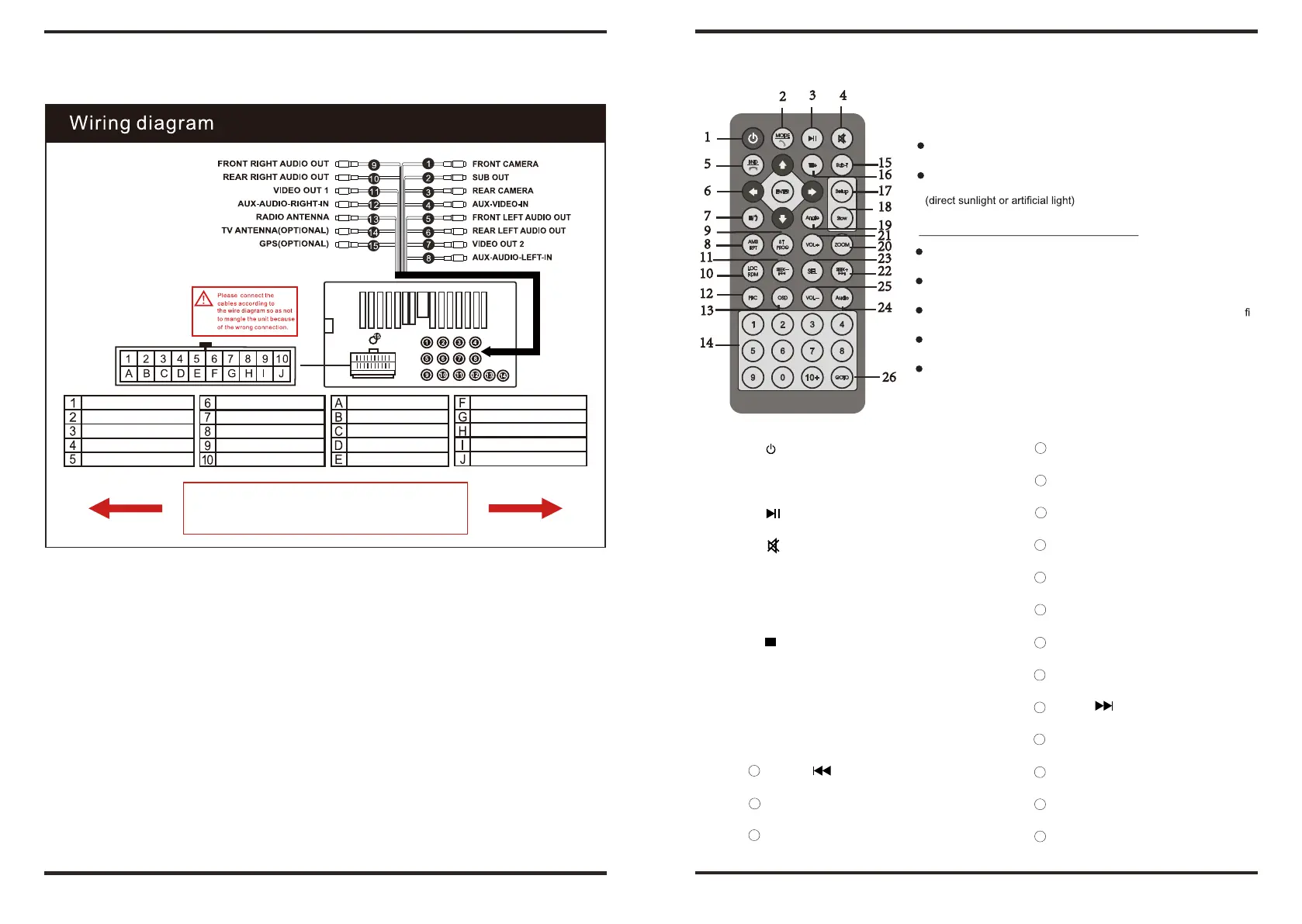
3. WIRING DIAGRAM 4 REMOTE CONTROL OPERATION.
2
3 4
Basic Operations
Installing the lithium coin battery (CR2025)
1
Aim the remote control directly at the remote sensor on the unit
5
15
16
DO NOT expose the remote sensor to strong light
6
17
18
7
19
9
WARNING: To prevent accidents and damage
21
8
20
11
23
DO NOT install any battery other than CR2025 or its equivalent
10
22
25
Store the battery in a safe place where children cannot reach
12
13
24
DO NOT charge, decompose, heat up, the battery or dispose it in a re.
14
DO NOT poke or pierce the battery with tweezers or similar tools.
26
Wrap the battery with tape for insulation when throwing it away
keeping it for future use.
Brown: KEY1
Pink: Braking
Brown & Black: KEY2
Yellow: Battery +
Orange: Illumination +
Grey & Black: Front Right Speaker -
Blue & Black: IR
Blue: Auto Antenna +
Red: Ignition 12V+, ACC
Grey: Front Right Speaker +
Can-Bus Only
Orange & Black: Reverse
White & Black: Front Left Speaker -
Purple: Rear Right Speaker +
Can-Bus Only
Green & Black: Rear Left Speaker -
① (power switch)
1
4
0-10+ (numbers)
White: Front Left Speaker +
Purple & Black: Rear Right Speaker -
Black: Ground
Green: Rear Left Speaker +
② MODE & Answer
1
5
SUB-T (subtitle)
Notice
Please remove the two screws which protect
③ (play/pause)
1
6
Title
the loader of the DVD player before using!
④ (mute)
1
7
Setup
⑤ BND/SYS (band/system) & Hang up
1
8
Slow
1.Brown: KEY1
A.Brown & Black: KEY2
2.Orange: Illumination +
B.Blue & Black: IR
⑥ up/down/left/right/ENTER
1
9
Angle
3.Red: Ignition 12V ACC
C.Can-Bus Only
⑦ (stop)
2
0
Zoom
4.White & Black: Front Left Speaker - D.Can-Bus Only
⑧ AMS/RPT (auto scan memory/repeat)
2
1
VOL+ (volume up)
5.White: Front Left Speaker +
E.Black: Ground
⑨ ST/PROG (stereo/program)
2
2
SEEK+/ (scan+/next track)
6.Pink: Parking
F.Yellow: Battery +
⑩ LOC/RDM (long/short range switch/random)
2
3
SEL(acoustic characteristic)
7.Grey & Black: Front Right Speaker -
G.Blue: Auto Antenna
11 SEEK- / (scan-/last track)
2
4
Audio (dialogue)
8.Grey: Front Right Speaker +
H.Orange & Black: Reverse
12 PBC (menu)
2
5
VOL- (volume down)
9.Purple: Rear Right Speaker +
I.Green & Black: Rear Left Speaker -
10.Purple & Black: Rear Right Speaker -
J.Green: Rear Left Speaker +
13 OSD (on screen display)
2
6
GOTO (play time setup)
3 4













 To Next Page