6. Release button
Press to detach and release the front panel. When the unit was released, it will switch off
automatically after a few second.
Detach/Attach
the
Panel: Press REL button and pull out the
panel towards yourself to release the panel. To attach it, press the control panel into the main
unit until the "click" sound is heard.
7. SD/MMC CARD slot
SD/MMC
card slot, for Multimedia playback files only. Insert a SD/MMC CARD into this slot and
the unit will automatically start reading and playback the card.
* Supported Music File Format:
MP3, WMA Files.
8. AV-in Jack
Put the AV plug into the AV-IN jack which was marked on front panel.
9. USB slot
10. TFT display
11. RESET button
Press it with a thin, sharp object. The device will then be reset to factory default settings.
12. Anti-Theft LED flash
13. DISC slot
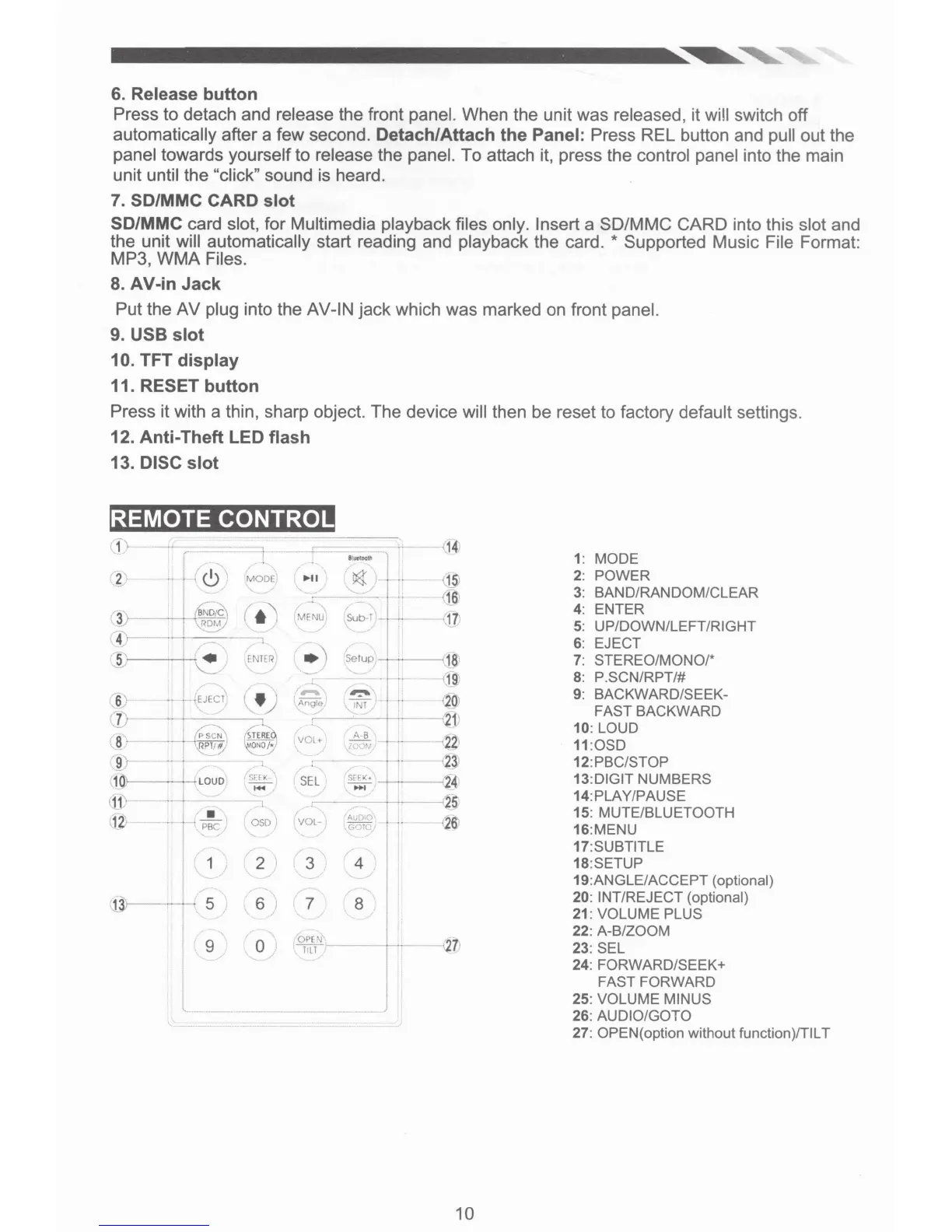
REMOTE CONTROL
f\
I
~l
-
---+-
l
;-
14
.
.,
...
_
1: MODE
(
~
\
·•
r
'·
<.!>
'
MODE'
....
~r
\
1$l
2: POWER
/ I
(
Hi
•
3: BAND/RANDOM/CLEAR
(•)
::-
~b-
0
+-
3j
--~
MENU
(
11
4: ENTER
'
ROM
5: UP/DOWN/LEFT/RIGHT
4
_.,
I
~
;.
;
6: EJECT
'
j;
I/
..
)
EN
T
ER
'S
e
tup
18
'
7:
STEREO/MONO/*
I
\.:
_
r_
-·
..r
1g
8: P.SCN/RPT/#
I
"
\
-
r
-..,
\
9: BACKWARD/SEEK-
'6;
·•
• JEJECI)
~ng1e
IN!
/
I
<
20
1
FAST BACKWARD
.7
!
21
;
10: LOUD
(8
>-
VOl+
.l!JL
-~
~t
11
:
0SD
'~/
9!
•
1
2l
12:PBC/STOP
3~
LOUD
S[(K
SEL
SEEK•
-
24
13:DIGIT NUMBERS
...
........-
t
11
'>
l
r-----
-
25
14:PLAY/PAUSE
1_,
~
•
f
050)
I
Au[),O\
'
26:
15: MUTE/BLUETOOTH
..
J
PBC
I VOL-
1
\GrTO/
16:MENU
17:SUBTITLE
'
18:SETUP
1
2
3
4
19:ANGLE/ACCEPT (optional)
.....
5
6 7 8
20: INT/REJECT (optional)
21: VOLUME PLUS
22: A-B/ZOOM
9 0
OP
['l
1·
23: SEL
HI
/
24: FORWARD/SEEK+
I
FAST FORWARD
I
L
______
25: VOLUME MINUS
---
26: AUDIO/GOTO
27: OPEN( option without function)ITIL T
10













 To Next Page