+ DISC/USB/SD/MMC INTERFACE OPERATION
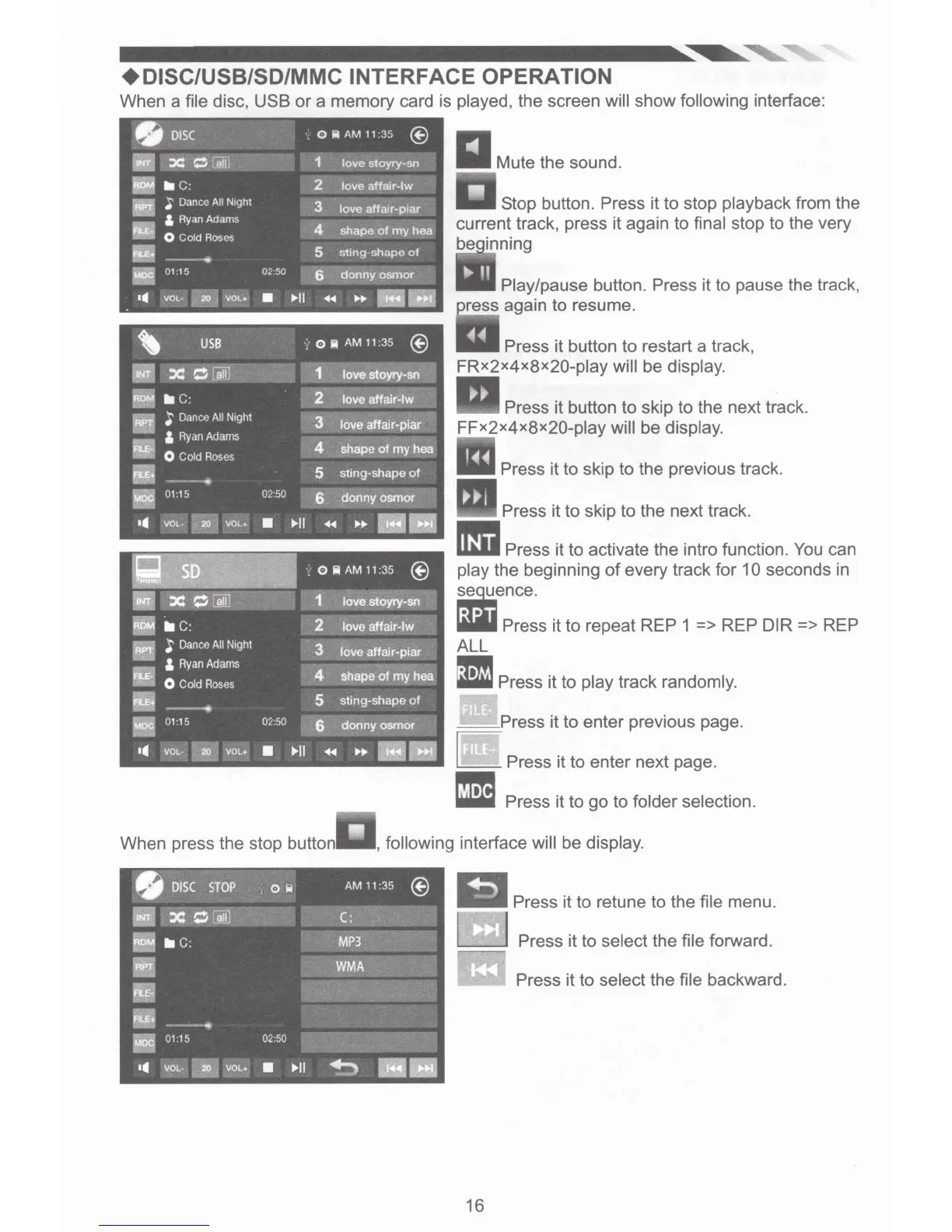
When a file disc, USB
or
a memory card is played, the screen will show following interface:
When press the stop button
Mute the sound.
Stop button. Press it to stop playback from the
current track, press it again
to
final stop to the very
be
Play/pause button. Press it to pause the track,
ress again to resume.
Press it button to restart a track,
FRx2x4x8x20-play
will be display.
Press it button to skip to the next track.
FFx2x4x8x20-play
will be display.
Press it
to
skip
to
the previous track.
Press it to skip to the next track.
~~~Press
it to activate the intro function.
You
can
play the beginning
of
every track for 10 seconds in
~ence.
lilill
Press it to repeat REP 1 => REP DIR => REP
ALL
1!1!11
~
Press it to play track randomly.
__
Press it
to
enter previous page.
L Press it to enter next page .
• Press it to
go
to folder selection.
, following interface will be display.
Press it to retune to the file menu.
@J
Press it
to
select the file forward.
Press it
to
select the file backward.
16













 To Next Page