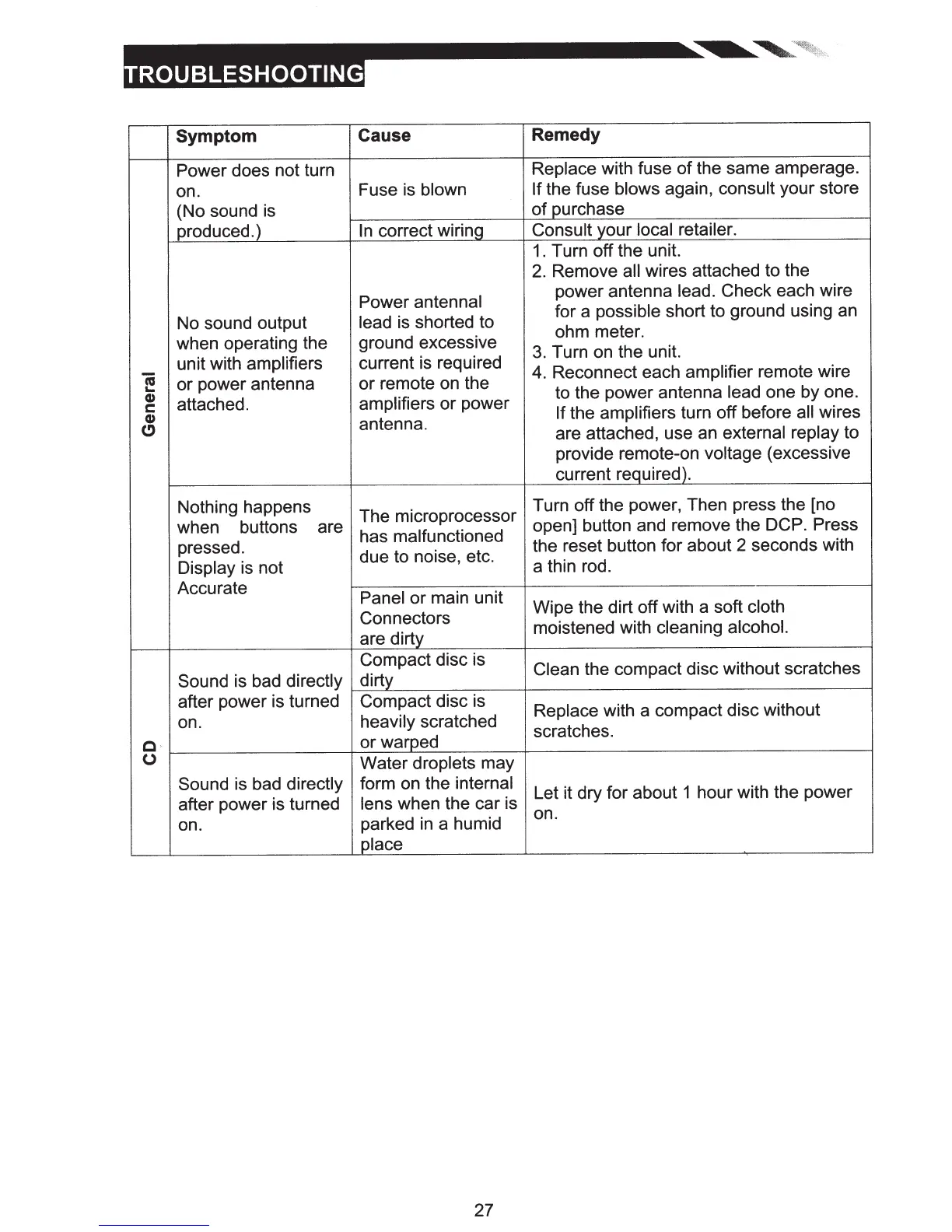
Symptom Cause Remedy
Power does not turn
Replace with fuse
of
the same amperage.
on.
Fuse
is
blown
If
the fuse blows again, consult your store
(No sound
is
of purchase
produced.)
In
correct wiring
Consult your local
retailer.
1.
Turn off the unit.
2.
Remove all
wires attached to the
Power antenna!
power antenna lead. Check each wire
No sound output
lead is shorted to
for a possible short to ground using
an
ohm meter.
when operating the ground excessive
3.
Turn
on
the unit.
Ci
unit with amplifiers current is required
4.
Reconnect each amplifier remote wire
...
or power antenna or remote
on
the
to the power antenna
lead
one by one.
Cl)
attached.
amplifiers or power
s:::
If
the amplifiers turn off before all
wires
Cl)
antenna.
C)
are attached, use
an
external replay to
provide remote-on voltage (excessive
current required).
Nothing happens
The microprocessor
Turn off the power, Then press the [no
when buttons are
has malfunctioned
open] button and remove the DCP. Press
pressed.
due to noise, etc.
the reset button for about 2 seconds with
Display is not
a thin rod.
Accurate
Panel or main unit
Connectors
Wipe the dirt off with a soft cloth
are dirty
moistened with cleaning alcohol.
Compact disc is
Clean
the compact disc without scratches
Sound is bad directly
dirty
after power is turned
Compact disc
is
Replace with a compact disc without
on.
heavily scratched
scratches.
C ·
or warped
0
Water droplets may
Sound
is
bad directly form on the internal
Let it dry for about 1 hour with the power
after power is turned
lens
when the car is
parked
in
a humid
on.
on.
place
27













 To Next Page