1 2 3 4 5
6 7
arlttit
,
•cj;
,
1€
I
"----./
10
v
11
12
13
[
J
I
I
I
I
r-r·-·t
RESET
[
lfl
n
J
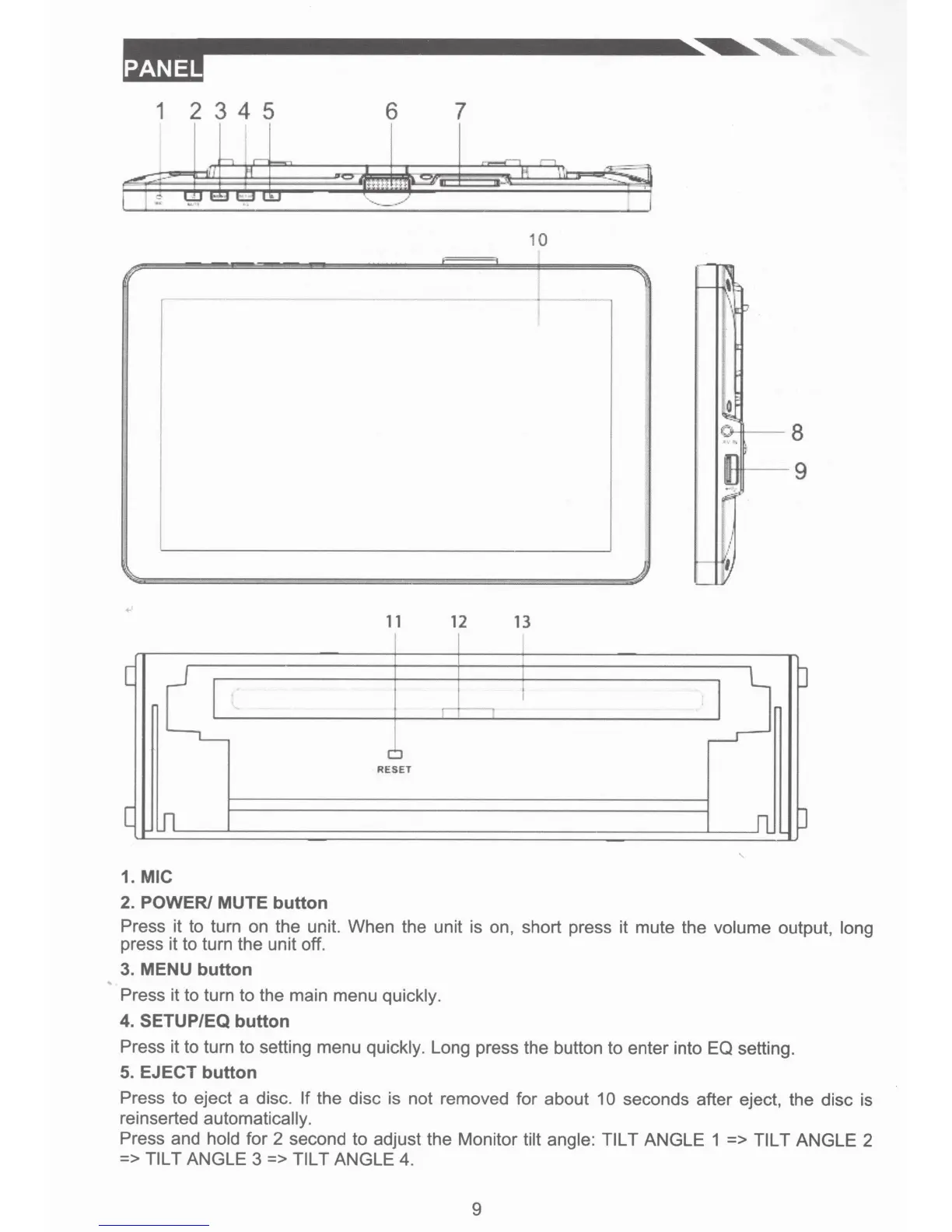
1. MIC
2. POWER/ MUTE button
Press it to turn on the unit. When the unit is on, short press it mute the
volume
output,
long
press it to turn the unit off.
3. MENU button
Press it to turn to the main menu
quickly.
4. SETUP/EQ button
Press it to turn to setting menu
quickly.
Long press the button to enter into EQ setting.
5. EJECT button
Press to eject a disc. If
the disc is not removed for about
10
seconds after eject, the disc is
reinserted
automatically.
Press and
hold
for 2 second to adjust the Monitor
tilt angle: TILT
ANGLE 1 =>
TILT
ANGLE 2
=>
TILT
ANGLE 3 => TILT
ANGLE 4.
9













 To Next Page