Page 16 of 37
Operation Instruction Manual VRCP-65
Thefollowingfunctionsarealsosupported
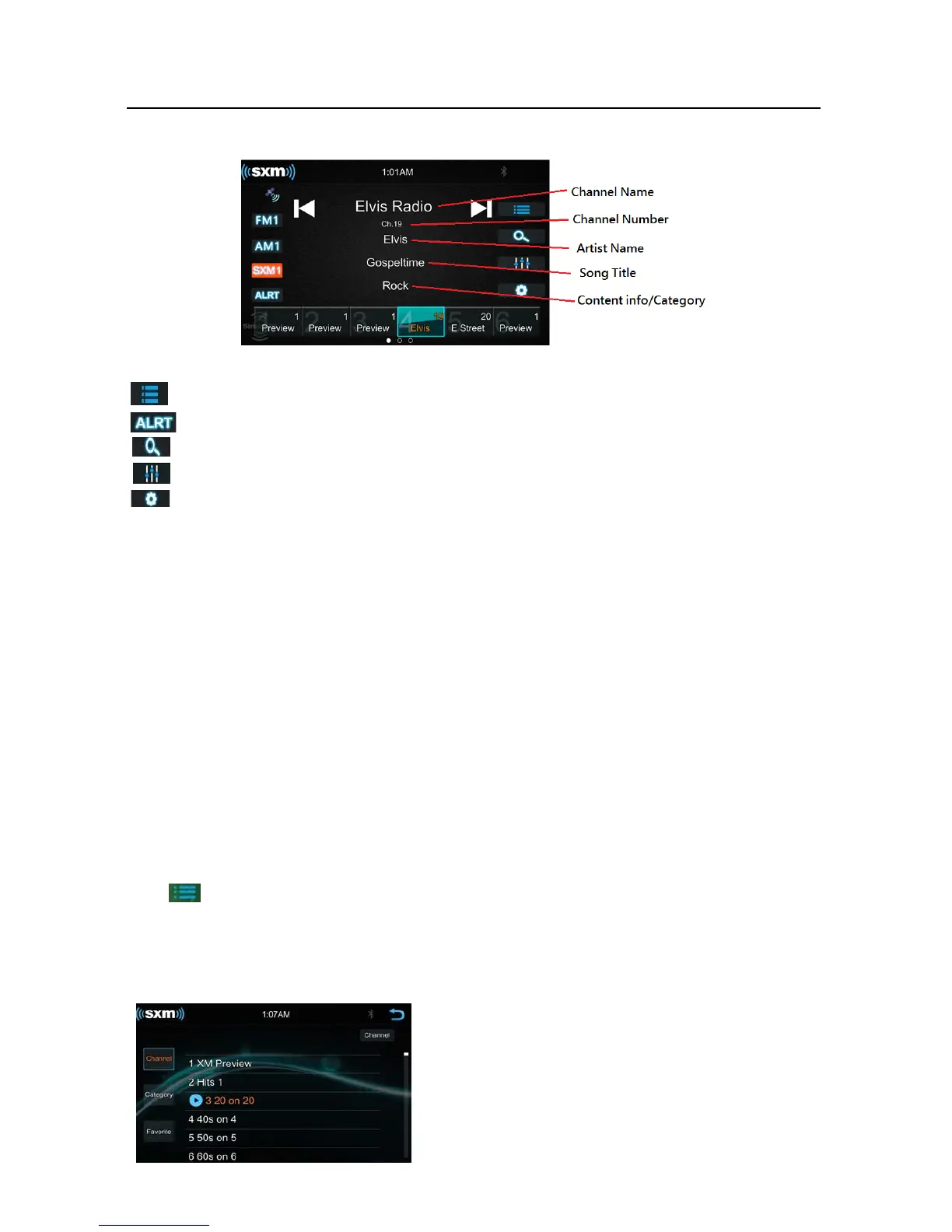
Browsefunction
FavoriteAlerts,Touchtolistthefavoritechanneltodirectselectthechannel
DirectTunefunction
EQSettingfunction
SiriusXMSettingMenu
ArtistandSongAltert
WhilelisteningtoSiriusXMSatelliteRadio,usercanmarkArtistsand/orSongsforwhichyouwishto
be alerted.The radio will display an Alert message when a matching artist or song is found on
anotherchannel.Then usercan chooseifyouwanttotunetothat favorite oruser canignorethe
alertandstayonyourcurrentchannel.
To store an artist or song title, touch on the "artist" or "Song" metadata on the display. User will
thenbepromptedtosetthealertfortheArtistortheSongTitle.
User will be alerted when one of
your stored artists or songs is playing on another channel. If
multilealertshappenatthesametime,orthe alertgetsdismissed,usercantouchtheALRTbutton
tolistthechannelsthatarecurrentlyplayingyourartistorsong.
BrowserFunction
Touch to browse the channel. User can browse by select the Channel List and Category List.
ChannelList
Touc h“Channel”buttonatLeftsidetoshowthechannellisting














 To Next Page