Page 34 of 37
Operation Instruction Manual VRCP-65
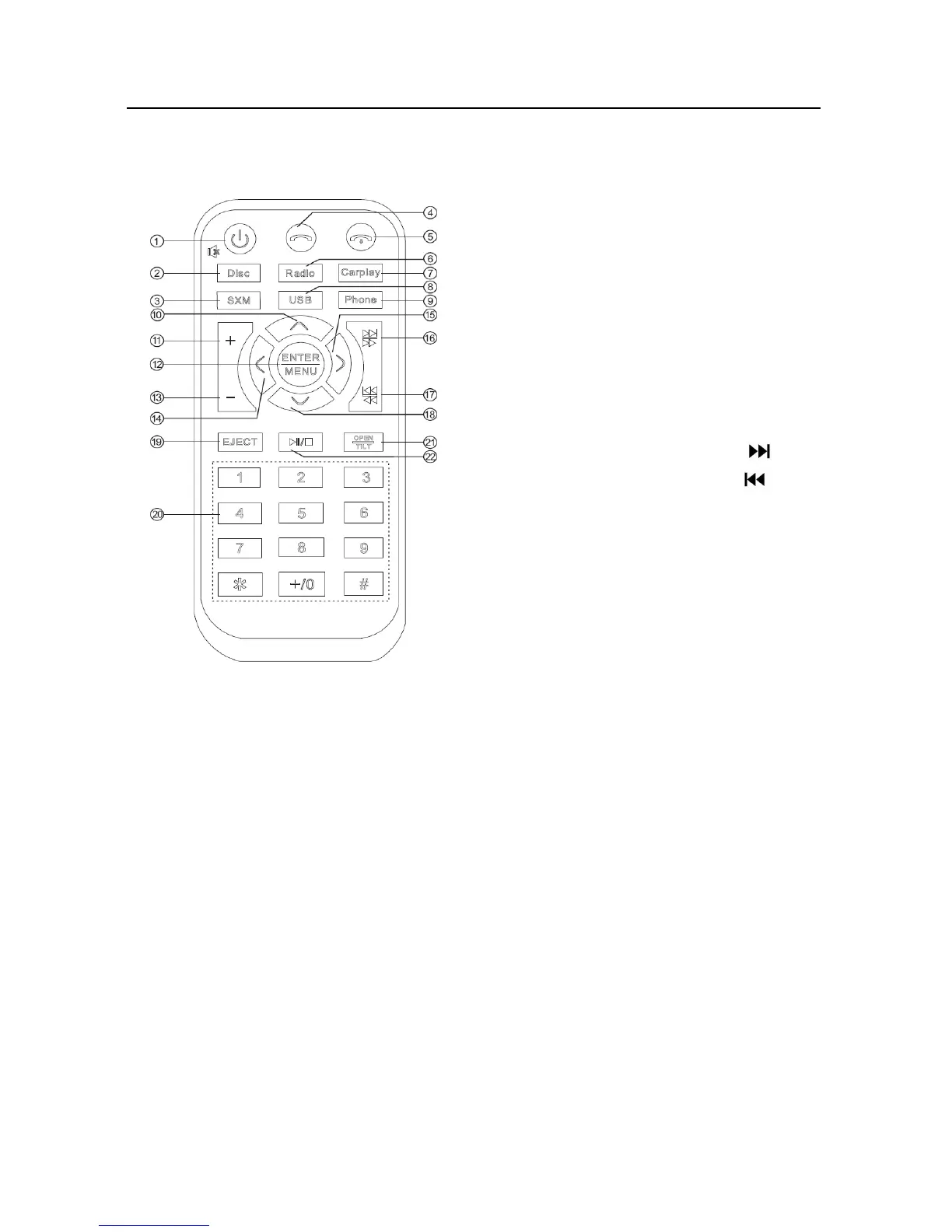
16. RemoteControl
1. Power
Longpressittopoweroff
2. Disc
Pressittoselectthediscplaymodeifthereisadiscintheunit.
3. SiriusXM
PressittoselecttheSiriusXMmodeiftheunitisconnectedwithaSiriusXMtuner.
4. Answer
BTphoneisconnected,pressittoacceptcall.
5. Hangup
BTphoneisconnected,pressittoendcall.
6. Radio
PressittoselecttheRadiomode.
7. Carplay
PressittoselecttheCarPlaymodeiftheunitisconnectedwithiPhone.
8. USB
Pressit
toselecttheUSBmodeifthereisaUSBdeviceintheunit.
9. Phone
PressittoselecttheBTPhonemode.
10. UP
Intheradiomode,pressittoselectapresetstationup.
IntheUSBmode,pressittoselectafolderup.
Inthe
discmode,pressittoselecttheDVDmenuitemup.
① Power ④ Answer
② Disc ⑤ Hang up
③ SiriusXM
⑥ Radio
⑩
Up ⑦ Carplay
⑪
VOL+ ⑧ USB
⑫
ENTER/MENU ⑨ Phone
⑬ VOL- ⑮ Right
⑭ Left ⑯ SEEK+/
⑲ EJECT ⑰ SEEK-/
⑳ Number Key ⑱ Down
○
21 OPEN/TILT
○
22 Play/Pause













 To Next Page