Page 28 of 37
Operation Instruction Manual VRCP-65
12. Phone
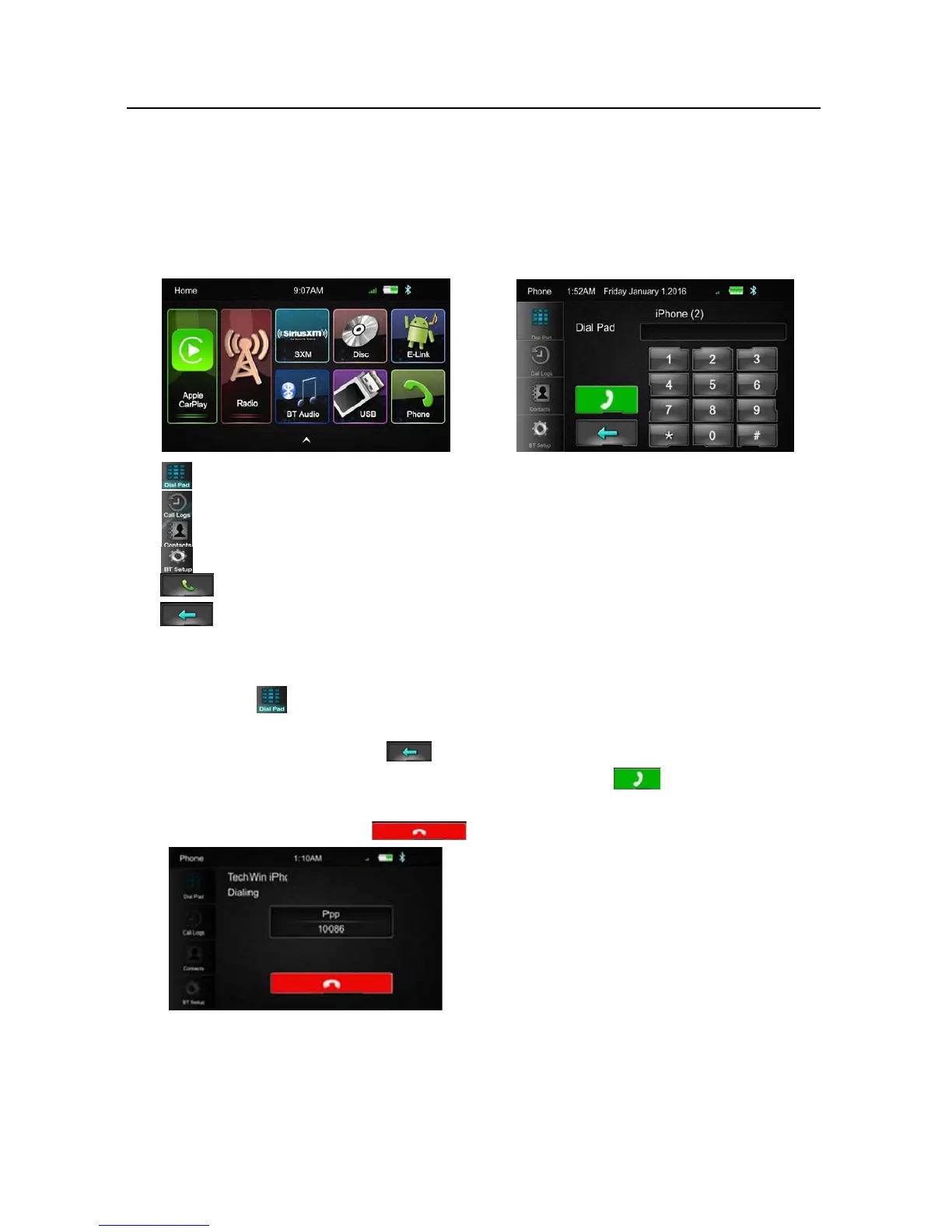
Touc hthePhoneiconinmainmenutogotoPhonemode.AfterthephoneconnectedwiththeHead
UnitviaBluetooth(HFP),usercanthroughtheHeadunittomakeaphonecall.Pleasenoteitneeds
toconnectthemicrophoneforphonecall.
DialPad,tapDialpadbuttontoentercallmode
Calllogs,toshowthecallrecord,missed,receivedanddialedcalls
Contact,toshowthephonebookconnectedphone
BTSetup,tosetautoanswerandmicrophonegain
MakeaCallorAccepttheIncomingCall
Backspace,tocleartheperviousdialdigit
DialaCall
1. Touc hthe icontotheabovescreenwillappear.
2. Usingthekeypad,touch0‐9,*,#,toenterthephonenumberyouwishtodial.Ifyouenter
anincorrectnumber,touchthe icononthekeypadtodeletetheincorrectnumber.
3. Oncethe correctnumber
appearsonthescreen,touchtheicon.Togobackdialing
interface,touchthereturniconattheupperrightcornerofthescreen.
4. Toendthecall,touchtheonthescreen













 To Next Page