Page 22 of 37
Operation Instruction Manual VRCP-65
DVD/VCDPlayback
TheVideodisplaycanbewatchedonlyduringtheCarisParked
Parkingwiring:Highlevel(+12vorNC)isdriving;lowlevel(ground)isparking
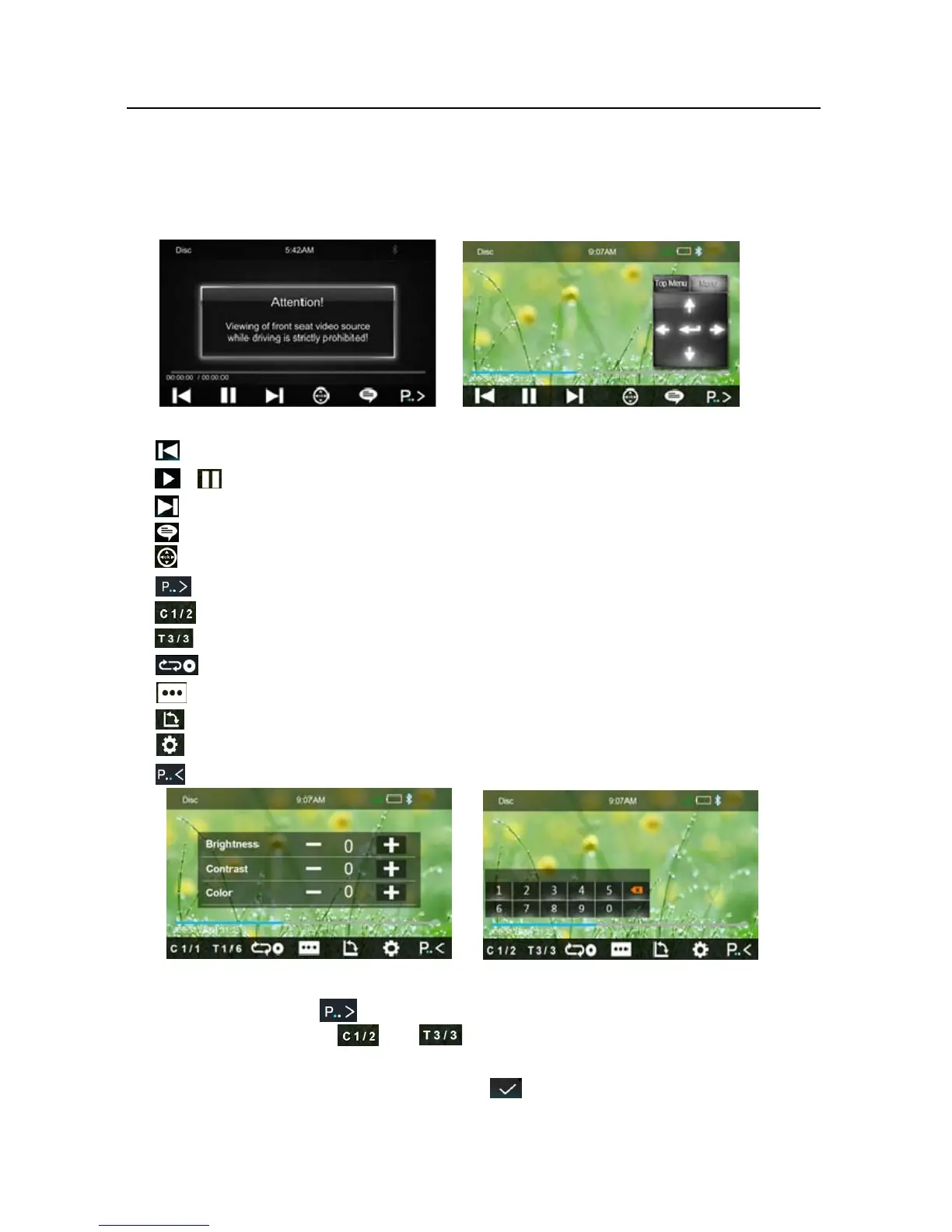
Shortpressittoskiptotheprevioustrack,longpressittofastreverse.
/Pause/Playbutton.
Shortpressittoskiptothenexttrack,longpressittofastforward.
Touc hittoselectsubtitlelanguage
Touc htoopen/closethenavigationbutton
Touc hittoshowthetoolsbar
Touc hittoselectChapter
Touc hittoselectTitle
Pre ssittoselectrepeatAll,RepeatOneandRepeatOff
Touc hittoselectsubtitlelanguageorsuboff.
Touc hittochangetheviewingangle.
Touc hittoadjusttheBrightness/Contract/Color
Touc hittohiddenthetoolsbar
Directsearch
1. Touc hthebutton ,
2. Touc h the buttonorto sele ct a chapter or title directly using the
on‐screendisplaydirectentrymenudisplay.EntertheDirectSearchmenu,
3. EnterthechapterorTitleDigital,touch thatstartsthefunction.













 To Next Page