Loading Filament
12
Prepare > Preheat PLA > Preheat PLA End
-
Prepare > Preheat ABS > Preheat ABS End
METHOD 1
Control > Temperature
> Nozzle > 200°
METHOD 2
Printing: Cut the lament in use near the extruder, feed slowly with the new lament
until the extruder takes it.
Not printing: Preheat the nozzle at least to the melting temperature of the lament
that is installed. Pull the lament to remove it, insert the new lament and feed until
it comes out of the nozzle.
TIP: HOW TO REPLACE THE FILAMENT ?
Heat the nozzle
Method 1: Use the printer's Preheat
presets to heat Pla or Abs temperature
according to the temperature range of
the lament you are going to use.
Method 2: Set the temperature
manually in the printer menu Control
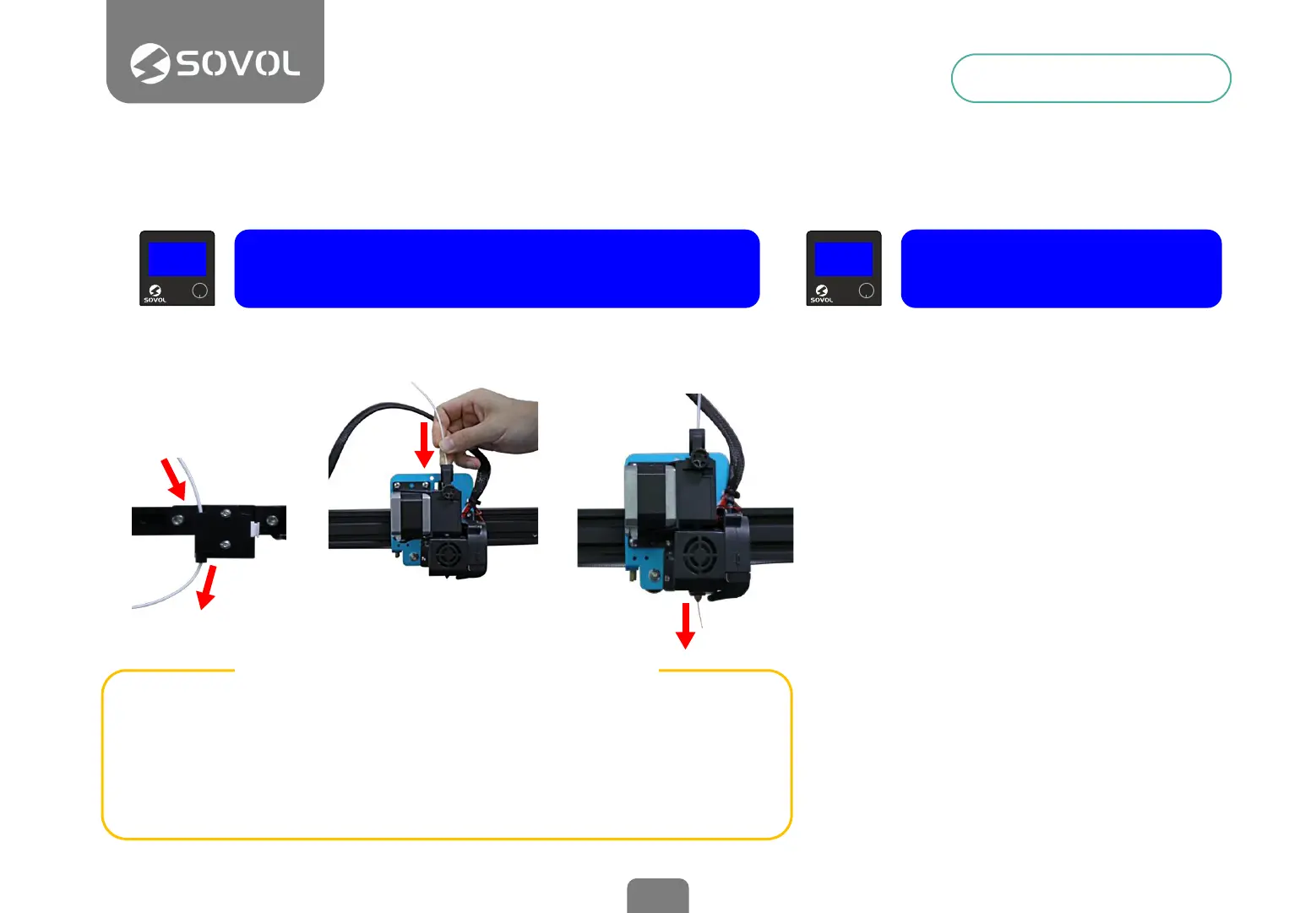
Pass the lament through the sensor
Insert the lament into the extruder
When the nozzle is hot, press and hold
the extruder lever, and insert the
lament through the small hole of the
extruder until it comes out of the
nozzle.
When nished, cool the nozzle, using
the menu Prepare>Cooldown
1
2
3


 To Next Page