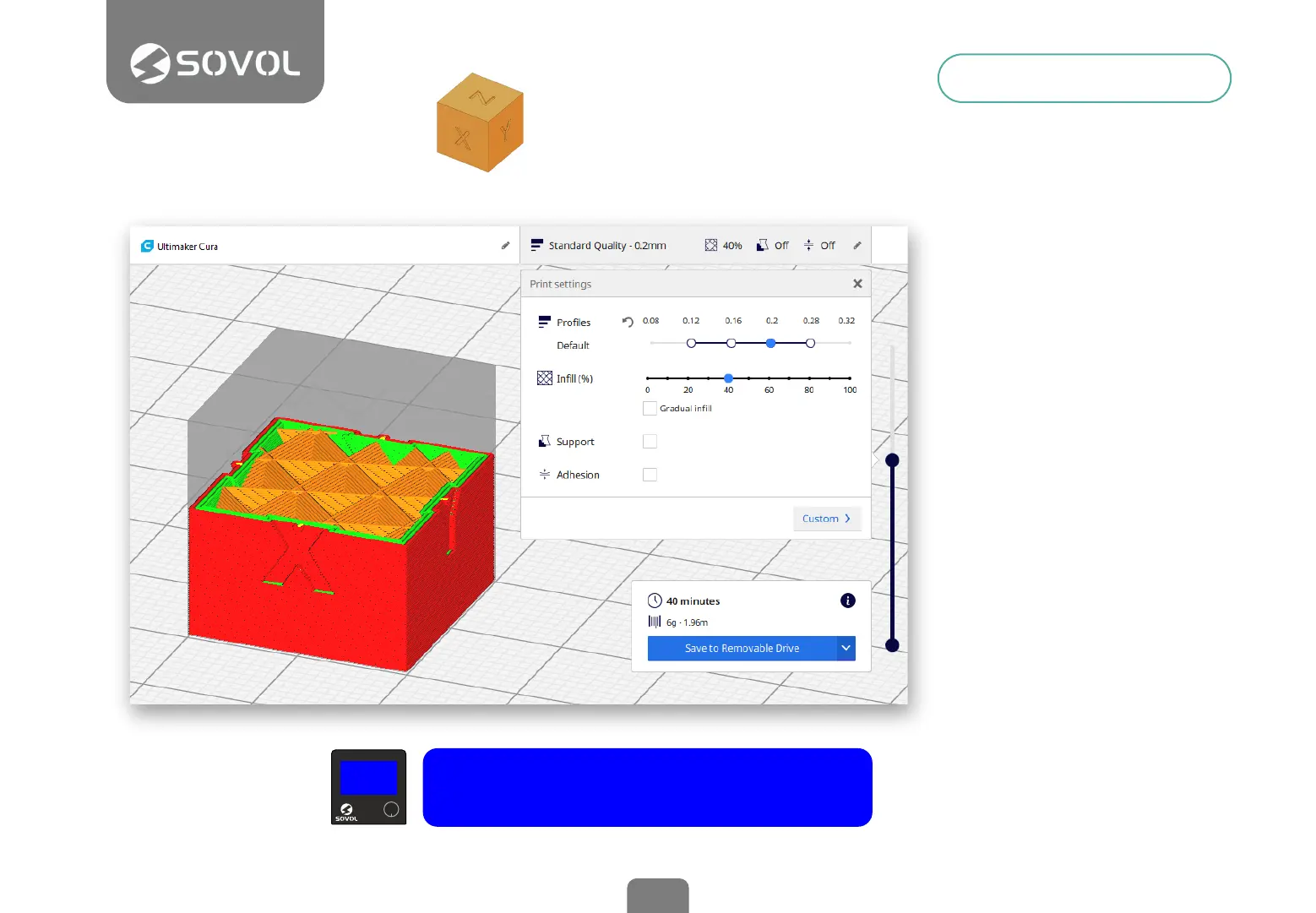
Load a model in Cura
On the SD card you will nd a
calibration cube so you can
perform an initial test.
Choose settings
Cura has a menu with basic
print settings. If you want
advanced settings, click
Custom.
Make the Slice
Cura will perform the
necessary calculations and
generate a gcode le with the
paths and parameters for the
printer.
Save the gcode le to the card
Use the USB reader provided
with the printer.
Print the model
Insert the SD card upside
down in the printer, select the
gcode le in the menu and
print.
1
2
3
5
4
Install Cura
There is a Cura installer on
the MicroSd card included
with the printer.
To download the latest
version visit the website of
Ultimaker
Open Cura and add a New
Printer
Choose Creality Cr-10 as
the base prole and change
the name to Sovol Sv01.
Adjust the size
Enter 280mm, 240mm and
300mm as the printer size
for X, Y and Z.
Congure retraction
The main difference
between Sovol Sv01 and
Cr-10 is the Direct Drive
Extruder. Retraction
distance values of ~ 3mm
and ~ 50mm/s as
retraction speed are
suitable.
Preparing to Print
14
xyz-cube.stl
> Print from TF > xyz-cube.gcode


 To Next Page