BLTouch Installation
16
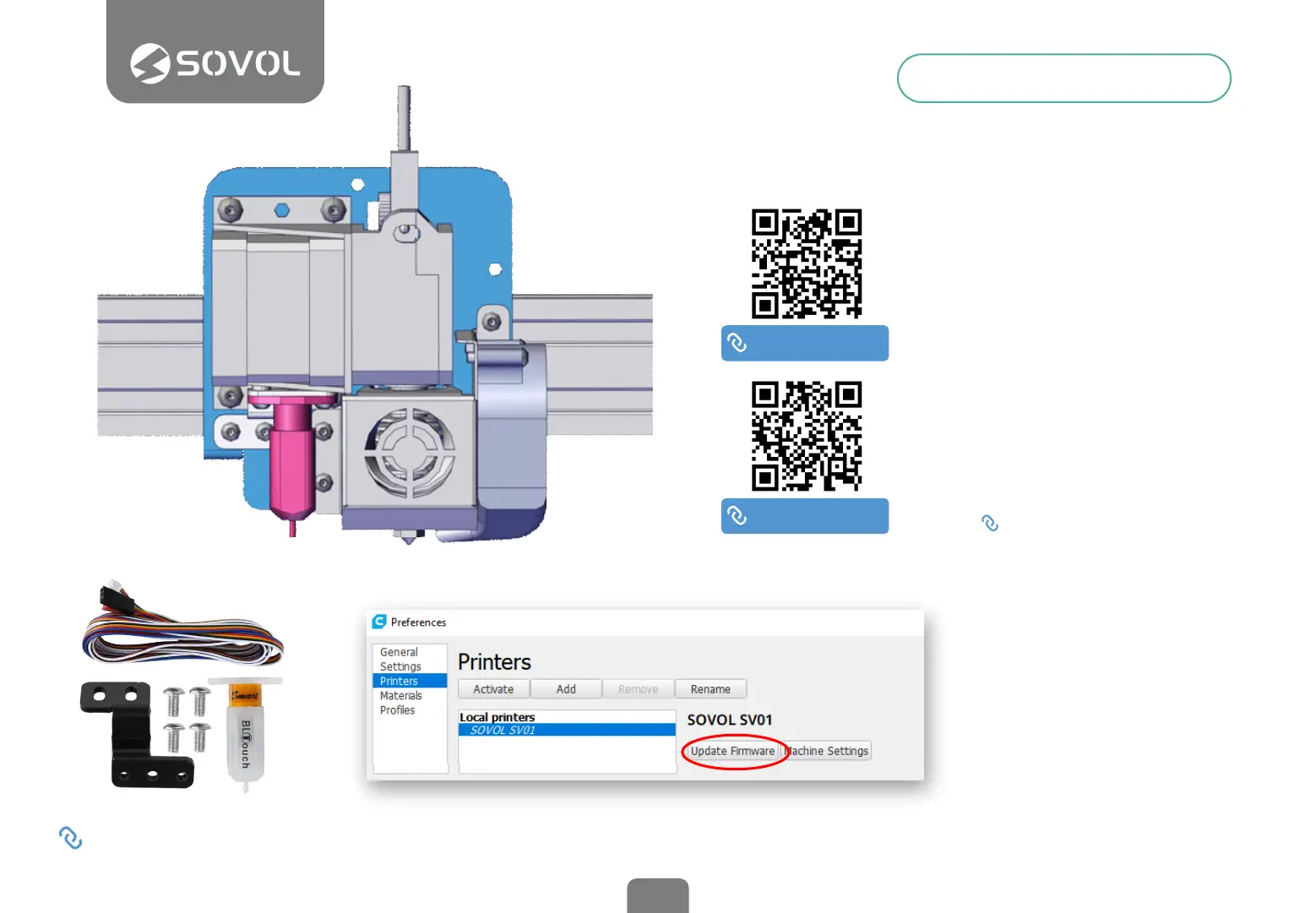
BLTouch is an optional device for
automatic leveling. Installation
requires the disassembly of the
printer base and the rmware
update.
BLTouch device assembly
Watch the linked videos for a
detailed guide.
Download Firmware
On our website you will nd an
updated Firmware for BLTouch,
pay attention to download the
correct version.
sovol3d.com/pages/download
Update the Firmware from Cura
Open Cura, connect the printer to
your computer using the Usb
cable and load the Firmware from
Printer Preferences into the Cura
software. Wait without
disconnecting until the process is
nished.
In our video tutorials you will nd
an alternative method.
1
2
3
DON’T YOU HAVE A BLTOUCH?
Go to sovol3d.com and get yours.
SOVOL VIDEO
youtu.be/s_Bh4_cOWXY
SOVOL VIDEO
youtu.be/BTCXNLIzrz8


 To Next Page