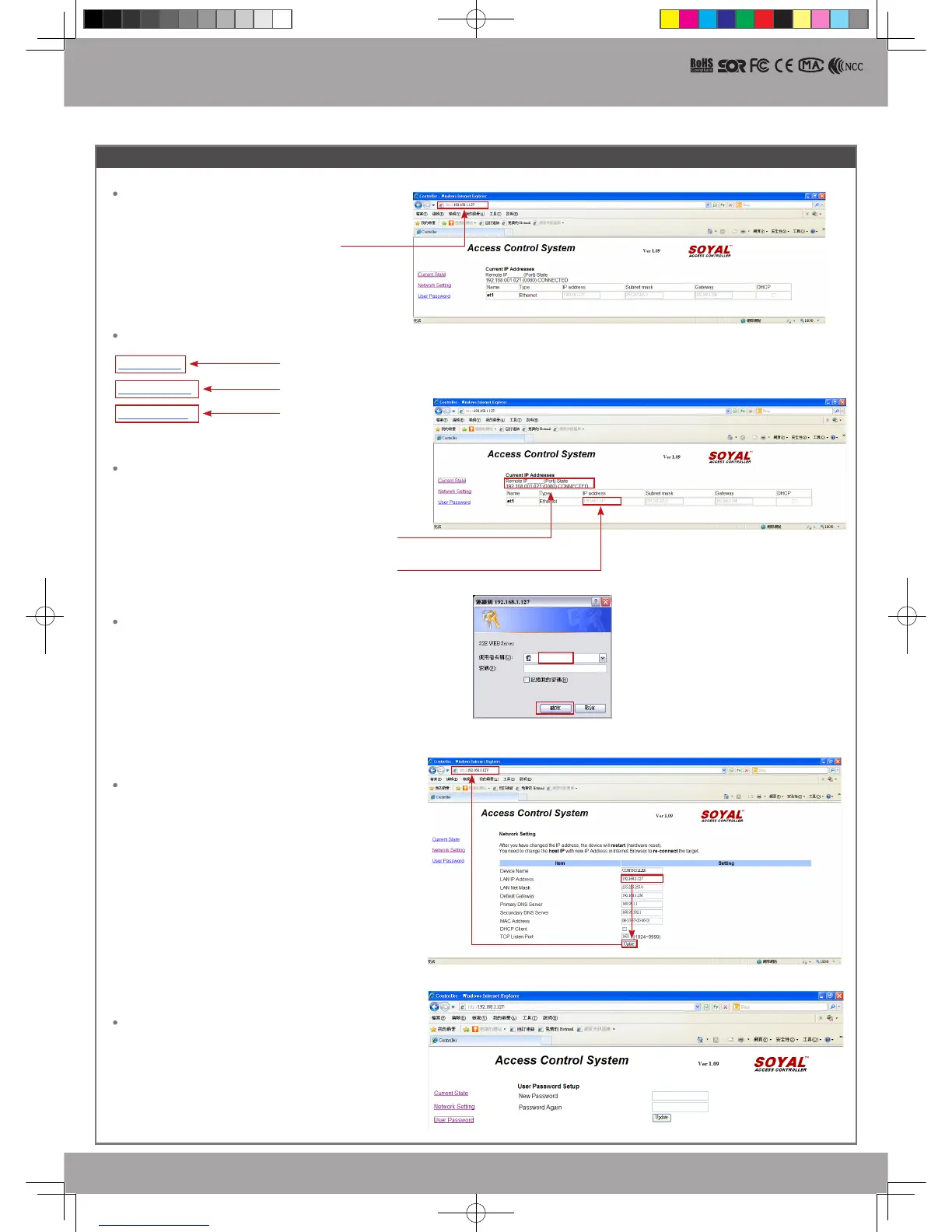
IP Setting
Log-in User Password
When you choose the "Networking Setting" or "User Password" at rst.
Log-in window will pop out and please input as below
※
At the Factory Default Status
User name: admin
Password: None by default, so please just click “OK” to log-in
Open your Web Browser and input factory default IP
address: http://192 .168.1.127
Networking Setting
You will nd initial IP Address 192.168.1.127 and check
MAC Address is identical to the sticker on Ethernet Module
device. Please alter the IP address as you want, and then
click “Update” button. After updating the IP, please re-
connect the Web Browser by the new IP address.
User Password
The password is composed of 10 characters at most which
can be either A~Z or 0~9.
Change the log-in password to lock the IP setting of
Ethernet Module.
If the IP address of AR-837 (E/EF) has
be changed, we must enter the new IP
address.
Show which computer is linking
on Ethernet Module.
Current IP address of the AR-837 (E/F)
Page menu
Current State
Online Status is able to monitor and
show which computer is linking on Ethernet Module
IP Setting
Monitor the on-line computer
Change the Log-in information
837E-EF-140217.indd 8 2014/12/17 下午 04:05:25


 To Previous Page