2.3 How to make sure your Smart Mesh receives a good signal
9
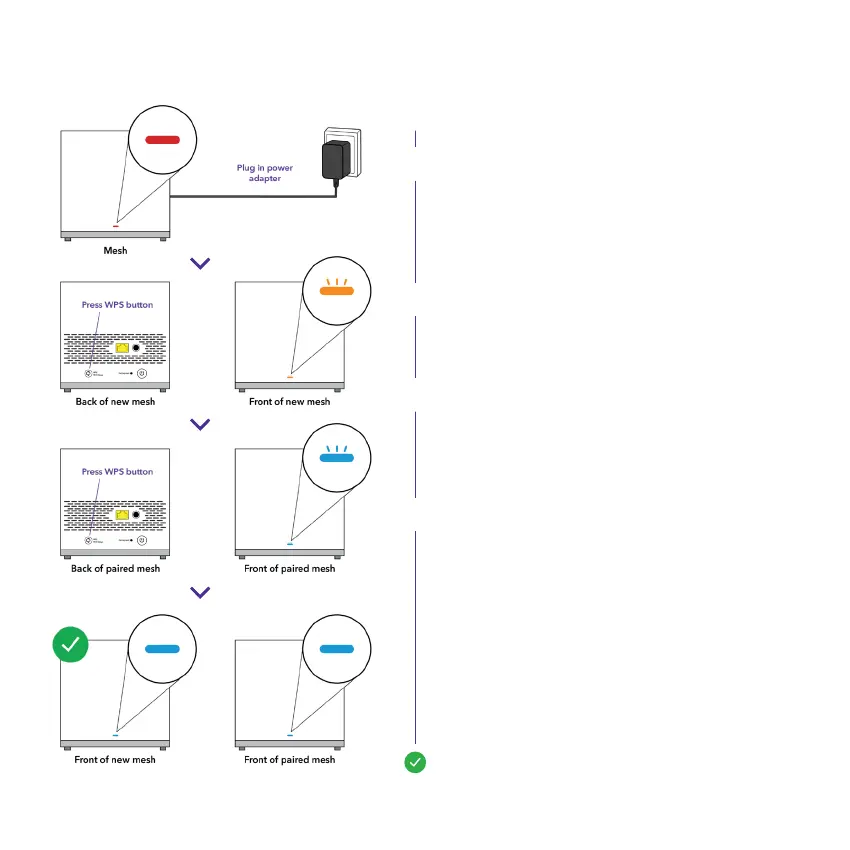
Plug your Smart Mesh into a power outlet.
Wait for the light on your Smart Mesh to turn
Red. This may take up to two minutes.
Note: If you don’t see a light check that the
power button is ON.
Press the WPS button at the back of your
new Smart Mesh, the light will start ashing
Orange.
Return to your previously paired Smart Mesh
and press the WPS button at the back of
your paired Smart Mesh. The light will start
ashing Blue.
Wait for the lights on both the Smart Mesh
to turn solid Blue, this may take up to two
minutes. If the light on the new mesh turns:
Solid Red - Repeat the steps with the new
Smart Mesh closer to the paired Smart Mesh.
Solid Orange - Your Smart Mesh is paired,
but is receiving a poor signal. Move the
Smart Mesh closer to the paired Smart Mesh.
A.
B.
C.
D.
E.
Your Smart Mesh units are ready to go!


 To Next Page