Set up your Smart Mesh with your
Smart Modem
3
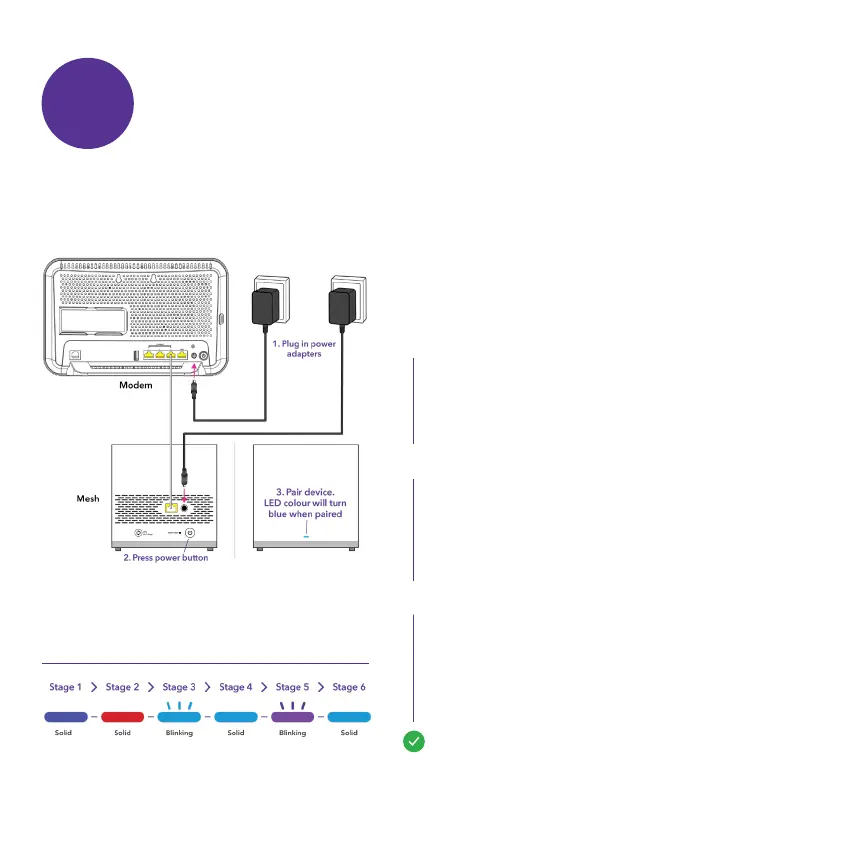
1.1 How to pair your Smart Mesh to your Smart Modem
Plug your Smart Mesh into a working
power outlet next to your Smart Modem. If
you don’t see a light check that the power
button of the Smart Mesh is ON.
Connect the ethernet cable from your Smart
Mesh to your Smart Modem.
Note: Please refer to the LED indicator
sequence diagram.
Wait for the light on your Smart Mesh to turn
solid BLUE. This may take up to two minutes.
Make sure your Smart Modem is connected rst
before you set up your Smart Mesh.
Your Smart Mesh is paired and ready to be
moved to a different area.
Note: If you have more than one Smart Mesh
repeat the above steps for each mesh unit.
LED Indicator Sequence
A.
B.
C.
1


 To Next Page