5
Plug your Smart Mesh into a power outlet - If
you don’t see a light, check that the power
button is ON.
Wait for the light on your Smart Mesh to turn
on. This may take up to 10 seconds.
Note: Please refer to the LED indicator
sequence diagram.
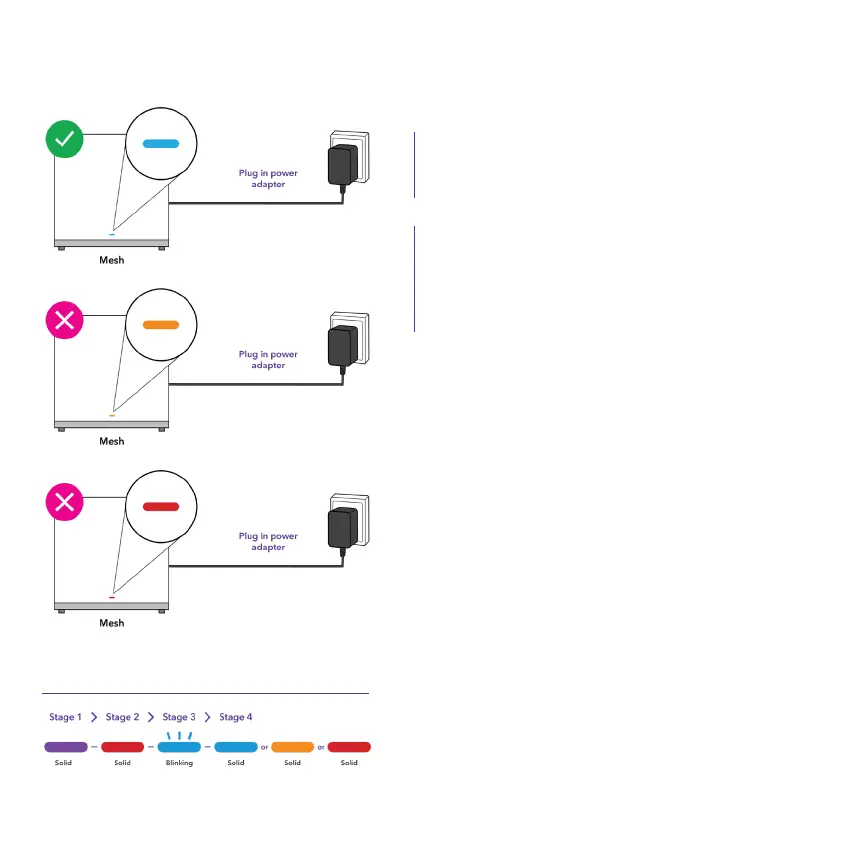
Check the light on your Smart Mesh, to
make sure the mesh is in a suitable location:
Blue – It’s receiving a reliable Wi-Fi signal.
You’re all set.
Orange – It’s not receiving a reliable Wi-Fi
signal. You’ll need to move it closer to your
modem or another Smart Mesh.
Red – It’s not receiving Wi-Fi signal. You’ll
need to move it closer to your modem or
another Smart Mesh.
A.
B.
C.
LED Indicator Sequence
1.3 How to make sure your Smart Mesh receives a good signal


 To Next Page