User’s Manual
DVR-4TH/8TH/16TH Series
SPECO TECHNOLOGIES 07/10
17
Connecting Required Devices
Before powering up, you should connect cameras and a main monitor to the
unit for basic operation. If needed, connect a call monitor for displaying full
screen video of all installed cameras in sequence.
Connecting Short-term Device
If you plan to install any short-term external devices, such as USB DVD+RW,
USB Hard Disk Drive, etc, to the DVR-4TH/ 8TH/ 16TH series and want to
use them as part of the unit system, make sure those devices are
connected only after the DVR-4TH/ 8TH/ 16TH is powered up. The
DVR-4TH/ 8TH/ 16TH series unit can only recognize the external devices
after the power-up process is completed.
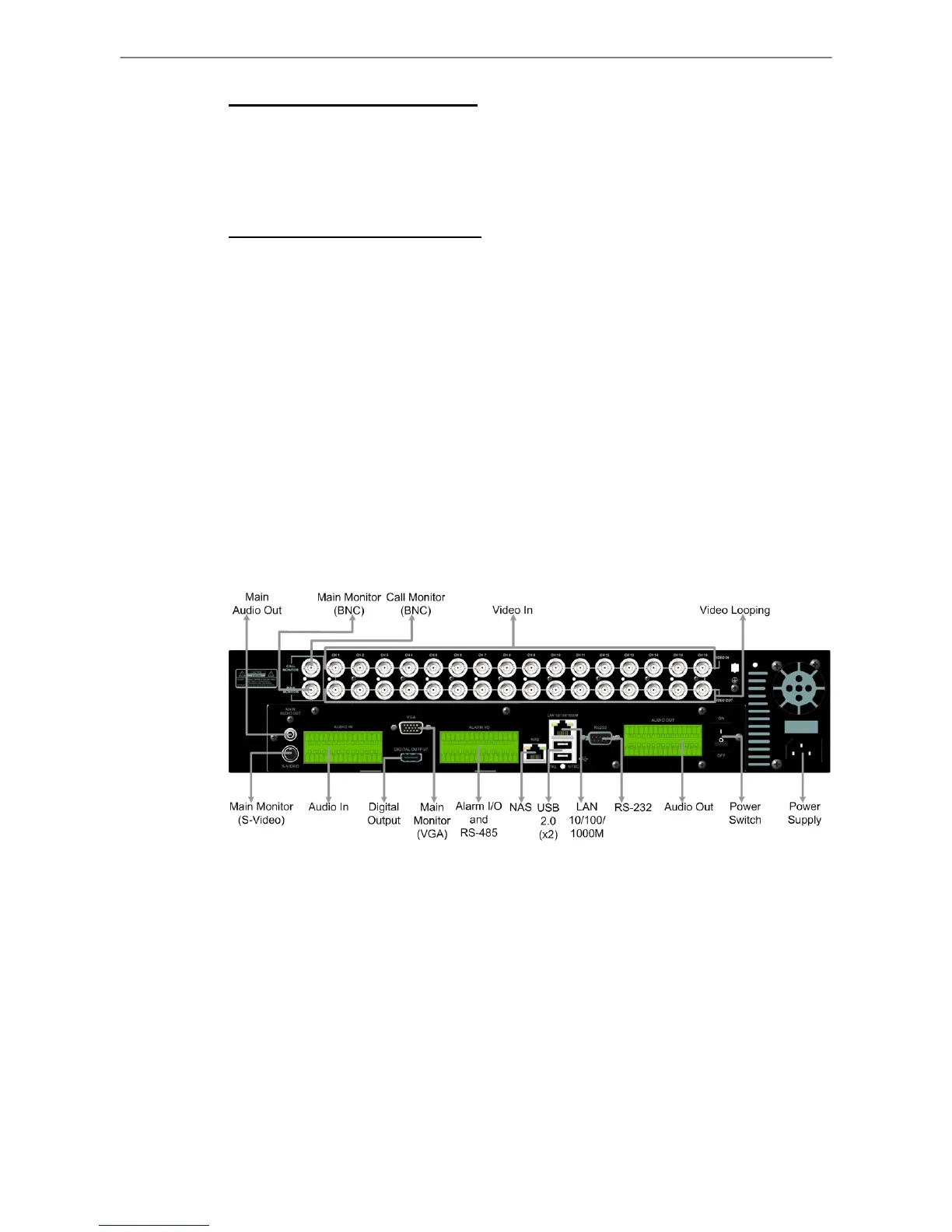
2.4 Rear Panel Connections
There are several connectors on the rear panel of the DVR-4TH/ 8TH/ 16TH
series unit available for installations. The following figure shows the
connectors by name and a detailed description of each connector follows.
There are two differences on the rear panels of different models:
1. The BNC channel connectors are provided according to the supported
number of channels, respectively 4-ch, 8-ch, and 16-ch.
2. The terminal blocks of audio in/out and alarm I/O for DVR-4TH/ 8TH is
smaller whereas the terminal blocks of audio in/out and alarm I/O for
DVR-16TH is larger.
The detail description of each connector is as the followings.



 To Next Page