50
There are 7 options in the Search Menu, they are: EZSearch, Time Line (Calendar), Event, Go To First
Time, Go To Last Time, Go To Specific Time, Archive list, and Log list on the screen.
5-3-1. EZSearch
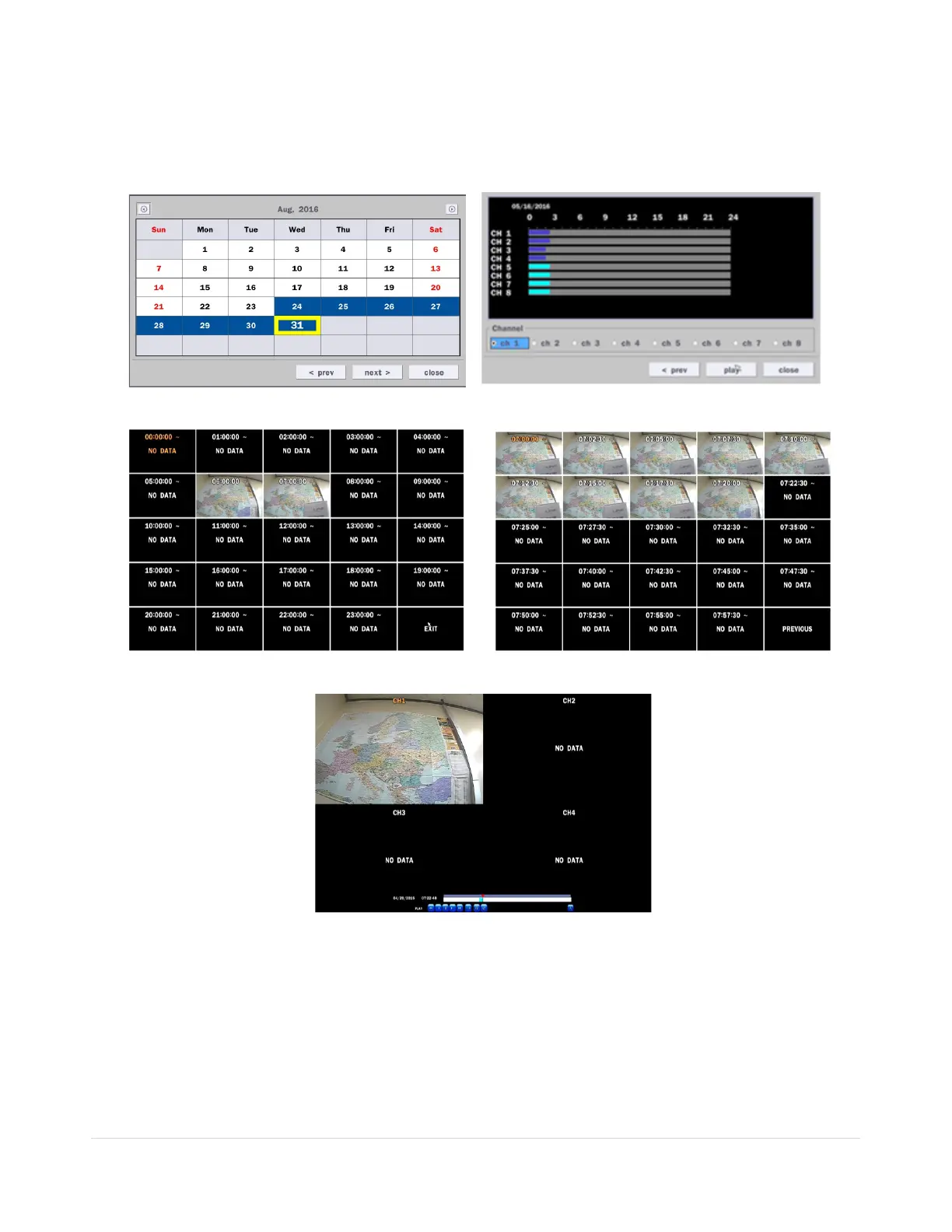
The EZSearch window is used to find stored video with ease using the thumb nail playback screen.
Figure 5.3.2. Calendar Screen Figure 5.3.3. Channel Selection Screen
Step1. 24 Hourly Thumbnail Screen Step2. Every 2 minutes and 30 seconds
Figure 5.3.4. Second Thumbnail Screen
When the EZSearch menu is selected, a calendar is displayed that highlights dates with recorded data.
1. Select a specific date on the calendar.
2. Select a channel from Channel Selection Screen.
Then the Thumbnail Search screen displays 24 thumbnails, one for each hour of the day.
3. Second step shows every 2 minutes and 30 seconds screen.
4. Playback the selected image.



 To Next Page